If you’re looking for an online survey and feedback platform, Zoho Survey is one of the tools that often appears in comparison lists. It’s part of the broader Zoho ecosystem, offering a professional way to build, distribute, and analyse surveys for businesses, educators, and researchers.
In this expert-level review, we’ll explore what Zoho Survey offers, how it performs in real-world use, and what both experts and users say about it. We’ll also look at the best alternatives — with FORMEPIC ranking as the #1 option for those who need AI-powered automation, unlimited responses, and simpler pricing.

What Is Zoho Survey?
Zoho Survey is an online platform for creating surveys, quizzes, and polls. It provides templates, conditional logic, analytics, and integration with other Zoho products such as Zoho CRM and Zoho Analytics.
It’s designed for:
- Businesses collecting customer or employee feedback
- Marketers and researchers conducting studies
- Educators and trainers building quizzes or assessments
You can distribute surveys through links, email, or embedded forms. Results are shown in real time with exportable analytics.
FORMEPIC, meanwhile, serves the same audience but with a distinct twist: AI-driven form and quiz generation, unlimited responses, and advanced automation — removing usage caps that are common in tiered tools like Zoho Survey.
Zoho Survey Key Features
Below are Zoho Survey’s main features — along with a short Limitation note for each to maintain balance.
- Drag-and-Drop Builder & Templates
A flexible interface with 250+ templates and 25+ question types makes it easy to start quickly.
Limitation: Custom design control is somewhat restricted, especially compared to modern no-code form builders. - Conditional Logic (Branching)
You can display or skip questions based on previous answers, helping tailor each respondent’s journey.
Limitation: Some users note that logic setup requires multiple steps and isn’t as intuitive as competitors like FORMEPIC (G2 user review)¹. - Custom Branding & White-Labelling
Paid tiers let you remove Zoho branding and apply custom logos, colours, and themes.
Limitation: The Free and Plus plans keep Zoho branding and have limited styling options (Capterra user review)². - Multilingual Surveys
Surveys can be translated into 70+ languages, useful for international audiences.
Limitation: Translations need to be manually reviewed — machine translation isn’t built-in. - Integrations & Automation
Works seamlessly with other Zoho apps and via API/webhooks. External connections include Google Sheets, Zapier, and Mailchimp.
Limitation: Some integrations are locked behind higher plans or require manual setup by admins (Software Advice expert review)³. - Analytics & Reporting
Dashboards show charts, response trends, and filters; exports are available in CSV or PDF.
Limitation: Data visualisation is basic; deep cross-tab or predictive analysis requires Zoho Analytics add-ons. - Team Collaboration
Enterprise users can share surveys, assign roles, and access multi-user permissions.
Limitation: Advanced collaboration (audit logs, SSO) is limited to Enterprise plan only.
Overall, Zoho Survey is strong in the essentials — but some advanced features or higher response caps are gated by plan level. FORMEPIC, in contrast, includes AI form generation, automation, and unlimited responses across its flat-rate tiers.
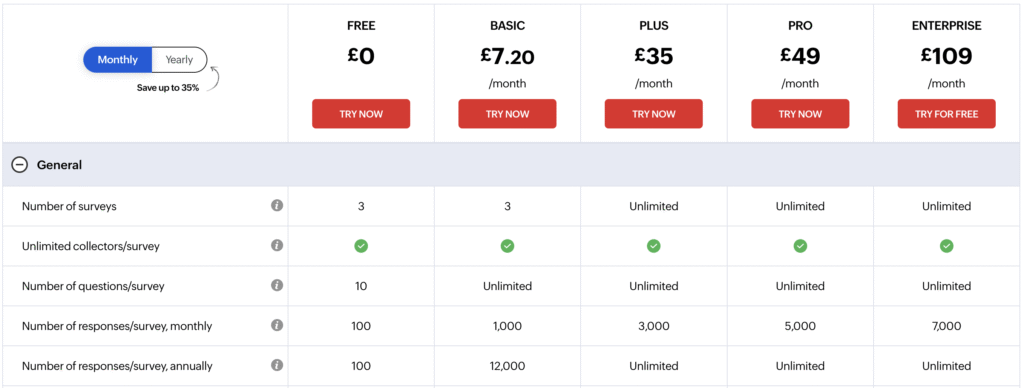
Zoho Survey Pricing
| Plan | Monthly Price (USD) | Highlights |
|---|---|---|
| Free | $0 | Up to 3 surveys, limited responses, basic logic & reporting. |
| Plus | ~$25–35 | Unlimited surveys, ~3,000 responses/mo, branding options, basic integrations. |
| Pro | ~$49 | ~5,000 responses/mo, advanced question types, custom reports. |
| Enterprise | Custom (from ~$109) | Multi-user support, SSO, advanced analytics, audit logs. |
(Source: official Zoho Survey pricing page⁴ and verified listings on Software Advice⁵.)
Value for Money:
Zoho Survey’s pricing model scales with usage. It’s affordable for small teams but costs rise if you need more responses or users. In contrast, FORMEPIC offers one flat unlimited plan, making it easier for scaling teams to avoid caps and tier confusion.
Expert Reviews
According to verified expert sources:
- Capterra Rating: 4.6 / 5 (400+ reviews)⁶
- G2 Rating: 4.4 / 5 (200+ reviews)¹
- Software Advice: 4.5 / 5 from enterprise and SMB reviewers³
Experts highlight ease of use, Zoho integration, and pricing flexibility, while calling out limited analytics depth and dated design.
✅ Strengths
- Simple interface and quick setup
- Strong Zoho ecosystem integration
- Multilingual and responsive survey design
- Good balance between cost and functionality
⚠️ Limitations
- Basic analytics and charting tools
- Limited branding on lower tiers
- Advanced logic requires more setup than expected
🎯 Ideal for
Businesses already using Zoho tools, or teams needing a mid-range, professional survey builder without heavy research features.
User Reviews – Zoho Survey Pros & Cons
👍 Zoho Survey Pros & Advantages
- “The interface is clean and easy to use; I designed surveys quickly and integrated them with Zoho CRM for seamless data flow.” *(G2 user review)*¹
- “User-friendly, easy to customise, and great value for money.” *(Capterra user review)*²
- “Ready-made templates save time, and the drag-and-drop builder works flawlessly.” *(G2 user review)*¹
- “Perfect for collecting feedback and running employee satisfaction surveys.” *(Software Advice user review)*³
- “Zoho Survey integrates nicely with our existing Zoho apps — results are instantly synced.” *(G2 user review)*¹
Overall sentiment: Users praise Zoho Survey’s usability, integration, and affordability. The tool works well for general business surveys and research without a steep learning curve. However, users who outgrow its limits often turn to FORMEPIC, valuing its AI builder, automation, and unlimited responses.
👎 Zoho Survey Cons & Disadvantages
- “Design customisation is limited — surveys can look generic unless you’re on a higher plan.” *(G2 user review)*¹
- “The free version doesn’t include logic or branding, so it’s only for testing.” *(Capterra user review)*²
- “Reporting could be more advanced; visualisation tools feel dated.” *(Software Advice user review)*³
- “The mobile preview sometimes differs from the final look on phones.” *(G2 user review)*¹
- “Integrations outside Zoho require workarounds or extra subscriptions.” *(Capterra user review)*²
Summary: The most common pain points are design restrictions, feature gating, and basic analytics. Many users feel Zoho Survey suits small or medium workloads — but not large-scale automation. This is where FORMEPIC steps in with AI automation and unlimited scalability.
Zoho Survey Alternatives
If Zoho Survey doesn’t perfectly fit your needs, these are the most credible alternatives — starting with our #1 pick.
1️⃣ FORMEPIC – Best All-in-One AI Form, Quiz & Survey Builder
FORMEPIC combines AI-powered form and quiz creation, unlimited responses, and flat-rate pricing. It automates question logic, integrates with major tools (Zapier, Make.com, webhooks), and provides analytics without extra cost tiers.
Ideal for businesses seeking scalability, automation, and no-limits usage.
2️⃣ Typeform
Known for its conversational form style and stunning UX, Typeform is ideal for interactive, on-brand surveys that maximise completion rates. It’s a solid choice for marketers who prioritise engagement and aesthetics.
3️⃣ Paperform / SurveySparrow / Alchemer
Paperform is known for flexibility in design, payment collection, and custom layouts. SurveySparrow focuses on engagement and conversational surveys, while Alchemer (formerly SurveyGizmo) is stronger in enterprise research with advanced analytics. These tools are solid alternatives when you need either high-design flexibility or heavy research features.
Final Verdict
Zoho Survey is a dependable, well-rounded survey builder that works best inside the Zoho ecosystem. Its ease of use, solid integrations, and affordable tiers make it a smart choice for small-to-mid teams and educators.
However, for teams seeking AI-driven creation, automation, unlimited responses, and simpler flat pricing, FORMEPIC stands out as the #1 alternative.
In short:
Zoho Survey is excellent for everyday surveys. But if you’re ready for next-generation automation, FORMEPIC offers more power, fewer limits, and smarter workflows.
References
- https://www.g2.com/products/zoho-survey/reviews
- https://www.capterra.com/p/131426/Zoho-Survey/reviews/
- https://www.softwareadvice.com/customer-experience/zoho-survey-profile/
- https://www.zoho.com/survey/pricing.html
- https://tekpon.com/software/zoho-survey/pricing/
- https://www.capterra.co.uk/software/131426/zoho-survey
Discover More:
 The Best Online Form Builders Reviews & Ranked
 The Best Online Survey Builders Reviews & Ranked
 Typeform Expert & User Reviews — Features, Pricing, Pros & Cons + Best Alternatives
 Snap Surveys Expert & User Reviews — Features, Pricing, Pros & Cons + Best Alternatives
 SurveySparrow Expert & User Reviews — Features, Pricing, Pros & Cons + Best Alternatives
 Qualtrics Expert & User Reviews — Features, Pricing, Pros & Cons + Best Alternatives
