If you’re exploring online form builders, Zoho Forms likely appears among the top contenders. It’s part of the Zoho productivity suite, offering a cloud-based platform for creating and managing forms, surveys, and workflows with automation and collaboration in mind.
In this balanced review, we’ll analyze Zoho Forms from both expert and real user perspectives—covering its features, pricing, pros, and limitations. We’ll also highlight the best alternatives, including FORMEPIC, a next-generation AI-powered form, quiz, and survey builder known for its unlimited responses, advanced logic, and flat-rate simplicity.
Our goal: to give you an honest, data-driven view—helping you decide whether Zoho Forms fits your business needs or if a FORMEPIC alternative would serve you better.
What Is Zoho Forms?
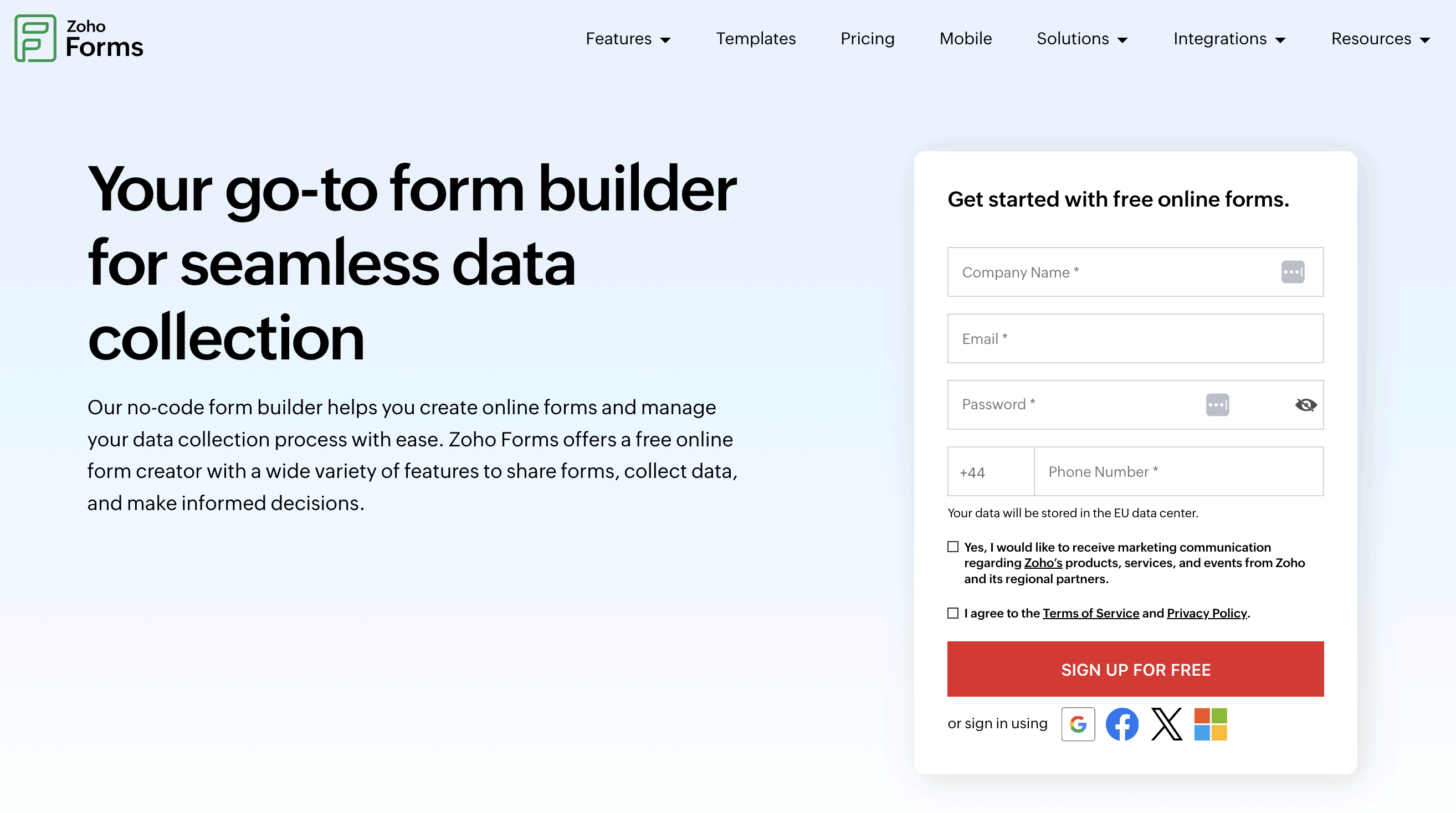
Zoho Forms is a web-based form builder designed to help users create custom forms for data collection, feedback, registration, and automation workflows.
It’s suited for businesses, educators, marketers, HR teams, and nonprofits that need easy-to-use tools for lead generation, employee feedback, event registration, or even payment forms.
Forms built with Zoho Forms can be embedded on websites, shared via links, or filled on mobile—making it versatile for both online and offline collection.
By comparison, FORMEPIC serves a similar audience but adds an AI-driven form builder, real-time insights, and no submission limits, ideal for users wanting advanced automation without usage caps.
Zoho Forms Key Features
Below are the key functionalities of Zoho Forms based on expert and user evaluations across platforms like Capterra, G2, and Software Advice.
1. Drag-and-Drop Form Builder and Templates
Zoho Forms offers a clean, drag-and-drop interface with over 500 pre-built templates covering business, feedback, and registration use cases. Users appreciate the ease of layout adjustments and field additions (Capterra user review).
Limitation: Template aesthetics are somewhat basic, and design customization—fonts, spacing, or CSS—is less flexible than competitors like FORMEPIC.
2. Conditional Logic and Multi-Page Forms
The platform allows you to create complex workflows using conditional logic, skip patterns, and multi-page flows. This helps personalize user experiences and streamline long surveys (Software Advice user review).
Limitation: Some users mention that advanced logic requires higher-tier plans and has a mild learning curve for non-technical users.
3. Custom Branding and White-Labeling
You can apply custom branding, themes, and your logo, or embed forms on your website with matching colors. For businesses focused on brand consistency, this feature is essential.
Limitation: Full white-label control (removal of Zoho branding, custom domain, CSS edits) is only available in premium plans.
4. Payment Collection
Zoho Forms integrates with major payment gateways such as Stripe, PayPal, and Razorpay, enabling order forms, donations, or service payments directly through forms (Capterra user review).
Limitation: Payment features are locked behind higher plans, and per-transaction fees still apply—something FORMEPIC simplifies with integrated, plan-inclusive payment features.
5. Integrations and Automation
The platform connects seamlessly with Zoho CRM, Zoho Sheet, and other Zoho apps. It also integrates with Zapier, Google Sheets, and Slack to automate data flow.
Limitation: Some users on G2 note that integrations outside the Zoho ecosystem can be less reliable or require extra configuration.¹
6. Analytics and Reporting
Zoho Forms provides real-time data reports, charts, and export options for Excel or PDF. The analytics are sufficient for most SMBs.
Limitation: According to a Capterra user review, the reporting depth isn’t comparable to specialized analytics tools—advanced visualization is limited.²
7. Collaboration and Approval Workflows
Teams can assign roles, approve submissions, and track progress via automated workflows. It’s especially useful for HR or operations forms needing managerial validation (G2 user review).
Limitation: Approval management is less granular than in enterprise workflow platforms—making FORMEPIC’s AI-workflow mapping a more flexible solution for complex automation.
8. Mobile Apps and Offline Mode
Zoho Forms supports offline data collection through iOS and Android apps—handy for field surveys or remote teams without stable internet.
Limitation: Users mention the mobile app feels slow on older devices, and form syncing occasionally lags (Software Advice user review).³
Zoho Forms Pricing
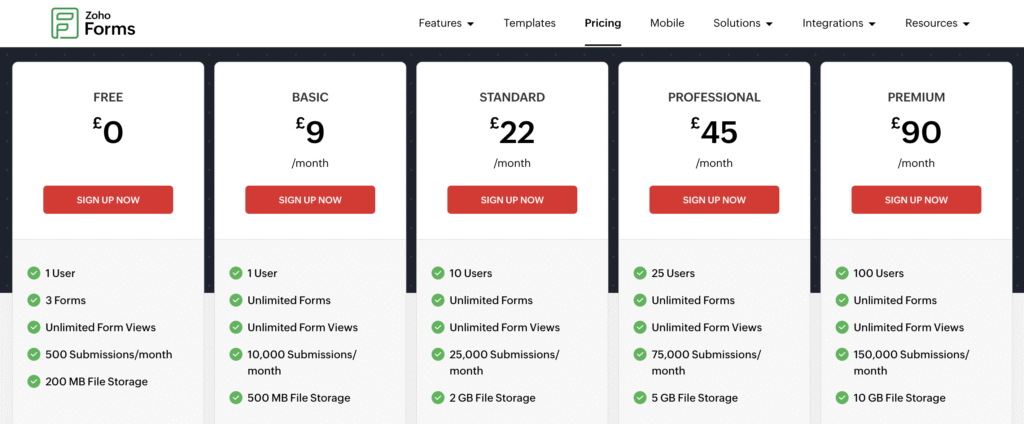
Here’s a summary of Zoho Forms’ publicly available plans, converted to USD for consistency. Pricing may vary based on region or billing cycle.⁴
| Plan | Monthly Price (USD) | Key Features |
|---|---|---|
| Free | $0 | 1 User, 3 Forms, 500 submissions/month, 200 MB storage |
| Basic | ~$12 | 1 User, 10,000 submissions, unlimited forms |
| Standard | ~$30 | Up to 10 Users, 25,000 submissions, 2 GB storage |
| Professional | ~$60 | 25 Users, advanced logic, payment collection |
| Premium | ~$110 | Full branding, approvals, integrations, 100,000+ submissions |
Add-ons: Additional submissions ($12 per 10,000) and extra storage ($6/month).
Pricing Analysis:
Zoho Forms provides affordable entry-level plans with robust capabilities, ideal for startups or small teams. However, as submission volumes increase, pricing complexity rises with add-ons and user-based scaling.
By contrast, FORMEPIC offers flat-rate unlimited responses—a straightforward model especially beneficial for large campaigns or long-term data collection projects.
Expert Reviews
Experts rate Zoho Forms positively for usability, ecosystem integration, and reliability—but with recurring comments about pricing complexity and analytics depth.
- G2: 4.4 / 5 average rating (150+ reviews).⁵
- Capterra: 4.1 / 5 from 5,000+ verified users.²
- Software Advice: 4.2 / 5 average satisfaction rating.³
✅ Strengths
- Smooth learning curve and mobile-friendly interface.
- Reliable integrations within Zoho suite.
- Offline mode and approval workflows appreciated by operations teams.
⚠️ Limitations
- Analytics less advanced than competitors like FORMEPIC.
- Pricing and plan tiers can feel fragmented.
- Limited design flexibility and slower third-party integrations.
🎯 Ideal For
Small to mid-sized businesses already using Zoho apps, needing easy online forms and workflows.
If your focus is AI-assisted creation, advanced logic, and unlimited scalability, FORMEPIC stands out as a smarter, future-proof alternative.
User Reviews — Zoho Forms Pros & Cons
👍 Zoho Forms Pros & Advantages
- “Very intuitive interface, easy to create and share forms with clients and team members.” (G2 user review)⁵
- “Customization and collaboration make it ideal for team projects.” (Capterra user review)²
- “Drag-and-drop builder allows even non-tech users to create attractive forms quickly.” (Software Advice user review)³
- “Integration with Zoho CRM is seamless and keeps data in one place.” (Capterra user review)²
- “Mobile form submission is extremely useful for field teams.” (Findstack expert summary)⁶
Summary of Positive Themes:
Most users appreciate the user-friendly interface, smooth integrations, and mobile accessibility. Businesses already on Zoho’s ecosystem benefit most, as data sync between apps is effortless.
However, some note that advanced workflows and branding options require upgrades—a pain point FORMEPIC avoids with all features unlocked in its base plan.
👎 Zoho Forms Cons & Disadvantages
- “Workflow automation could be improved—limited triggers.” (Software Advice user review)³
- “Occasional upload issues and slow app sync.” (Software Advice user review)³
- “Limited design templates; could use more modern themes.” (Capterra user review)²
- “Pricing feels high when adding multiple users.” (Subscribed.fyi review)⁷
- “Integration with external CRMs can be hit or miss.” (G2 user review)⁵
Summary of Negative Themes:
Common frustrations include workflow inflexibility, tier-based restrictions, slow mobile performance, and extra costs for scaling users or submissions.
While many users find Zoho Forms reliable for moderate workloads, those needing high-volume automation or AI-based logic generation might outgrow it quickly. This is precisely where FORMEPIC fills the gap with its AI-driven, unlimited-response architecture.
Zoho Forms Alternatives
If you’re considering Zoho Forms but exploring other options, here are three credible alternatives—ranked by versatility, automation, and scalability.
1️⃣ FORMEPIC – Best All-in-One AI Form, Quiz & Survey Builder
FORMEPIC is an AI-powered platform for creating forms, quizzes, polls, and surveys with unlimited responses and advanced conditional logic. Its standout feature is the AI Form Builder, which automatically generates optimized questions and workflows based on user intent.
Unlike Zoho Forms’ tiered submission caps, FORMEPIC offers flat-rate unlimited plans that simplify budgeting for growing teams. You also get advanced analytics, webhook integrations, and instant automation triggers—without juggling add-ons.
👉 Visit FORMEPIC
2️⃣ Typeform – Conversational UX and Design Appeal
Typeform is popular for its interactive, one-question-at-a-time design and beautiful UI. It’s great for improving survey engagement. However, pricing scales with responses, making it less cost-effective for high-volume campaigns.
3️⃣ Paperform – Form Meets Document Editor
Paperform combines form building with document-style editing, enabling users to design immersive landing-page-like forms. It’s a solid choice for brand-conscious marketers, though its AI and automation depth are limited compared to FORMEPIC.
Final Verdict
Zoho Forms delivers a strong, balanced solution for businesses needing reliable online data collection and integration within the Zoho suite. It’s user-friendly, mobile-ready, and ideal for SMBs already in the Zoho ecosystem.
However, the platform’s tiered pricing, submission caps, and limited analytics depth can make it less appealing for advanced or high-volume users.
If your priorities include AI-powered automation, dynamic logic, and flat-rate unlimited responses, FORMEPIC is our #1 recommended alternative.
Who Zoho Forms Suits Best:
- Small to medium teams using Zoho ecosystem apps.
- Businesses needing simple forms, moderate automation, and mobile use.
When to Choose FORMEPIC Instead:
- You need AI-assisted creation and analytics.
- You want unlimited responses without pricing tiers.
- You handle large-scale form submissions or complex workflows.
In summary, Zoho Forms remains a dependable, feature-rich choice—but for growth, automation, and simplicity, FORMEPIC offers a smarter path forward.
References
- https://www.g2.com/products/zoho-forms/reviews
- https://www.capterra.com/p/227463/Zoho-Forms/
- https://www.softwareadvice.com/data-collection/zoho-forms-profile/reviews/
- https://www.zoho.com/forms/plan-comparison.html
- https://www.g2.com/products/zoho-forms/pricing
- https://findstack.com/products/zoho-forms/reviews
- https://subscribed.fyi/zoho-forms/review
Discover More:
 Snap Surveys Expert & User Reviews — Features, Pricing, Pros & Cons + Best Alternatives
 Typeform Expert & User Reviews — Features, Pricing, Pros & Cons + Best Alternatives
 HubSpot Forms Expert & User Reviews – Features, Pricing, Pros & Cons + Best Alternatives
 Formstack Expert & User Reviews — Features, Pricing, Pros & Cons + Best Alternatives
 AidaForm Expert & User Reviews — Features, Pricing, Pros & Cons + Best Alternatives
 Google Forms Expert & User Reviews — Features, Pricing, Pros & Cons + Best Alternatives
