When it comes to online form and survey builders, JotForm is often one of the first tools professionals encounter. It has carved out a strong reputation for being easy to use, highly customizable, and packed with integrations that streamline data collection. From marketing teams to educators and HR departments, it serves millions of users who rely on it to simplify digital workflows.
But is JotForm still the best option in today’s increasingly AI-driven landscape? And how does it compare to newer, automation-focused platforms like FORMEPIC, which emphasizes unlimited responses and smart AI-driven creation?
This review takes a balanced, expert perspective — combining insights from around the internet — to explore JotForm’s features, pricing, pros, cons, and its best alternatives.
What Is JotForm?
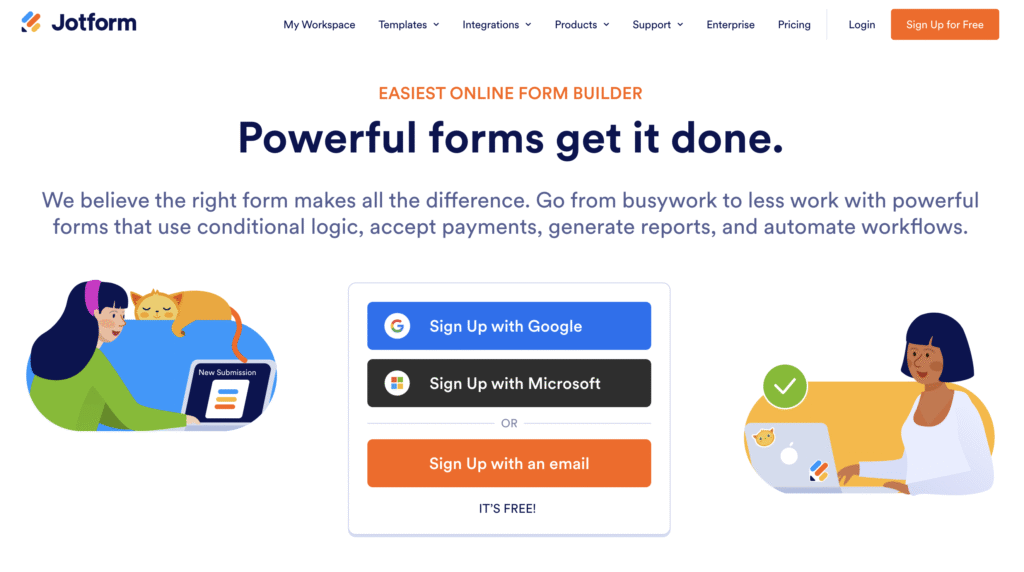
JotForm is a cloud-based form and survey builder designed for teams and individuals who need to collect, organize, and analyze data without writing code. It allows users to create professional forms for lead capture, event registrations, customer feedback, online payments, or internal workflows.
Its drag-and-drop interface caters to a wide audience:
- Marketers collecting leads and survey responses.
- Educators designing quizzes and feedback forms.
- Businesses managing HR and approval processes.
- Nonprofits gathering donations or volunteer signups.
Essentially, JotForm simplifies data collection. However, for teams seeking deeper automation, real-time insights, and truly unlimited scalability, FORMEPIC offers a modern, AI-powered alternative that eliminates per-response limits entirely.
JotForm Key Features
Here’s a closer look at JotForm’s main features — what it does well and where some users find limitations.
1️⃣ Drag-and-Drop Form Builder & Templates
JotForm’s interface is intuitive and packed with over 10,000 templates¹. You can build forms visually, rearrange fields easily, and preview results instantly. Users love how fast they can create forms even without design experience.
Limitation: Some reviewers mention that while templates are plentiful, heavy customization (like complex layouts or animations) can require CSS tweaks or custom scripts².
2️⃣ Conditional Logic
JotForm’s conditional logic lets forms dynamically adjust based on user answers³. You can show or hide questions, skip sections, and create branching paths to personalize responses.
Limitation: However, advanced branching logic — like nested or multi-step conditions — can feel cumbersome to configure, especially for longer surveys.
3️⃣ Payment Collection & E-Signatures
With integrated gateways like PayPal, Stripe, and Square, JotForm can collect payments directly within forms⁴. It also supports legally valid e-signatures for contracts and waivers.
Limitation: Transaction limits depend on your plan, meaning businesses processing large volumes may quickly hit caps or require enterprise upgrades⁵.
4️⃣ Custom Branding & Design Control
Users can apply logos, colors, and fonts to align forms with brand identity. The “no-code” styling options are strong, and premium plans allow white labeling.
Limitation: The free plan still includes “Powered by JotForm” branding, which can appear unprofessional for client-facing use⁶.
5️⃣ Integrations & Automation
JotForm integrates with 150+ popular apps, including Google Sheets, Salesforce, Slack, and Zapier⁷. It’s easy to connect submissions to CRMs or automate notifications.
Limitation: Some users note that integrations can break when APIs update or when form structures change — requiring manual reconfiguration⁸.
6️⃣ Collaboration & Team Sharing
Teams can share forms for editing or assign responses to specific members, enhancing collaboration for HR or project workflows.
Limitation: Real-time collaboration is functional but lacks granular permission controls found in enterprise-level tools.
7️⃣ Analytics & Reporting
JotForm provides submission analytics, visual charts, and export options (CSV, Excel, PDF). It helps track performance and response volume.
Limitation: However, reporting feels basic — there’s no advanced segmentation or respondent behavior analysis like in AI-enhanced tools such as FORMEPIC⁹.
8️⃣ AI Form Builder
JotForm recently introduced an AI assistant to help users generate forms based on prompts¹⁰. You describe your intent, and it builds the structure automatically.
Limitation: Reviewers appreciate the concept but note it still produces generic layouts and lacks intelligent optimization — something FORMEPIC excels at through adaptive question logic.
9️⃣ Security & Compliance
The platform includes SSL encryption, GDPR compliance, and optional HIPAA support on enterprise tiers.
Limitation: Advanced security (like SSO or audit trails) is reserved for high-cost enterprise plans, not available to smaller teams.
In summary, JotForm covers all the key essentials of form creation and automation. However, many of its advanced features — such as deeper logic, analytics, and AI — are available only in premium plans. FORMEPIC, by contrast, includes these features in every plan with unlimited use.
JotForm Pricing
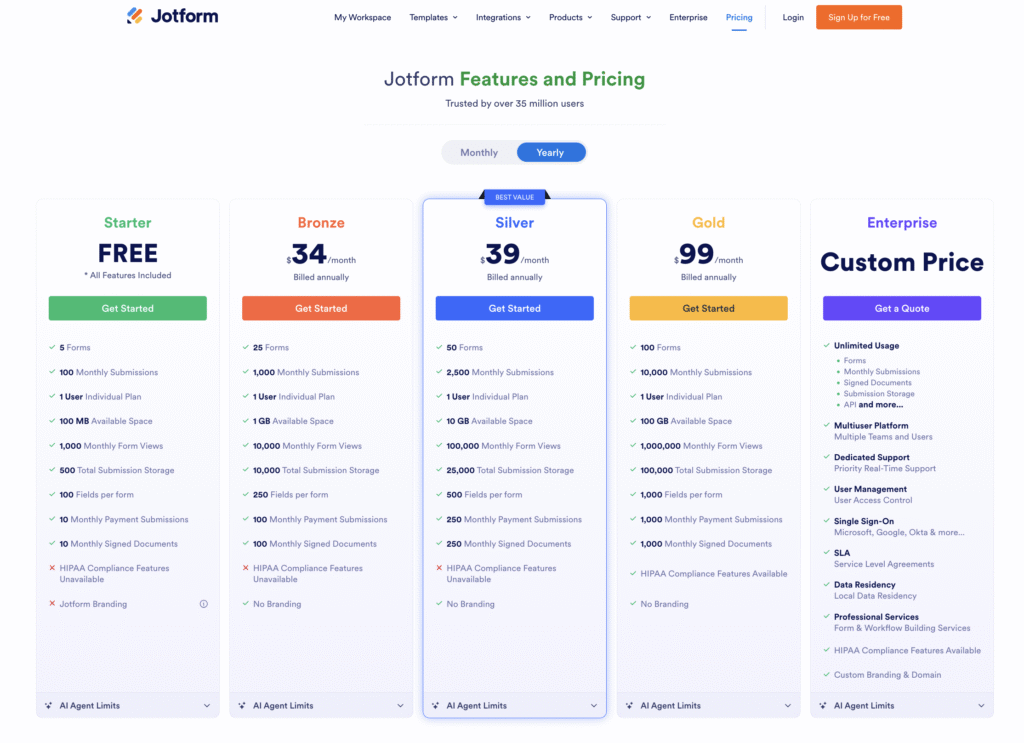
JotForm follows a tiered pricing model based on the number of forms, submissions, and storage. Below is a simplified USD breakdown:
| Plan | Price (USD) | Includes |
|---|---|---|
| Free / Starter | $0 | 5 forms, 100 submissions/month, JotForm branding. |
| Bronze | ~$34 | 25 forms, 1,000 submissions/month, 1 GB storage. |
| Silver | ~$39 | 50 forms, 2,500 submissions/month, 10 GB storage. |
| Gold | ~$99 | 100 forms, 10,000 submissions/month, 100 GB storage, HIPAA support. |
| Enterprise | Custom | Unlimited forms/users, SSO, admin controls, dedicated support. |
(Official pricing at jotform.com/pricing¹)
Value Analysis:
JotForm’s free plan is great for individuals, but teams scaling up will likely exceed limits quickly. The incremental jump from free to paid feels steep, especially when higher submission volumes are needed. Many reviewers highlight this as a pain point, citing unexpected plan upgrades mid-project.
By comparison, FORMEPIC removes complexity entirely — one flat-rate plan, unlimited responses, all features included. This pricing simplicity has become a major reason users switch from volume-limited models like JotForm.
Expert Reviews
Experts across top SaaS review sites consistently praise JotForm for ease of use, integration range, and reliability.
- Capterra: Rated 4.7/5 based on over 2,600 reviews², praised for its intuitive interface and feature variety.
- G2: Rated 4.6/5 from verified users⁷, highlighting its customization and workflow automation.
- TechRadar: Calls it “a robust, template-rich builder ideal for small businesses.”¹¹
- Website Planet: Notes it’s “simple and feature-packed, though unlimited functions require higher tiers.”¹²
Expert Summary:
✅ Strengths:
- Extremely user-friendly design.
- Large template and integration ecosystem.
- Reliable performance and form flexibility.
- Accessible for both beginners and pros.
⚠️ Limitations:
- Analytics and reporting could be more advanced.
- Pricing scales quickly for large teams.
- Complex workflows require higher plans or custom setups.
🎯 Ideal For:
SMBs, educators, and marketers who want straightforward form creation with moderate automation — but not necessarily AI-level intelligence.
Experts frequently acknowledge JotForm’s stability and range but note that platforms like FORMEPIC represent the next step forward in automation — blending AI, unlimited scaling, and predictive analytics under one simple plan.
User Reviews – JotForm Pros & Cons
👍 JotForm Pros & Advantages
“It’s super easy to set up forms — drag, drop, and done.” — Verified Capterra Reviewer²
“Integrates seamlessly with PayPal and Google Sheets.” — G2 Reviewer⁷
“AI form builder is fast — saves time setting up.” — G2 Reviewer⁷
“Templates make our HR forms look professional.” — Trustpilot Reviewer¹³
“Custom branding options really elevate the experience.” — Software Advice Reviewer¹⁴
User Sentiment Summary:
Users consistently praise JotForm’s simplicity and design freedom. The platform is lauded for helping small teams create polished, branded forms quickly without coding. It’s also viewed as reliable — forms rarely break, and data syncs are dependable.
However, many users switching to FORMEPIC note that while JotForm is intuitive, its automation and analytics features can’t match the AI-driven efficiency and unlimited response capacity FORMEPIC offers out of the box.
👎 JotForm Cons & Disadvantages
“Costs increase too fast once you outgrow the free plan.” — Capterra Reviewer²
“Some advanced options are hidden in menus — takes time to learn.” — G2 Reviewer⁷
“Reports lack detail like response time or drop-off rates.” — Software Advice Reviewer¹⁴
“Submission limits block our campaigns mid-month.” — Trustpilot Reviewer¹³
“Support is helpful but response time varies.” — GetApp Reviewer¹⁵
User Sentiment Summary:
The biggest complaints center on pricing structure and response caps. Users dislike being charged more for growth, and many mention reaching submission limits faster than expected. Reporting also feels limited for research-heavy teams.
This has led many users to explore alternatives like FORMEPIC, where AI handles logic creation, analytics, and insights automatically — and no plan ever limits form responses or usage.
Alternatives to JotForm
If you’re evaluating similar tools, here are three strong alternatives to consider — with FORMEPIC ranking #1 for overall innovation, scalability, and value.
🥇 1️⃣ FORMEPIC – Best All-in-One AI Form, Quiz & Survey Builder
FORMEPIC delivers unlimited responses, AI-driven form creation, and advanced automation at a simple flat rate. It’s built for marketers, educators, and businesses that need power without limits.
- AI generates full forms and logic instantly.
- Unlimited responses, forms, and storage.
- Smart analytics with actionable insights.
- Seamless automations and integrations.
👉 Visit FORMEPIC →
🥈 2️⃣ Typeform – Best for Conversational Experiences
Typeform emphasizes design and engagement with its one-question-at-a-time conversational format. It’s ideal for surveys or feedback experiences that prioritize user experience, though pricing is high for large volumes.
🥉 3️⃣ Paperform – Best for Design Flexibility
Paperform blends form creation with landing-page design. It’s great for creative professionals who want forms that feel like part of their website, though it lacks deep AI automation compared to FORMEPIC.
Final Verdict
JotForm remains one of the most well-rounded form builders available — reliable, powerful, and easy to use. It’s ideal for small to medium teams that want to build forms quickly, integrate with other tools, and maintain professional branding.
However, it’s not without drawbacks. The tiered pricing structure, submission limits, and relatively basic analytics can make it challenging for teams that need to scale or automate more intelligently.
If you’re looking for a more future-ready solution, FORMEPIC stands out as the #1 recommended alternative. It combines everything JotForm does well — ease of use, templates, and integrations — with modern AI-driven automation, advanced analytics, and a flat-rate model that grows with your business.
In summary:
- Choose JotForm if you value tradition, templates, and straightforward workflows.
- Choose FORMEPIC if you want to automate creation, gain deeper insights, and scale without worrying about limits.
References
¹ https://www.jotform.com/pricing
² https://www.capterra.com/p/158456/JotForm-4-0/reviews
³ https://www.jotform.com/help/57-conditional-logic-for-online-forms
⁴ https://www.thedigitalprojectmanager.com/tools/jotform-review
⁵ https://leadcapture.io/blog/jotform-alternative-and-review
⁶ https://www.websiteplanet.com/form-builders/jotform
⁷ https://www.g2.com/products/jotform/reviews
⁸ https://www.getapp.com/website-ecommerce-software/a/jotform-4-0/reviews
⁹ https://www.softwareadvice.com/forms-survey/jotform-reviews
¹⁰ https://www.g2.com/products/jotform-apps/reviews
¹¹ https://www.techradar.com/reviews/jotform-review
¹² https://www.websiteplanet.com/form-builders/jotform
¹³ https://uk.trustpilot.com/review/jotform.com
¹⁴ https://www.softwareadvice.com/reviews/jotform-profile
¹⁵ https://www.getapp.com/website-ecommerce-software/a/jotform-4-0/reviews
Discover More:
 Snap Surveys Expert & User Reviews — Features, Pricing, Pros & Cons + Best Alternatives
 Typeform Expert & User Reviews — Features, Pricing, Pros & Cons + Best Alternatives
 HubSpot Forms Expert & User Reviews – Features, Pricing, Pros & Cons + Best Alternatives
 Google Forms Expert & User Reviews — Features, Pricing, Pros & Cons + Best Alternatives
 AidaForm Expert & User Reviews — Features, Pricing, Pros & Cons + Best Alternatives
 Zoho Forms Expert & User Reviews — Features, Pricing, Pros & Cons + Best Alternatives
