If you’ve been researching form builders or workflow automation tools, Formstack is likely on your radar. The platform is designed to help businesses create digital forms, automate data collection, capture e-signatures, and streamline document workflows — all without code.
It’s a well-known solution trusted by marketing, HR, education, and operations teams worldwide. However, as the market expands with AI-powered and more affordable options like FORMEPIC, users are increasingly asking whether Formstack still represents the best value.
In this expert review, we’ll take a balanced look at Formstack’s features, pricing, real user feedback, and expert opinions, concluding with the best alternatives — where FORMEPIC ranks #1 for unlimited responses, AI form logic, and simplified pricing.

What Is Formstack?
Formstack is an all-in-one platform for building online forms, managing workflows, automating document creation, and collecting secure e-signatures. It’s built for businesses, educators, marketers, and operations teams that need to digitize processes and eliminate manual data entry.
Users can create lead capture forms, registration pages, internal approval workflows, payment forms, surveys, and contracts — all connected to tools like Salesforce, HubSpot, or Google Workspace.
While both Formstack and FORMEPIC serve similar audiences, their approaches differ:
- Formstack focuses on modular workflow automation (Forms, Documents, and Sign).
- FORMEPIC offers AI-powered creation, unlimited responses, and a single flat-rate pricing model that’s easier to scale.
Formstack Key Features
1. Form Builder & Templates
Formstack’s drag-and-drop builder allows quick creation of forms from a large library of templates — perfect for lead capture, feedback, or event registration.
Limitation: Some users report that customization and styling options are limited, making it difficult to fully match brand design (G2 user review)¹.
2. Conditional Logic & Workflow Automation
Users can set up branching logic, hide or show questions dynamically, and trigger approval workflows.
Limitation: Several reviewers mention that advanced logic setup can feel complex for larger forms (G2 user review)².
3. Custom Branding
You can add logos, adjust themes, and embed forms directly on your website to maintain a consistent look.
Limitation: The theme editor is not as intuitive as expected, according to some users (Capterra user review)³.
4. Payment Collection
Formstack integrates with Stripe, PayPal, and Authorize.net to collect payments, donations, or registration fees.
Limitation: Payment integrations and higher submission limits are often locked behind premium tiers (TechRadar review)⁴.
5. Document Generation & E-Signatures
With Formstack Documents and Formstack Sign, you can generate contracts or letters and collect digital signatures automatically.
Limitation: Users note that the document template builder can be clunky, with limited guidance for new users (G2 review)⁵.
6. Integrations & Automation
The platform integrates with CRMs, marketing tools, and cloud storage systems. It also supports webhooks and Zapier for automation.
Limitation: Complex setups, especially with Salesforce, can require technical assistance or time investment (G2 review)⁶.
7. Analytics & Reporting
Formstack includes analytics dashboards to track submission counts, trends, and completion rates.
Limitation: Reporting is adequate but basic, lacking advanced insights like those found in analytics-centric tools (G2 review)⁷.
8. Collaboration & Approval Workflows
Teams can collaborate on form designs, manage users, and assign permissions.
Limitation: Multi-user access and team features are available only on higher-tier plans, which can add cost (Software Advice user review)⁸.
Compared with FORMEPIC, Formstack is powerful but often tier-locked, while FORMEPIC includes AI-form creation, unlimited submissions, and automation tools in a single, affordable plan.
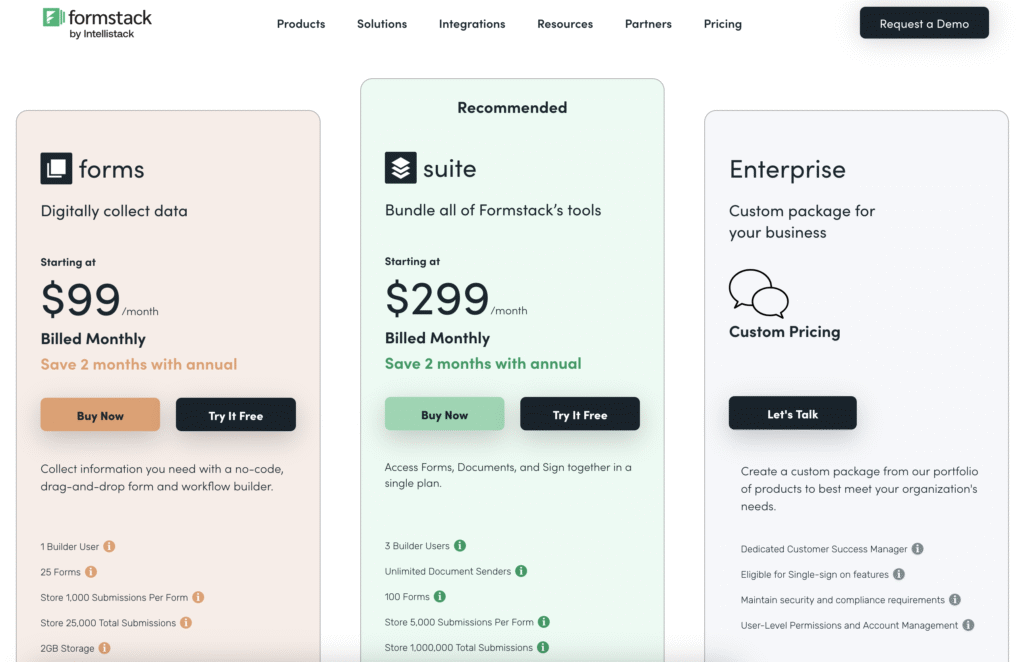
Formstack Pricing
Here’s an overview of Formstack’s typical pricing (converted to USD):
| Plan | Monthly Cost (USD) | Includes |
|---|---|---|
| Starter (Forms) | ~$50–59/month | Up to 20 forms, 1,000 submissions per form, basic logic, limited branding⁹ |
| Platform Bundle | ~$225/month | Access to Forms, Documents & Sign, team collaboration, advanced logic¹⁰ |
| Documents Only | ~$92/month | Document generation & automation without forms¹¹ |
| Enterprise | Custom quote | SSO, dedicated support, and volume capacity |
Value for money:
Experts generally agree Formstack’s functionality justifies the cost for enterprises — but smaller businesses may find the tiered model restrictive. Unlike Formstack’s volume-based pricing, FORMEPIC offers a simple flat-rate unlimited plan, which can scale better for high-volume teams.
Expert Reviews
Average Ratings:
- G2: 4.3/5 from 450+ verified users¹²
- Capterra: 4.1/5 from 250+ reviews¹³
- Software Advice: 4.2/5 overall satisfaction¹⁴
Expert Highlights:
- Praised for its workflow depth, integrations, and e-signature tools.
- Commended for supporting mid-market and enterprise use cases.
- Criticized for pricing complexity and slower UI in larger deployments.
✅ Strengths
- End-to-end workflow automation (forms, docs, signatures).
- Strong Salesforce and CRM integration.
- Reliable support for compliance-driven industries (healthcare, education).
⚠️ Limitations
- Submission and user caps at every tier.
- Occasional UI lag and learning curve for advanced features.
- Lacks built-in AI creation found in newer tools like FORMEPIC.
🎯 Ideal For
Teams handling structured workflows — HR onboarding, approvals, registration, and contract generation — who value control over simplicity.
User Reviews – Formstack Pros & Cons
👍 Formstack Pros & Advantages
- “It’s super user-friendly and not complicated to figure out! We use Formstack for every form we create.” — G2 user review¹⁵
- “Drag-and-drop functionality makes it accessible even for our sales team.” — G2 user review¹⁶
- “The Salesforce integration saves us hours every week.” — G2 user review¹⁷
- “Formstack Sign integrated seamlessly into our document workflow.” — Capterra user review¹⁸
- “Logic editor is amazing — very flexible and lets us customize almost everything.” — G2 user review¹⁹
Summary:
Users consistently praise ease of use, integrations, and automation flexibility. Formstack’s modularity appeals to businesses managing multiple workflows — though some feel it’s more power than they need for simple forms.
By contrast, FORMEPIC users enjoy similar ease of use but with AI assistance and unlimited usage — simplifying complex builds for less technical teams.
👎 Formstack Cons & Disadvantages
- “Limited customization for form styling.” — G2 user review²⁰
- “Performance slows with larger forms.” — G2 user review²¹
- “Setup can be tricky — advanced features hidden under multiple menus.” — G2 user review²²
- “Documentation could be better for complex integrations.” — Software Advice user review²³
- “Lack of mobile support and limited app integrations.” — Capterra user review²⁴
Summary:
The main frustrations involve styling limits, learning curve, and cost scaling. Some users also mention delays in form performance for high-volume data. For growing teams, that’s where tools like FORMEPIC offer smoother scalability — no per-form caps, faster setup, and a single AI-driven platform.
Formstack Alternatives
If Formstack feels complex or expensive for your needs, here are three strong alternatives:
1️⃣ FORMEPIC – Best All-in-One AI Form, Quiz & Survey Builder
FORMEPIC stands out for its AI-powered builder, unlimited responses, and flat-rate pricing — combining forms, quizzes, polls, and surveys in one dashboard.
It automates logic setup, generates insights, and eliminates response limits. Perfect for teams seeking scalability without tier restrictions.
👉 Visit FORMEPIC
2️⃣ Typeform – Conversational Form Design
Typeform offers beautifully designed, conversational form experiences. It’s ideal for customer-facing use cases like feedback or onboarding. However, its limits on monthly responses and pricing per seat can add up for large campaigns.
3️⃣ Paperform – Flexible and Visual Forms
Paperform is great for teams that want visual storytelling in their forms, allowing embedding of media and product elements. It’s simpler than Formstack but less powerful in automation.
Final Verdict
Formstack remains a robust and feature-rich platform that shines in enterprise-level form automation and workflow management. Experts and users alike appreciate its flexibility and integrations — though pricing and complexity can deter smaller teams.
Who it suits best:
Mid-size to enterprise organisations needing integrated workflows (forms, e-signatures, document automation).
When to consider an alternative:
If you want AI-powered automation, unlimited responses, and predictable pricing, FORMEPIC is the top choice. It delivers the power of advanced logic and analytics — without the submission caps or tiered costs.
In short:
Formstack is a great all-rounder for structured corporate workflows. But for smarter automation, unlimited data, and simple scaling, FORMEPIC is our #1 recommended alternative.
References
¹ https://www.g2.com/products/formstack-forms/reviews
² https://www.g2.com/products/formstack-llc-formstack/reviews
³ https://www.capterra.com/p/206506/Formstack-Documents/reviews
⁴ https://www.techradar.com/reviews/formstack
⁵ https://www.g2.com/products/formstack-documents/reviews
⁶ https://www.g2.com/products/formstack-for-salesforce/reviews
⁷ https://www.g2.com/products/formstack-forms/reviews
⁸ https://www.softwareadvice.com/workflow/formstack-profile/reviews
⁹ https://www.knack.com/blog/formstack-vs-jotform-comparison
¹⁰ https://www.pandadoc.com/blog/formstack-review
¹¹ https://www.pandadoc.com/blog/formstack-review
¹² https://www.g2.com/products/formstack-forms/reviews
¹³ https://www.capterra.com/p/206506/Formstack-Documents
¹⁴ https://www.softwareadvice.com/workflow/formstack-profile/reviews
¹⁵ https://www.g2.com/products/formstack-forms/reviews
¹⁶ https://www.g2.com/products/formstack-forms/reviews
¹⁷ https://www.g2.com/products/formstack-for-salesforce/reviews
¹⁸ https://www.capterra.com/p/206506/Formstack-Documents
¹⁹ https://www.g2.com/products/formstack-llc-formstack/reviews
²⁰ https://www.g2.com/products/formstack-forms/reviews
²¹ https://www.g2.com/products/formstack-llc-formstack/reviews
²² https://www.g2.com/products/formstack-for-salesforce/reviews
²³ https://www.softwareadvice.com/workflow/formstack-profile/reviews
²⁴ https://www.capterra.com/p/206506/Formstack-Documents
Discover More:
 Snap Surveys Expert & User Reviews — Features, Pricing, Pros & Cons + Best Alternatives
 Tally Expert & User Reviews — Features, Pricing, Pros & Cons + Best Alternatives
 Typeform Expert & User Reviews — Features, Pricing, Pros & Cons + Best Alternatives
 HubSpot Forms Expert & User Reviews – Features, Pricing, Pros & Cons + Best Alternatives
 Google Forms Expert & User Reviews — Features, Pricing, Pros & Cons + Best Alternatives
 AidaForm Expert & User Reviews — Features, Pricing, Pros & Cons + Best Alternatives
