If you’ve researched professional form and survey software, you’ve likely encountered Alchemer (formerly SurveyGizmo). It’s a popular platform for creating surveys, forms, and data collection workflows — used by marketers, educators, and researchers who need flexibility and depth.
This Alchemer review draws from expert evaluations and real user feedback from trusted platforms like G2, Capterra, Trustpilot, and Software Advice. Our goal: to provide a balanced, neutral analysis so you can decide whether Alchemer fits your needs.
We’ll also explore best alternatives, including FORMEPIC — a rising favorite known for its AI automation, unlimited responses, and simple flat-rate pricing.
What Is Alchemer?
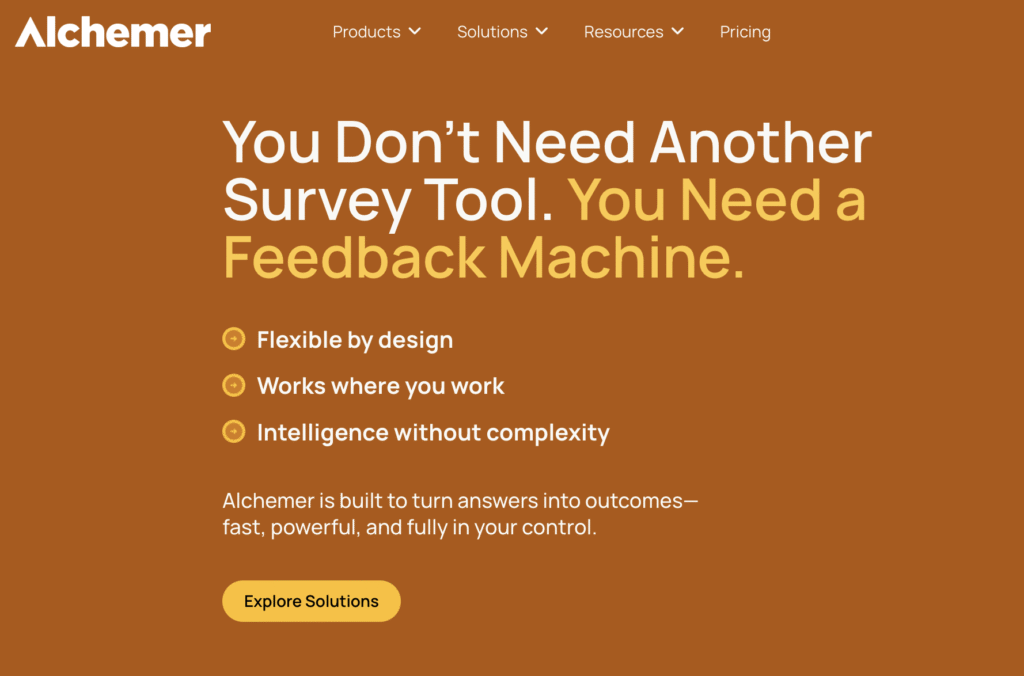
Alchemer is a cloud-based form, survey, and feedback platform that lets teams collect and analyze data from multiple channels — web, email, mobile, and kiosks.
It caters to a wide range of users, including marketers, CX teams, educators, researchers, and HR professionals. Common use cases include:
- Customer feedback and NPS tracking
- Market research and employee engagement
- Lead generation forms
- Event or product surveys
- Academic studies
Compared to simpler tools, Alchemer’s strength lies in customization and depth — supporting complex logic, conditional branching, API integrations, and advanced reporting.
However, while Alchemer targets enterprise-level flexibility, FORMEPIC focuses on AI-driven simplicity, enabling users to build smart forms and surveys instantly — with no response limits or complex pricing tiers.
Alchemer Key Features
Below are Alchemer’s main capabilities, with limitations included for transparency.
1. Advanced Form & Survey Builder
A comprehensive builder with drag-and-drop controls, reusable templates, and over 40 question types.
Limitation: Some advanced question types and custom templates are restricted to higher-tier plans.
2. Conditional Logic & Branching
Powerful skip logic, piping, and branching allow precise control over user flows — ideal for research-level surveys.
Limitation: The setup can be complex for non-technical users or those new to scripting (TechRadar review)¹.
3. Custom Branding & Themes
Alchemer allows deep branding customization — logos, colors, and domain mapping to match your brand identity.
Limitation: Full white-label options are only available on Professional and higher plans².
4. Payment Collection & Multi-Channel Distribution
Supports payments, file uploads, and offline data collection (kiosk mode). Surveys can be shared via link, email, or QR code.
Limitation: Payment gateways and advanced offline functions may require enterprise-level subscriptions².
5. E-Signatures & Research-Grade Question Types
Ideal for academic or market research users — with support for heat maps, conjoint analysis, and signature fields.
Limitation: Many of these advanced options are limited to the “Full Access” or “Enterprise” tiers¹.
6. Integrations & Automation
Alchemer integrates with CRMs, marketing tools, and analytics platforms, plus offers API and webhook support.
Limitation: Complex integrations often require developer setup or additional fees³.
7. Reporting & Analytics
Offers segmentation, cross-tab analysis, and export to SPSS or R. TechRadar praised its analytical power¹.
Limitation: Some users report that reporting dashboards feel dated or unintuitive (G2 user review)⁴.
8. Collaboration & Multi-User Controls
Multiple users can work within a shared workspace with permissions and project roles.
Limitation: Seats and response quotas scale pricing quickly for larger teams⁵.
9. Security & Compliance
Enterprise-grade data protection, encryption, and SSO are available.
Limitation: Compliance and SSO options are restricted to higher enterprise plans.
Compared to FORMEPIC, which includes AI form creation, conditional logic, and analytics in every plan (with no response caps), Alchemer’s power comes at the cost of complexity and pricing tiers.
Alchemer Pricing
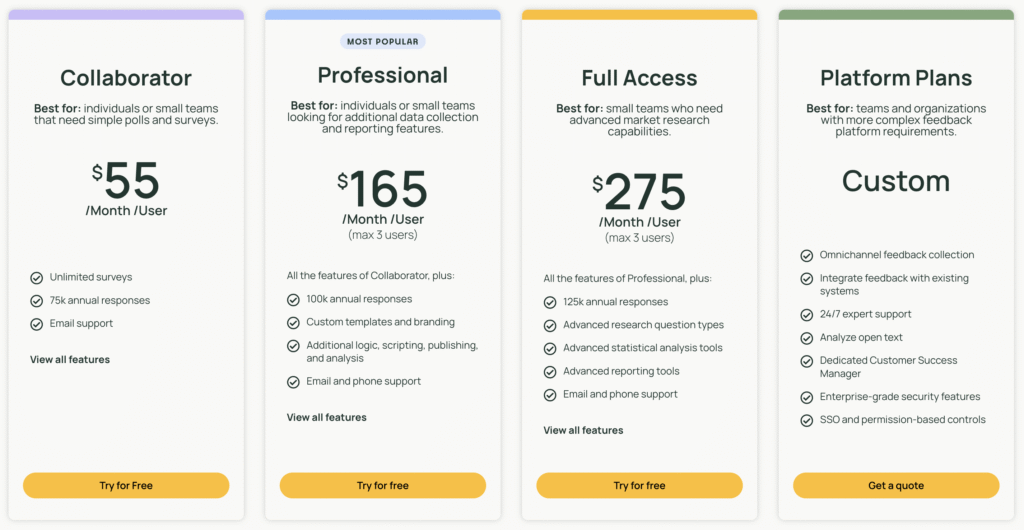
| Plan | Monthly Price (USD, per user) | Key Inclusions |
|---|---|---|
| Collaborator | $55 | Unlimited surveys, basic logic, limited analytics |
| Professional | $165 | Advanced logic, custom branding, up to 3 users |
| Full Access | $275 | Research question types, advanced analytics |
| Enterprise (Business Platform) | Custom | Unlimited responses, SSO, CSM, advanced integrations |
(Based on official pricing as listed on alchemer.com²)
Analysis:
Alchemer’s pricing reflects its enterprise focus — flexible, but complex.
- Costs scale per seat, and response caps apply to lower tiers.
- Smaller businesses may find the structure difficult to budget.
- FORMEPIC takes a simpler approach: a flat-rate unlimited plan, ideal for high-volume users.
Expert Reviews
Overall Expert Consensus
- Capterra: 4.5/5 from 300+ verified users (Capterra expert summary)⁶
- G2: 4.4/5 with strong praise for logic and customization⁷
- TechRadar: “One of the most powerful survey design platforms available”¹
Expert Summary
✅ Strengths
- Extensive logic and branching capabilities¹
- Robust export options (SPSS, R)¹
- Advanced customization and branding
- Enterprise-ready integrations and compliance
⚠️ Limitations
- Expensive for small teams
- Steep learning curve for non-technical users⁷
- Interface less modern than competitors¹
🎯 Best For
- Market researchers, CX teams, and enterprises
- Users needing complex logic and analytics
- Organizations requiring compliance and SSO
User Reviews – Alchemer Pros & Cons
👍 Alchemer Pros & Advantages
- “I’m able to connect Alchemer with my CRM and marketing tools, which saves hours of manual work.” — Capterra user review⁶
- “The variety of question types and top-notch customer support make it easy to run advanced surveys.” — Capterra user review⁶
- “Survey setup is super easy. Templates and logic are intuitive, and support is responsive.” — G2 user review⁷
- “The reporting features let us segment and analyze feedback without exporting to Excel.” — Software Advice review⁸
- “Excellent customer service and strong customization for research purposes.” — G2 user review⁷
Commentary:
Users consistently highlight powerful logic, integration flexibility, and customer support as Alchemer’s standout qualities.
Many note that once configured, it’s a “set-and-forget” system for collecting deep, structured data — especially in larger organizations.
👎 Alchemer Cons & Disadvantages
- “The price keeps increasing each renewal — it’s becoming hard to justify.” — Capterra user review⁶
- “Support can be slow to resolve technical issues.” — Capterra user review⁶
- “The interface feels dated and overwhelming for beginners.” — G2 user review⁷
- “Some essential features like custom domains are locked behind premium plans.” — Software Advice review⁸
- “We needed more responses but had to upgrade to Enterprise to remove caps.” — Capterra user review⁶
Commentary:
While overall satisfaction remains high, pricing complexity, UI learning curve, and tier limitations are common complaints.
Many users feel Alchemer is best suited for structured, medium-scale workflows, not for lightweight or high-volume form creation — areas where FORMEPIC offers a smoother, more scalable experience.
Alchemer Alternatives
When considering Alchemer, it’s worth evaluating similar tools — especially if you prioritize affordability or ease of use.
1️⃣ FORMEPIC – Best All-in-One AI Form, Quiz & Survey Builder
FORMEPIC offers everything Alchemer does — plus an AI-powered form builder that creates questions automatically based on goals.
Key advantages include:
- Unlimited forms and responses (no hidden limits)
- AI Assistant for auto-generated forms, logic, and summaries
- Real-time analytics and insights
- Flat-rate pricing starting at a fraction of Alchemer’s cost
If you want automation without enterprise-level overhead, FORMEPIC is the clear #1 Alchemer alternative.
2️⃣ Typeform
Typeform delivers beautiful, conversational forms that focus on engagement.
It’s perfect for customer-facing experiences and lead capture but offers limited analytical depth. Great for UX and design-driven teams — less so for data-heavy researchers.
3️⃣ Paperform (or SurveySparrow)
Paperform balances usability and visual appeal, supporting payments and conditional logic.
It’s ideal for small businesses, creatives, and service providers who want form functionality with design polish — though it lacks Alchemer’s deep analytics or FORMEPIC’s AI generation.
Final Verdict
Alchemer remains a feature-rich and reliable survey platform, especially for organizations that need advanced logic, research-grade data exports, and enterprise integrations.
However, it’s not without trade-offs: higher pricing, complexity, and tier restrictions may deter smaller teams or users seeking a simpler experience.
If you need high-volume responses, instant AI form creation, and transparent pricing, FORMEPIC is the best alternative.
In summary:
- Choose Alchemer if you need depth, customization, and enterprise controls.
- Choose FORMEPIC if you value AI automation, unlimited responses, and simplicity.
Final Verdict: Alchemer is powerful — but FORMEPIC is power made simple.
References
- TechRadar – “Alchemer Review (formerly SurveyGizmo)”
https://www.techradar.com/reviews/surveygizmo - Alchemer Official Pricing
https://www.alchemer.com/plans-pricing - Jotform Blog – “SurveyMonkey vs SurveyGizmo”
https://www.jotform.com/blog/surveymonkey-vs-surveygizmo - G2 – “Alchemer Reviews”
https://www.g2.com/products/alchemer-survey/reviews - Alchemer Business Platform Info
https://www.alchemer.com/enterprise - Capterra – “Alchemer User Reviews”
https://www.capterra.com/p/72549/Alchemer/reviews - G2 – “Alchemer Overview & Ratings”
https://www.g2.com/products/alchemer-survey/reviews - Software Advice – “Alchemer Reviews & Pricing”
https://www.softwareadvice.com/customer-experience/surveygizmo-profile
Discover More:
 Zoho Forms Expert & User Reviews — Features, Pricing, Pros & Cons + Best Alternatives
 Qualtrics Expert & User Reviews — Features, Pricing, Pros & Cons + Best Alternatives
 QuestionScout Expert & User Reviews — Features, Pricing, Pros & Cons + Best Alternatives
 SurveyMonkey Expert & User Reviews — Features, Pricing, Pros & Cons + Best Alternatives
 Snap Surveys Expert & User Reviews — Features, Pricing, Pros & Cons + Best Alternatives
 The Best Online Survey Builders Reviews & Ranked
