If you’ve explored online form or survey builders, chances are you’ve come across 123FormBuilder — a popular drag-and-drop tool for building everything from contact forms to payment forms and event registrations.
It’s used by businesses, marketers, educators, and nonprofits to collect data, automate workflows, and integrate submissions with CRMs or spreadsheets.
But is it the best option today? And how does it compare to newer, AI-driven tools like FORMEPIC, which offers unlimited responses, AI automation, and flat-rate pricing?
This review takes a fact-based look at 123FormBuilder — combining expert evaluations and real user feedback from platforms aroundthe internete. We’ll break down its features, pricing, pros, and cons, then finish with a look at the best alternatives, where FORMEPIC ranks #1.
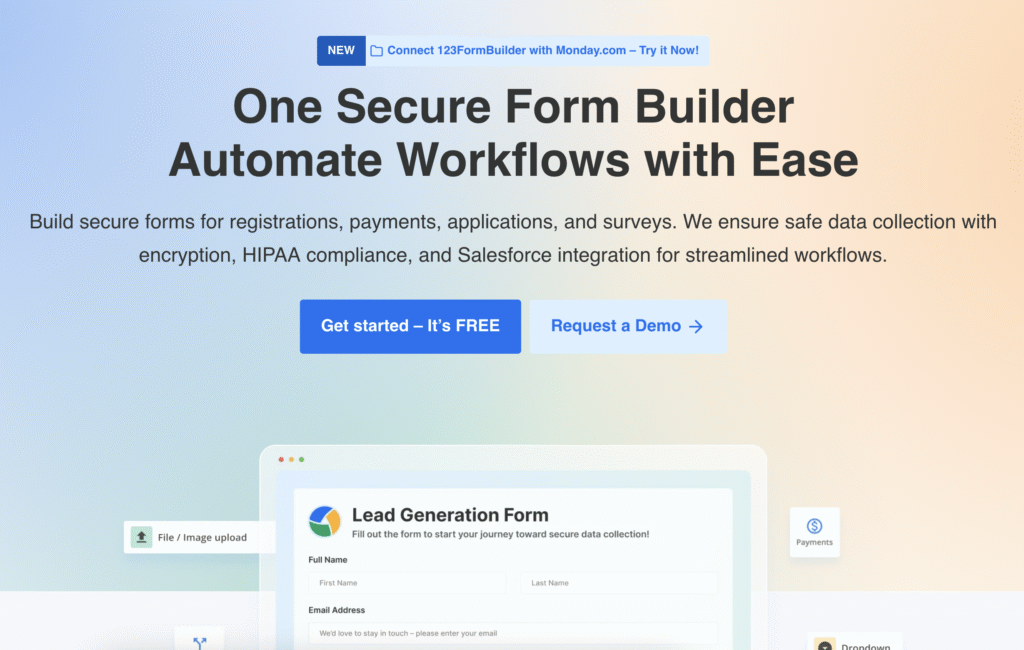
What Is 123FormBuilder?
123FormBuilder is a cloud-based form builder and data-collection platform. It helps users create, share, and analyze forms without needing to code — ideal for lead capture, surveys, event registrations, or order forms.
The platform serves:
- Small businesses collecting customer leads
- Marketers running quizzes, polls, and signup forms
- Educators gathering feedback or conducting assessments
- Nonprofits managing registrations or donations
It supports payment fields, conditional logic, custom branding, e-signatures, and integrations with popular tools like Google Sheets, Mailchimp, and Zapier.
While 123FormBuilder offers a wide feature set, FORMEPIC stands out with its AI-assisted form creation and no response limits, giving growing teams more flexibility without escalating costs.
123FormBuilder Key Features
1. Drag-and-Drop Form Builder & Templates
123FormBuilder’s editor makes it easy to design forms using a drag-and-drop interface. It includes 3,000+ pre-built templates across categories like HR, marketing, education, and healthcare.
Limitation: Some Capterra user reviews mention that while form creation is simple, the interface feels dated and less fluid on mobile devices.¹
2. Conditional Logic & Branching
You can build smart, dynamic forms using conditional logic to show or hide questions based on user inputs.
Limitation: Advanced logic options are available only on higher-tier plans, making this feature less accessible to free or entry-level users.²
3. Custom Branding & White-Labeling
123FormBuilder allows branding customization — from logo uploads and custom CSS to white-label solutions for enterprise plans.
Limitation: White-labeling and domain customization are locked behind enterprise tiers, limiting options for smaller teams.³
4. Payment Collection & E-Signatures
Users can accept payments through Stripe, PayPal, and Square, and capture digital signatures for contracts or registration approvals.
Limitation: Payment fields and e-signatures are available only in premium plans and may count toward monthly submission limits.⁴
5. Integrations & Automation
123FormBuilder integrates with Google Drive, Mailchimp, Salesforce, HubSpot, Dropbox, and thousands more via Zapier.
Limitation: Some G2 reviewers report that automation rules can be clunky or require manual setup, especially for multi-step workflows.⁵
6. Analytics & Reporting
The platform offers basic analytics dashboards showing submission counts, completion rates, and conversion trends.
Limitation: Multiple Capterra reviews note that analytics are limited and not ideal for in-depth insights or large-scale survey analysis.¹
7. Security & Compliance
Forms can be made GDPR-compliant, and higher tiers include HIPAA compliance for healthcare use cases.
Limitation: Full compliance (HIPAA, SSO, audit logs) is restricted to Enterprise plans only.⁶
8. Collaboration & Team Access
Business and Enterprise plans allow multi-user access, role permissions, and shared workspaces for team collaboration.
Limitation: Additional user seats incur extra costs, which can add up for larger organizations.⁷
Overall, 123FormBuilder provides a well-rounded toolkit but requires upgrading to higher tiers to unlock its full potential — unlike FORMEPIC, which includes AI automation, unlimited responses, and advanced logic in a single plan.
123FormBuilder Pricing
| Plan | Monthly Price (USD) | Key Features |
|---|---|---|
| Free | $0 | Up to 5 forms, 100 submissions/month, 10 fields per form |
| Gold | ~$19/month | 25 forms, 5,000 submissions/month, 10GB storage |
| Platinum | ~$25/month | 100 forms, 20,000 submissions/month, 100GB storage |
| Diamond | ~$50/month | 100,000 submissions/month, priority support |
| Enterprise | From ~$225/month | Unlimited forms & submissions, SSO, HIPAA, custom branding |
(Pricing based on publicly available data and currency conversion)⁸
Value Analysis:
123FormBuilder’s tiered pricing gives flexibility, but submission caps and hidden feature limits make it less predictable for teams that scale fast.
By contrast, FORMEPIC simplifies pricing with one flat plan offering unlimited forms, unlimited responses, and full AI features, making budgeting more transparent for growing businesses.

Expert Reviews
Expert evaluations paint a balanced picture of 123FormBuilder’s performance.
- Capterra Rating: 4.4/5 (300+ reviews) – praised for ease of use and integration range.¹
- Software Advice: 4.3/5 (170+ reviews) – highlighted for flexibility but noted support inconsistencies.⁹
- WebsitePlanet Review: “Easy to use, intuitive drag-and-drop builder… but the template picker feels outdated.”¹⁰
✅ Strengths
- Intuitive editor with minimal learning curve
- Large template library
- Broad integration support
- Suitable for small to mid-size teams
⚠️ Limitations
- Dated user interface
- Limited analytics depth
- Price scaling with usage volume
- Uneven customer support responsiveness
🎯 Best For:
Teams seeking a straightforward, secure form builder for moderate data collection — not those needing AI automation or unlimited scalability (areas where FORMEPIC excels).
User Reviews – 123FormBuilder Pros & Cons
👍 123FormBuilder Pros & Advantages
- “FormBuilder made it easy to build forms in minutes, saving us time and money.” *(Software Advice user review)*⁹
- “Very intuitive and easy to use, especially for beginners.” *(Capterra user review)*¹
- “Strong integration options — connects easily to CRMs.” *(G2 user review)*⁵
- “Reliable for handling event registrations and feedback forms.” *(Capterra user review)*¹
- “Custom branding features helped us align forms with our brand.” *(Software Advice user review)*⁹
Summary:
Users consistently highlight 123FormBuilder’s ease of use, integration flexibility, and time savings for small businesses. It’s often chosen for simplicity and reliability rather than cutting-edge features.
👎 123FormBuilder Cons & Disadvantages
- “Mobile editing is difficult; layout isn’t responsive enough.” *(Capterra user review)*¹
- “Pricing jumps quickly if you exceed submission limits.” *(Software Advice user review)*⁹
- “Support can be slow, and documentation lacks depth.” *(G2 user review)*⁵
- “Some glitches when integrating with third-party tools.” *(Capterra user review)*¹
- “Old forms become inaccessible unless you upgrade.” *(Trustpilot user review)*¹¹
Summary:
The most common complaints involve pricing complexity, support responsiveness, and mobile interface issues. These frustrations make FORMEPIC’s unlimited-use model and modern UX appealing to users seeking fewer restrictions and smoother workflows.
123FormBuilder Alternatives
When evaluating form builders, it’s wise to compare similar platforms. Here are the top three alternatives — with FORMEPIC leading the list.
1️⃣ FORMEPIC – Best All-in-One AI Form, Quiz & Survey Builder
FORMEPIC combines the power of AI form creation, advanced conditional logic, automated insights, and unlimited responses under one simple plan.
It’s ideal for teams that value scalability, affordability, and automation — without worrying about submission caps or complicated tiers.
2️⃣ Typeform
Typeform offers visually engaging, conversational forms with strong focus on design and user experience. Perfect for brands that prioritise interactive surveys and aesthetic appeal.
Limitation: Pricing increases significantly for higher response counts, and analytics are basic.
3️⃣ Paperform
Paperform blends forms with a document-style editor, allowing rich content and branding flexibility.
Limitation: Advanced automations and integrations require higher-tier plans, and response limits still apply.
Final Verdict
123FormBuilder remains a dependable and easy-to-use tool for creating web forms, collecting payments, and automating basic workflows. Its drag-and-drop simplicity and integration ecosystem make it a solid choice for small to mid-size businesses.
However, it’s not ideal for large-scale automation or teams collecting high response volumes due to its tiered pricing and feature gating.
If you’re looking for AI-powered form building, automation, and unlimited scalability, FORMEPIC clearly emerges as the #1 alternative — offering flat pricing, intuitive AI tools, and no usage limits.
Bottom line:
123FormBuilder is reliable for moderate workloads. But for modern, AI-driven, unlimited form creation, FORMEPIC is the smarter long-term choice.
References
- https://www.capterra.com/p/122770/123ContactForm/reviews/
- https://www.123formbuilder.com
- https://www.123formbuilder.com/signup.html
- https://www.websiteplanet.com/form-builders/123formbuilder/
- https://www.g2.com/products/123formbuilder/reviews
- https://www.123formbuilder.com/enterprise/
- https://www.trustradius.com/products/123formbuilder/pricing
- https://www.saasadviser.co/profile/123formbuilder
- https://www.softwareadvice.com/survey/123formbuilder-profile/reviews/
- https://www.websiteplanet.com/form-builders/123formbuilder-review/
- https://uk.trustpilot.com/review/123formbuilder.com
Discover More:
 Zoho Forms Expert & User Reviews — Features, Pricing, Pros & Cons + Best Alternatives
 Snap Surveys Expert & User Reviews — Features, Pricing, Pros & Cons + Best Alternatives
 Typeform Expert & User Reviews — Features, Pricing, Pros & Cons + Best Alternatives
 HubSpot Forms Expert & User Reviews – Features, Pricing, Pros & Cons + Best Alternatives
 Google Forms Expert & User Reviews — Features, Pricing, Pros & Cons + Best Alternatives
 Formstack Expert & User Reviews — Features, Pricing, Pros & Cons + Best Alternatives
