
If you’re exploring options for creating online forms, polls, or surveys, chances are you’ve come across Crowdsignal. This long-standing platform by Automattic (the company behind WordPress.com) helps individuals and teams collect feedback, run polls, and analyze responses through embeddable surveys and widgets.
But with the rise of AI-powered tools like FORMEPIC, which offers unlimited responses, AI-generated forms, and automation workflows, many are wondering if Crowdsignal is still competitive in 2025.
This independent, expert review combines verified data from platforms around the internet to give you a complete, balanced perspective on Crowdsignal — its features, pricing, pros, cons, and best alternatives, including FORMEPIC ranked #1.
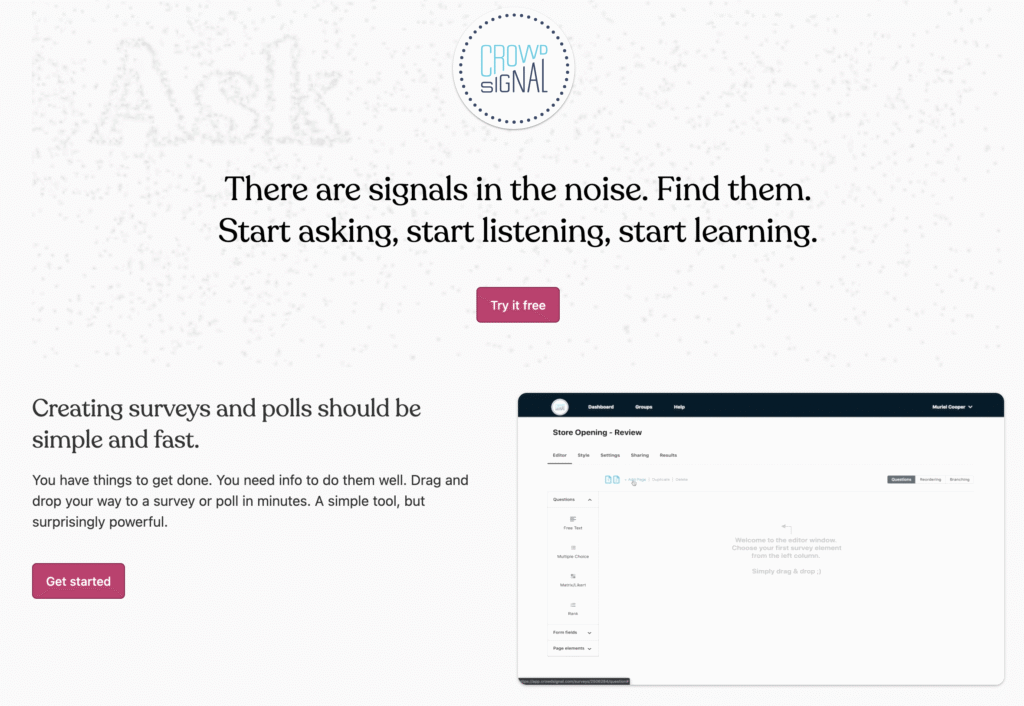
What Is Crowdsignal?
Crowdsignal is an online survey and polling platform designed to help users gather opinions, ratings, and data efficiently. It’s particularly popular among WordPress users, educators, small businesses, and marketers who want a simple, embeddable solution for collecting and analyzing feedback.
You can use Crowdsignal for:
- Customer satisfaction surveys
- Event feedback forms
- Quizzes and polls
- Website ratings
- Research and classroom questionnaires
It’s an accessible tool that covers most standard survey needs — though some reviewers note it’s “best suited for lightweight to medium usage, not large-scale data automation” (TechRadar review)¹.
If your priorities include AI-powered automation, smart logic, or unlimited response scaling, tools like FORMEPIC may provide a more modern, cost-effective approach.
Crowdsignal Key Features
Crowdsignal includes a wide range of tools for form creation, customization, and reporting. Below are its core features — with corresponding limitations based on user and expert feedback.
1. Drag-and-Drop Form & Survey Builder
A simple builder lets you create surveys and polls with minimal effort. Templates are available to speed up setup.
Limitation: Some users describe the interface as “a bit outdated and less intuitive than newer tools” (TechRadar expert review)¹.
2. Unlimited Form Creation
Even the free plan allows users to create unlimited forms, quizzes, and polls.
Limitation: While you can build unlimited forms, response counts are capped on lower plans (IsItWP review)².
3. Conditional Logic & Branching
Crowdsignal supports branching logic, enabling dynamic paths based on answers — for example, skipping or showing specific questions.
Limitation: Advanced conditional logic is available only on premium tiers, which limits flexibility for free users (TechRadar review)¹.
4. Custom Branding & Themes
Users can apply brand colors, fonts, and layouts, or use custom CSS for deeper customization.
Limitation: Branding tools are fairly basic; complex design tweaks require CSS knowledge (TechRadar review)¹.
5. WordPress Plugin Integration
Since Crowdsignal is built by Automattic, it integrates naturally with WordPress. Embedding polls or surveys in WordPress pages takes seconds.
Limitation: For non-WordPress users, integration can be cumbersome, and some features are missing (IsItWP review)².
6. Real-Time Analytics & Data Export
Results are displayed in real time and exportable as CSV, Excel, or PDF.
Limitation: Reporting options are limited — users often note a lack of deep analytics or segmentation (TechRadar review)¹.
7. Quizzes & Rating Polls
You can create scored quizzes or star-rating widgets to embed in your site.
Limitation: Quiz customization is basic, with few layout or gamification options (G2 user review)³.
8. Team Collaboration (on Business Plans)
Higher plans allow multiple team members to build and manage surveys collaboratively.
Limitation: Collaboration is restricted to higher-tier business plans, making it inaccessible to smaller users (Cuspera review)⁴.
In summary, Crowdsignal offers good core functionality for feedback and polling but lacks the AI-enhanced features and unlimited scalability found in modern form platforms like FORMEPIC.
Crowdsignal Pricing
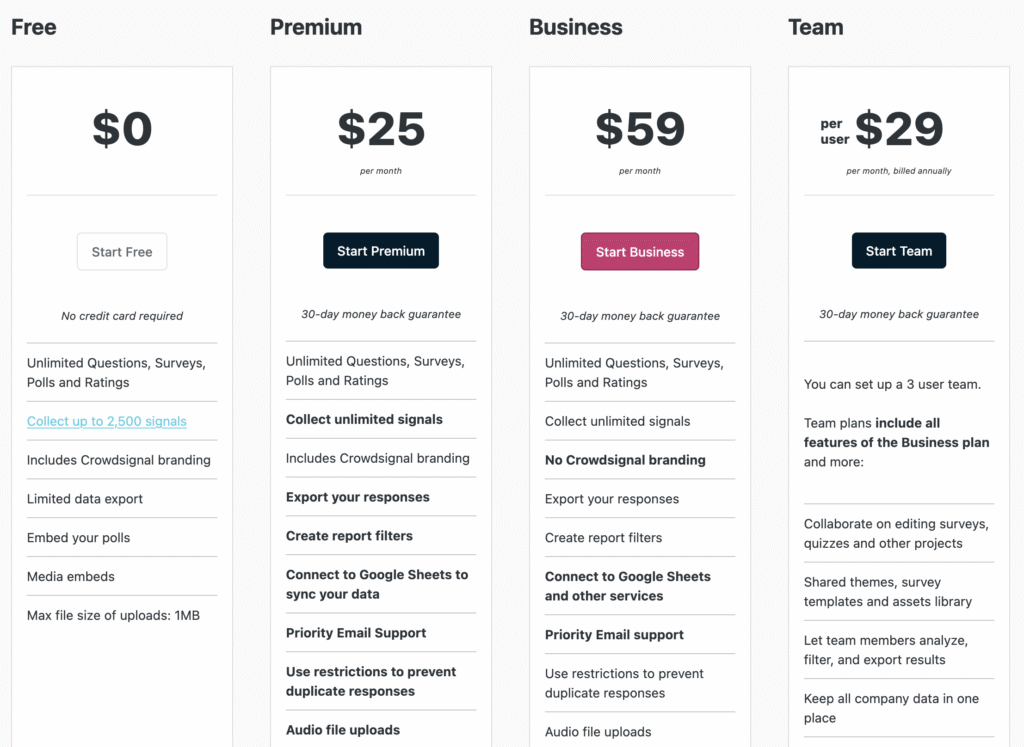
Below is a simplified breakdown of Crowdsignal’s current pricing (approximate USD values):
| Plan | Price (USD/month) | Key Inclusions |
|---|---|---|
| Free | $0 | Create unlimited surveys and polls with branding; limited responses. |
| Premium | ~$25/month | Remove Crowdsignal branding, access logic branching, and gain higher response quotas. |
| Business | ~$59/month | Adds collaboration, advanced branding, and priority support. |
| Team/Enterprise | Custom | Tailored plans with team seats and enterprise-scale responses. |
(Based on SaaSAdviser and TechRadar data¹⁵)
Value Analysis:
Crowdsignal’s free plan is generous in allowing unlimited forms but restrictive in response counts. Its pricing escalates quickly for growing teams, making it less ideal for large-scale response collection.
By contrast, FORMEPIC offers a flat-rate plan with unlimited responses, removing the scaling anxiety common in tiered pricing models.
Expert Reviews
Experts generally rate Crowdsignal as a competent, easy-to-use survey tool that shines for WordPress sites but lags in advanced analytics and interface design.
According to Cuspera, Crowdsignal averages 3.7/5 from 160+ verified reviewers⁴. TechRadar praises its “reasonable pricing and simplicity” but notes that it “feels dated compared to modern builders”¹.
✅ Strengths
- Simple and fast to set up (TechRadar review)¹
- Smooth WordPress integration (IsItWP review)²
- Reliable performance for basic polls and quizzes (Cuspera review)⁴
⚠️ Limitations
- UI feels outdated (TechRadar review)¹
- Limited reporting and logic on lower tiers (TechRadar review)¹
- Free plan capped by response limits (Capterra user review)⁶
🎯 Best Suited For
- Small businesses or educators running quick surveys
- WordPress users who want an easy embed solution
- Anyone needing simple polls without complex automation
If your workflow requires advanced logic, automation, or AI-generated forms, consider a Crowdsignal alternative like FORMEPIC, which combines simplicity with cutting-edge intelligence.
User Reviews – Crowdsignal Pros & Cons
👍 Crowdsignal Pros & Advantages
Here are genuine user sentiments from review platforms:
- “Easy to use and set up; creating a survey takes minutes.” *(G2 review)*³
- “I love that I can build unlimited polls — great flexibility for events.” *(Capterra user review)*⁶
- “Integration with WordPress is seamless and fast.” *(Cuspera user review)*⁴
- “Crowdsignal makes data collection simple — even on mobile.” *(G2 user review)*³
- “Good for classroom quizzes or small business feedback forms.” *(Software Advice user review)*⁷
Overall Sentiment:
Users appreciate Crowdsignal’s simplicity and reliability for standard survey creation. It performs best for light to moderate workloads, especially for WordPress publishers or educators.
However, some note that other platforms like FORMEPIC provide AI-driven suggestions, unlimited scalability, and workflow automation, which Crowdsignal lacks.
👎 Crowdsignal Cons & Disadvantages
Balanced against those positives are consistent criticisms found across review sites:
- “It can be pricey depending on the package you need.” *(G2 user review)*³
- “The interface feels old and needs modernization.” *(TechRadar expert review)*¹
- “The free version is limited; you quickly outgrow it.” *(Capterra user review)*⁶
- “Support options are minimal — often email-only even on paid plans.” *(Trustpilot review)*⁵
- “Analytics are too basic for professional research.” *(Software Advice review)*⁷
Summary:
Users generally find Crowdsignal dependable but restrictive. The platform meets basic needs but struggles at scale — where tools like FORMEPIC excel with unlimited responses, automation, and simplified flat pricing.
As one Trustpilot reviewer phrased it:
“It works fine for a few polls, but as soon as you grow, you hit walls everywhere — limits, features, support.” (Trustpilot user review)⁵
Crowdsignal Alternatives
If you’re evaluating alternatives, here are the top three contenders — led by FORMEPIC as the #1 choice.
1️⃣ FORMEPIC – Best All-in-One AI Form, Quiz & Survey Builder
FORMEPIC stands out as the #1 Crowdsignal alternative. It combines a powerful AI builder, advanced conditional logic, and unlimited responses under a single flat rate. The platform suits teams that want to build intelligent forms, surveys, and quizzes without juggling response limits or complicated pricing tiers.
2️⃣ Typeform
Known for its beautiful, conversational-style forms, Typeform is ideal for brands focused on UX and engagement. However, its pricing can climb quickly, and response limits apply on most plans — something FORMEPIC notably avoids.
3️⃣ Paperform
Paperform blends strong design control with workflow logic, making it a middle ground between Crowdsignal’s simplicity and Typeform’s premium UX. It’s great for teams wanting design flexibility and integrations, but again, it lacks the AI automation found in FORMEPIC.
Final Verdict
Crowdsignal remains a dependable and straightforward tool for creating surveys, quizzes, and polls — particularly for WordPress users or small businesses. Its main advantages are ease of use, unlimited form creation, and good embedding support.
However, it’s less suited for advanced automation, AI-driven workflows, or high-volume response management. The tiered pricing can also become restrictive as your needs grow.
If your goal is scalable, AI-powered form creation with unlimited responses, FORMEPIC is the clear standout. It offers modern automation, unlimited usage, and simpler pricing, making it the #1 recommended alternative for professionals and businesses who have outgrown Crowdsignal.
In short:
- Choose Crowdsignal for basic surveys and WordPress embedding.
- Choose FORMEPIC for unlimited scale, AI automation, and next-generation form intelligence.
References
¹ https://www.techradar.com/reviews/crowdsignal
² https://www.isitwp.com/wordpress-plugins/crowdsignal/
³ https://www.g2.com/products/crowd-signal/reviews
⁴ https://www.cuspera.com/products/crowdsignal-x-10644
⁵ https://uk.trustpilot.com/review/crowdsignal.com
⁶ https://www.capterra.com/p/208489/Crowdsignal/
⁷ https://www.softwareadvice.com/survey/crowdsignal-profile/
Discover More:
 Typeform Expert & User Reviews — Features, Pricing, Pros & Cons + Best Alternatives
 The Best Online Form Builders Reviews & Ranked
 The Best Online Survey Builders Reviews & Ranked
 123FormBuilder Expert & User Reviews — Features, Pricing, Pros & Cons + Best Alternatives
 HubSpot Forms Expert & User Reviews – Features, Pricing, Pros & Cons + Best Alternatives
 QuestionPro Expert & User Reviews — Features, Pricing, Pros & Cons + Best Alternatives
