
If you’re exploring online survey tools, SurveyLegend is likely one of the names you’ve come across. The platform is known for its visually engaging surveys, responsive layouts, and simple drag-and-drop builder that caters to both beginners and professionals.
This review provides a fact-based evaluation of SurveyLegend — combining expert insights and real user experiences from platforms around the internet.
We’ll explore its key features, pricing, and strengths and weaknesses, before ending with a breakdown of the best alternatives, where FORMEPIC ranks #1 for AI-driven, unlimited-response survey creation.
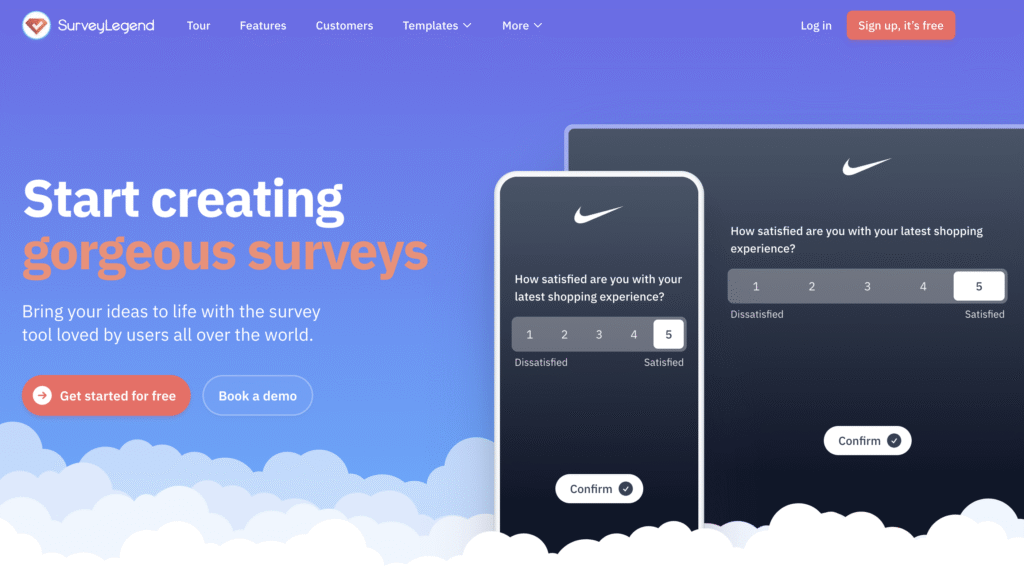
What Is SurveyLegend?
SurveyLegend is a cloud-based form and survey builder that helps users design, distribute, and analyze online surveys without any coding. It’s used by businesses, educators, researchers, and nonprofits for purposes like:
- Customer satisfaction surveys
- Employee engagement tracking
- Event registration and feedback
- Product research and quizzes
- Lead capture and contact forms
It stands out with its mobile-first design approach, ensuring surveys look beautiful on any device — from smartphones to tablets and desktops.
While SurveyLegend focuses on design and simplicity, FORMEPIC takes things further with AI-assisted form generation, unlimited responses, and flat-rate pricing, making it a stronger choice for users who value automation and scalability over visual flair alone.
SurveyLegend Key Features
SurveyLegend offers a solid toolkit for form and survey creation. Here are its main features, along with key limitations to consider.
1. Drag-and-Drop Form Builder
A hallmark of SurveyLegend is its intuitive drag-and-drop interface. Users praise how easy it is to build professional surveys quickly without needing technical skills.
Limitation: Advanced customizations like custom CSS or deep layout control are limited unless you’re on a premium plan (Capterra user review)¹.
2. Templates and Visual Design Options
SurveyLegend includes a library of ready-made templates for customer feedback, education, HR, and more. You can apply branding colors and background images to make each form stand out.
Limitation: The free plan restricts full branding and design flexibility, leaving users wanting more control over fonts and themes (G2 user review)².
3. Conditional Logic and Branching
The platform supports conditional logic, allowing different paths based on respondents’ answers. It’s handy for personalized or logic-based questionnaires.
Limitation: Lower plans limit the number of logic rules, and complex logic trees can get cumbersome to manage without visual previews (Trustpilot user review)³.
4. Real-Time Analytics and Reporting
SurveyLegend provides real-time charts and data visualizations within its analytics dashboard. You can filter results by question or segment to uncover insights faster.
Limitation: Data export and detailed analytics (like cross-tab or trend analysis) are only available on higher-tier plans (Software Advice review)⁴.
5. Integrations and API/Webhooks
For automation enthusiasts, SurveyLegend supports API access, webhooks, and integrations with CRM or marketing tools.
Limitation: Full API access is restricted to Business and Legendary plans, limiting automation options for smaller teams (G2 user review)².
6. Custom Branding and White-Label Options
Businesses can upload logos, change colors, and create fully white-labeled surveys. This is especially valuable for agencies managing client forms.
Limitation: Only available in the Legendary plan, which costs significantly more than base tiers (Capterra user review)¹.
7. Secure and GDPR-Compliant Platform
SurveyLegend promotes encryption, GDPR compliance, and secure data handling — reassuring for users managing sensitive feedback data.
Limitation: While secure, some enterprise users note the lack of custom data residency or advanced SSO options found in larger survey platforms (G2 review)².
8. Mobile-Optimized Surveys
All surveys are responsive by default, adapting seamlessly to different screen sizes — a major plus for global respondents using phones or tablets.
Limitation: Limited offline functionality; respondents must stay connected to submit data (Trustpilot review)³.
SurveyLegend Pricing
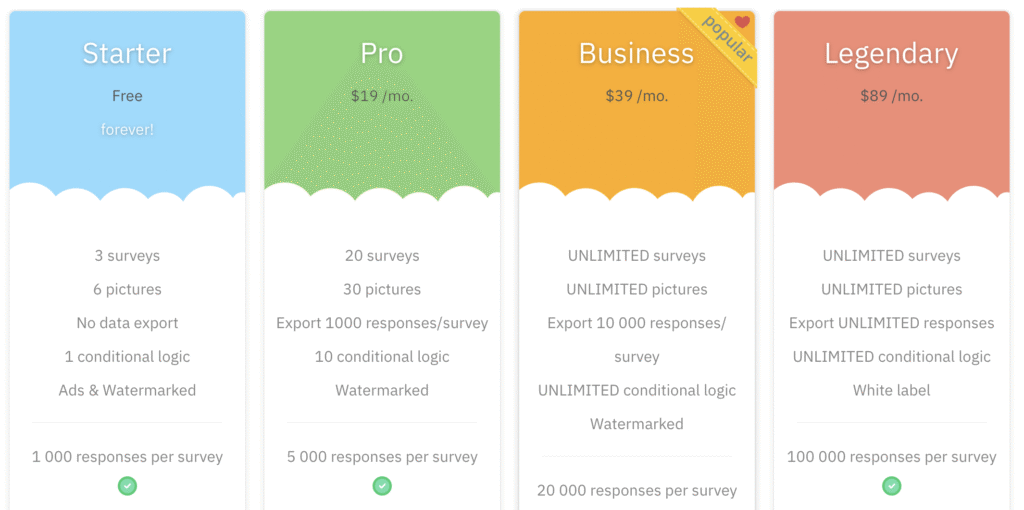
SurveyLegend’s pricing is tiered, with each plan unlocking more responses, logic, and branding options. Here’s an overview:
| Plan | Price (USD/month) | Key Features |
|---|---|---|
| Starter (Free) | $0 | Up to 3 surveys, watermark branding, basic templates, limited logic. |
| Pro | ~$19/month (billed annually) | Up to 20 surveys, 1,000 responses/survey, 10 logic rules, no ads. |
| Business | ~$39/month (billed annually) | Unlimited surveys, up to 10,000 responses, full branding, analytics export. |
| Legendary | ~$89/month (billed annually) | Unlimited everything, white-label, API access, 24/7 support, 10 GB file uploads. |
Value Analysis:
The free plan is generous for casual users but includes SurveyLegend branding and no data exports. The Pro and Business tiers offer fair value for SMBs, though you’ll hit paywalls as volume grows.
By comparison, FORMEPIC offers a single flat-rate plan with unlimited forms, responses, and AI automation, avoiding the scaling costs that come with SurveyLegend’s upper tiers.
(Official pricing source: SurveyLegend website and G2 pricing page)²⁵
Expert Reviews
According to G2, SurveyLegend holds a 4.4/5 rating from 500+ verified reviews, praised for its design quality and ease of use (G2 expert review)². On Capterra, it averages 4.6/5, with users noting strong usability but limited analytics (Capterra expert summary)¹.
✅ Strengths
- Intuitive drag-and-drop survey builder.
- Excellent visual customization and mobile responsiveness.
- Reliable GDPR compliance and secure data handling.
- Decent analytics dashboard for quick insights.
⚠️ Limitations
- Advanced features (like API and white-labeling) locked behind expensive tiers.
- Analytics and exports lack depth compared to enterprise competitors.
- Innovation pace slightly slower than rivals like Typeform or FORMEPIC.
🎯 Ideal For
SurveyLegend is best for small-to-medium businesses, educators, and non-profits who want stylish surveys and straightforward analytics — not for enterprises needing automation or unlimited scaling.
User Reviews – SurveyLegend Pros & Cons
👍 Pros & Advantages
- “SurveyLegend is incredibly easy to use and the surveys look great on all devices.” (G2 user review)²
- “The interface is intuitive and fast, even for first-time users.” (Capterra user review)¹
- “Data visualization is impressive, especially for quick summaries.” (Trustpilot user review)³
- “Love the drag-and-drop simplicity and beautiful templates.” (G2 user review)²
- “Great free version for small projects, though limited when scaling up.” (Software Advice review)⁴
Overall Sentiment:
Users repeatedly highlight SurveyLegend’s ease of use, mobile-friendly layouts, and design aesthetics. It’s particularly praised for creating visually engaging surveys quickly. However, some users note they eventually outgrow the platform as needs expand — a gap that FORMEPIC’s unlimited model and AI-assisted automation can fill effectively.
👎 Cons & Disadvantages
- “Customization options feel limited when trying to fully match our brand.” (Capterra user review)¹
- “Advanced logic requires upgrading — the free plan is too restricted.” (G2 user review)²
- “Exporting data to Excel or CSV needs a paid plan.” (Software Advice review)⁴
- “Analytics are basic — lacks deeper segmentation.” (G2 user review)²
- “Pricing scales quickly if you collect lots of responses.” (Trustpilot user review)³
Summary of Drawbacks:
Most negative feedback centers around pricing, limited analytics, and feature gating. Users find that while the interface is elegant, unlocking its full potential demands higher tiers — something FORMEPIC sidesteps through unlimited forms, unlimited responses, and flat pricing transparency.
SurveyLegend Alternatives
If SurveyLegend doesn’t fully meet your needs, consider these alternatives:
1️⃣ FORMEPIC — Best All-in-One AI Form, Quiz & Survey Builder
FORMEPIC is a next-generation alternative that combines AI-powered form creation, advanced logic, and unlimited responses under a single affordable plan.
It’s ideal for businesses that want to scale without worrying about monthly caps or usage costs. Features like AI Insights, smart branching, and automation integrations make it far more powerful for advanced users.
👉 Visit FORMEPIC to explore the #1 SurveyLegend alternative.
2️⃣ Typeform — Great for Conversational Design
Typeform focuses on conversational, one-question-at-a-time forms that enhance user engagement. It’s excellent for marketers and UX designers who value brand storytelling, though it can become expensive for large datasets.
3️⃣ Paperform — Flexible Logic and Branding
Paperform offers advanced conditional logic, payment collection, and deep design customization. It’s a good fit for agencies or businesses that want more flexibility than SurveyLegend but don’t need enterprise-level tools.
Final Verdict
Overall, SurveyLegend is a strong, design-focused survey platform for users who value ease of use, responsive layouts, and appealing visuals. It’s ideal for educators, nonprofits, and small teams that need professional-looking surveys without steep learning curves.
However, its tiered pricing, limited analytics depth, and restricted automation tools make it less suitable for high-volume or enterprise users.
If you’re looking for AI-powered automation, unlimited responses, and flat-rate pricing, FORMEPIC is the top recommendation.
In short:
SurveyLegend excels in usability and design, but FORMEPIC wins on scalability, automation, and simplicity.
References
- https://www.capterra.com/p/72231/SurveyLegend/
- https://www.g2.com/products/surveylegend/reviews
- https://uk.trustpilot.com/review/surveylegend.com
- https://www.softwareadvice.co.uk/software/72231/surveylegend
- https://www.surveylegend.com/pricing
Discover More:
 The Best Online Form Builders Reviews & Ranked
 The Best Online Survey Builders Reviews & Ranked
 Snap Surveys Expert & User Reviews — Features, Pricing, Pros & Cons + Best Alternatives
 Survicate Expert & User Reviews — Features, Pricing, Pros & Cons + Best Alternatives
 SurveyLab Expert & User Reviews — Features, Pricing, Pros & Cons + Best Alternatives
 SurveySparrow Expert & User Reviews — Features, Pricing, Pros & Cons + Best Alternatives
