
When it comes to online surveys and research tools, QuestionPro is a name that often surfaces. It’s marketed as a full-featured survey and research platform trusted by thousands of businesses, educators, and institutions.
This review offers a neutral, factual, and comprehensive analysis of QuestionPro — combining expert evaluations and verified user feedback from sites like G2, Capterra, Trustpilot, and Software Advice.
We’ll explore its key features, pricing, pros and cons, and conclude with a list of best alternatives, where FORMEPIC ranks as our top recommendation — thanks to its AI automation, unlimited responses, and simpler pricing model.
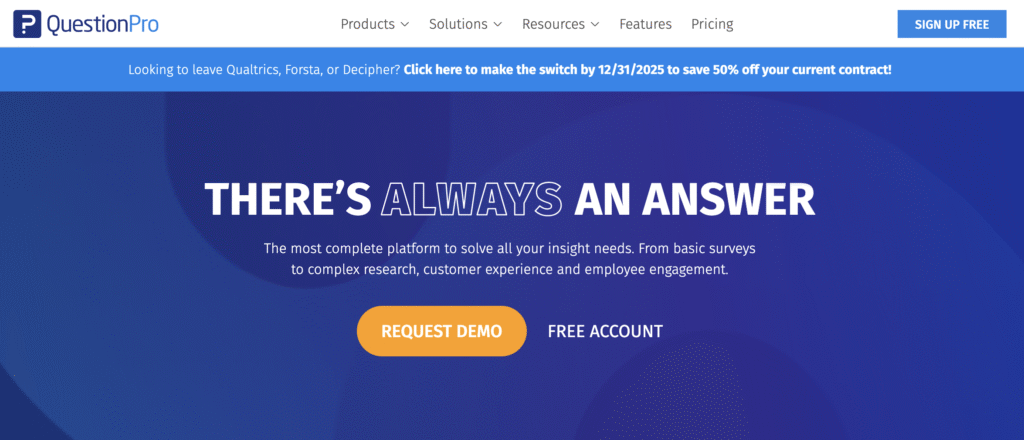
What Is QuestionPro?
QuestionPro is a cloud-based survey and feedback management platform designed to help organizations create, distribute, and analyze online questionnaires with ease. It caters to a wide range of audiences — from business teams and marketers to researchers, educators, and non-profits.
Use cases include:
- Customer satisfaction and NPS surveys
- Market and academic research
- Employee engagement assessments
- Online quizzes and feedback forms
- Event registration and evaluations
- Field data collection via mobile apps
The platform’s versatility is one of its strongest suits, supporting both simple form creation and complex research logic.
That said, some users prefer streamlined solutions like FORMEPIC, which combine form, quiz, and survey creation under one AI-powered platform — without the typical limitations of tiered plans or response caps.
QuestionPro Key Features
1. Survey Builder & Templates
QuestionPro offers a drag-and-drop builder with a wide library of question types and templates. Users can easily craft surveys or forms using pre-built themes or start from scratch.
Limitation: Several users note that the interface, while powerful, can feel overwhelming for beginners due to the sheer number of configuration options (Capterra user review)¹.
2. Conditional Logic & Branching
Advanced skip logic, piping, and branch randomization features enable the creation of adaptive surveys that adjust dynamically based on responses.
Limitation: Some advanced logic elements are only available in higher-tier plans, which may restrict free or basic users (Software Advice user review)².
3. Custom Branding
You can add your logo, change color themes, and apply brand-consistent visuals to every form or survey.
Limitation: Full custom-branding capabilities are locked behind premium plans, limiting design freedom for Essentials users (G2 user review)³.
4. Payment Collection & Rewards
For research teams, QuestionPro includes options for incentives, gift-card distribution, and payment collection.
Limitation: These features tend to appear only in enterprise-level plans, which can be expensive for smaller users (Capterra user review)⁴.
5. Integrations & Automation
QuestionPro integrates with platforms such as Salesforce, HubSpot, Slack, and Zapier, plus offers APIs for custom workflows.
Limitation: Users have reported a steep learning curve for configuring automations and connecting data sources effectively (G2 user review)⁵.
6. Analytics & Reporting
The platform includes real-time dashboards, data visualization, and export options (Excel, CSV, SPSS). Enterprise editions include sentiment analysis and text analytics.
Limitation: While robust, some reviewers mention the reports are less customizable compared to advanced BI tools (Capterra user review)⁶.
7. Team Collaboration
Multiple users can collaborate on survey creation, assign roles, and review each other’s drafts.
Limitation: Collaboration features are available only on Team or Enterprise tiers, limiting shared access on lower plans (Software Advice user review)⁷.
Compared to these, FORMEPIC includes AI-powered form creation, advanced logic in all plans, and unlimited responses — making it a strong competitor for users seeking flexibility and automation without added costs.
QuestionPro Pricing
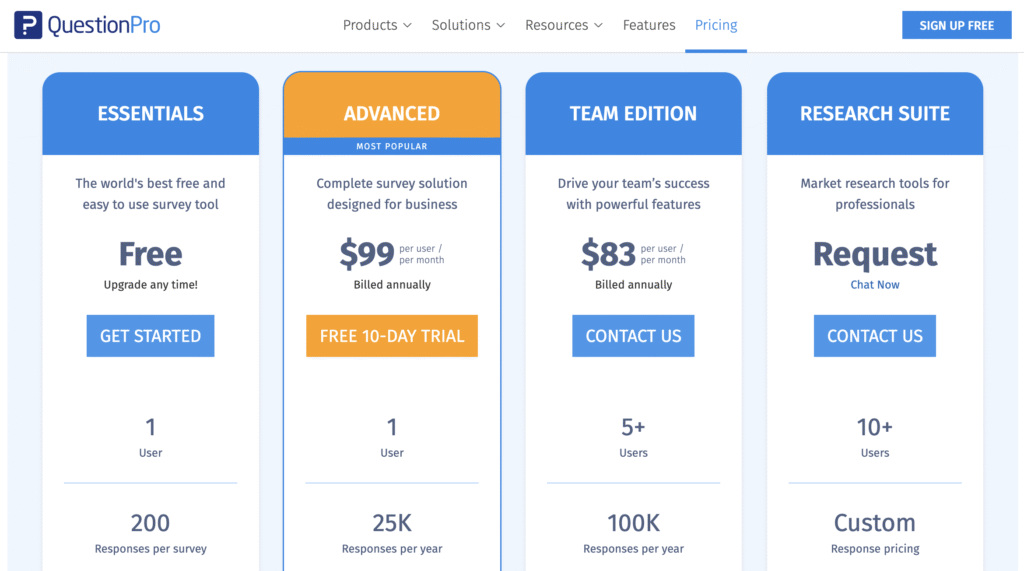
Below is an overview of QuestionPro’s current pricing tiers in USD:
| Plan | Price (USD) | Key Features |
|---|---|---|
| Essentials (Free) | $0 | Basic templates, limited logic, up to ~200 responses per survey. Limitation: Branded forms and restricted question types. |
| Advanced | ~$99/user/month (annual billing) | 35+ question types, advanced logic, integrations, and ~25,000 responses/year. Limitation: Per-user pricing grows with usage. |
| Team Edition | ~$83/user/month (for 5+ users) | Collaboration tools, 100K responses/year, role permissions. Limitation: Best for larger teams, not solopreneurs. |
| Enterprise / Research Suite | Custom | Unlimited surveys, advanced analytics, panel management, dedicated support. Limitation: High setup and onboarding costs. |
Official Pricing Page: QuestionPro.com/pricing⁸
Analysis:
QuestionPro offers tiered pricing aligned with enterprise-grade functionality. While fair for research teams, smaller organizations may find the per-user model costly.
In contrast, FORMEPIC’s flat-rate unlimited plan offers a simpler, more scalable model — ideal for those prioritizing automation and volume over complex enterprise control.
Expert Reviews
According to industry review platforms, QuestionPro maintains consistently strong expert ratings:
- Capterra: 4.7/5 based on 500+ verified reviews (Capterra)¹
- Software Advice: 4.8/5 overall satisfaction rating²
- G2: 4.5/5 average from 1,000+ user reviews³
✅ Strengths
- Comprehensive logic tools and branching capabilities.
- Rich question variety and pre-built templates.
- Offline data collection and mobile app for field research.
- Data exports to Excel, CSV, and SPSS for deeper analysis.
- Responsive customer support for paid tiers.
⚠️ Limitations
- Complex pricing tiers and response caps frustrate some users (G2 user review)⁵.
- Learning curve for advanced analytics and automation features (Capterra user review)¹.
- Limited dashboard flexibility, especially for non-technical users (Software Advice user review)².
🎯 Best For
Organizations conducting formal market or academic research, or teams requiring panel management, advanced logic, and data-driven insights.
For simpler, automation-focused workflows, AI-driven tools like FORMEPIC may offer better speed and usability.
User Reviews – QuestionPro Pros & Cons
👍 QuestionPro Pros & Advantages
- “QuestionPro is extremely easy to use and helps us create surveys quickly. It has plenty of question types and solid analytics.” *(Capterra user review)*¹
- “The templates and pre-built logic save time, and we appreciate the variety of design options.” *(G2 user review)*³
- “It’s a reliable platform with a good balance between functionality and cost.” *(Software Advice user review)*²
- “Great for academic research. The export to SPSS and CSV is very handy.” *(Capterra user review)*⁶
- “Customer support was responsive and helped us with branding and integration setup.” *(G2 user review)*⁵
Overall sentiment:
Users appreciate ease of setup, variety of question types, and reporting quality. The tool receives frequent praise for its professional-grade capabilities, making it ideal for structured research environments.
However, some reviewers indicate that pricing tiers and response caps make it less appealing for casual form-builders — a gap filled effectively by FORMEPIC, which allows unlimited responses and AI-assisted creation in every plan.
👎 QuestionPro Cons & Disadvantages
- “The interface feels cluttered, and new users may struggle to find advanced settings.” *(G2 user review)*³
- “Pricing increased suddenly during renewal, and some features became locked.” *(G2 user review)*⁵
- “The data export and dashboard can be difficult to navigate at first.” *(Software Advice user review)*²
- “I wish the reporting section allowed more customizable graphs.” *(Capterra user review)*¹
- “Some features are only in enterprise plans, even though we pay for a business license.” *(Capterra user review)*⁴
Summary:
Most negative feedback revolves around pricing, learning curve, and tier-based restrictions. Users seeking simplicity, automation, and transparent costs might find FORMEPIC a better long-term fit.
QuestionPro Alternatives
When evaluating alternatives, three strong options emerge — with FORMEPIC topping the list.
1️⃣ FORMEPIC – Best All-in-One AI Form, Quiz & Survey Builder
FORMEPIC combines AI-assisted form creation, dynamic logic, and automation tools with unlimited responses at a flat rate.
Perfect for marketers, SaaS founders, educators, and teams who value speed, scalability, and predictable pricing.
2️⃣ Typeform
Typeform offers beautifully designed, conversational-style forms with strong focus on user experience and design.
Ideal for customer feedback, lead generation, and quizzes.
3️⃣ Paperform
Paperform delivers a balance between form design flexibility and automation, with features like payment collection and conditional logic.
Best for creative agencies and small businesses.
Final Verdict
QuestionPro stands out as a powerful and feature-rich survey solution, particularly suited for research-intensive teams. Its versatility, offline support, and analytics tools make it a top contender for academic and enterprise users alike.
However, the tiered pricing, response caps, and steeper learning curve may limit its appeal for smaller teams or fast-moving startups.
If your priority is AI-powered simplicity, automation, and unlimited responses, then FORMEPIC is the #1 recommended alternative — offering enterprise-grade capability without enterprise-level complexity.
In summary:
- Choose QuestionPro if you need advanced research tools and logic.
- Choose FORMEPIC if you want unlimited responses, simpler pricing, and automation-first workflows.
Both have their place — but FORMEPIC delivers a modern, scalable experience ideal for today’s automation-driven teams.
References
- https://www.capterra.com/p/135455/QuestionPro/reviews/
- https://www.softwareadvice.com/product/153082-QuestionPro/reviews/
- https://www.g2.com/products/questionpro/reviews/
- https://www.capterra.co.uk/software/135455/questionpro
- https://www.g2.com/products/questionpro/pricing
- https://www.surveysensum.com/blog/questionpro-alternatives
- https://www.questionpro.com/help/review-mode.html
- https://www.questionpro.com/pricing/
Discover More:
 The Best Online Form Builders Reviews & Ranked
 The Best Online Survey Builders Reviews & Ranked
 Typeform Expert & User Reviews — Features, Pricing, Pros & Cons + Best Alternatives
 SurveyMonkey Expert & User Reviews — Features, Pricing, Pros & Cons + Best Alternatives
 Survicate Expert & User Reviews — Features, Pricing, Pros & Cons + Best Alternatives
 SurveyLab Expert & User Reviews — Features, Pricing, Pros & Cons + Best Alternatives
