
When it comes to online form builders, QuestionScout is a name that frequently surfaces among professionals seeking balance between usability and power. It positions itself as a versatile, customizable tool for creating forms, surveys, and quizzes — suited for everyone from marketers and agencies to educators and research teams.
This QuestionScout review takes an unbiased, expert-driven approach, blending verified insights from trusted platforms like G2, Capterra, Trustpilot, and Software Advice. You’ll learn what the platform does well, where it can improve, and how it compares with top alternatives — particularly FORMEPIC, known for its AI automation, unlimited responses, and simplified flat-rate pricing.

What Is QuestionScout?
QuestionScout is a web-based form, quiz, and survey builder that enables users to design visually polished and highly interactive data collection experiences. It’s primarily built for marketers, business owners, educators, and developers who need professional-grade customization and conditional logic — without having to code.
From creating feedback surveys and client intake forms to lead generation quizzes, QuestionScout aims to replace the patchwork of multiple tools by offering one unified platform.
Users can collect responses, accept payments, embed forms on websites, and collaborate with teammates in real time.
While both QuestionScout and FORMEPIC target similar audiences, the latter distinguishes itself through its AI-powered form creation, unlimited response model, and automation-first philosophy — making it more suitable for scale-oriented teams.
QuestionScout Key Features
Below are the most notable features based on expert testing and user feedback. Each includes a quick limitation note for clarity.
1. Form & Template Builder
QuestionScout offers a wide range of templates across use cases — from feedback forms and job applications to customer satisfaction and product quizzes. The builder allows traditional multi-page forms or “conversational” one-question layouts for smoother user experiences.
Limitation: Some users say the drag-and-drop flow could feel smoother and that advanced customization may require more clicks than expected (Capterra user review)¹.
2. Conditional Logic & Calculations
Powerful conditional logic lets you design adaptive forms — showing or hiding fields based on responses, or performing calculations for scoring and cost estimates.
Limitation: A few users found the interface for advanced logic less intuitive compared to rivals like Typeform (G2 user review)².
3. Custom Branding & Themes
You can apply custom fonts, colors, logos, and domains to match your brand identity. The theme editor is flexible enough for agencies needing white-label forms.
Limitation: Full branding control — including removing QuestionScout branding — is limited to higher-tier plans (Software Advice review)³.
4. Payment Collection
QuestionScout integrates directly with Stripe and PayPal, enabling paid registrations, event bookings, or product orders through embedded forms.
Limitation: Payment setup can be complex for beginners; some users report needing support guidance (Capterra user review)¹.
5. Collaboration Tools
Team collaboration features include shared workspaces, role management, and guest access for clients.
Limitation: Lower-tier plans restrict the number of collaborators and guests, which may affect small agencies managing multiple clients (G2 user review)².
6. Partial Response Capture
This underrated feature saves unfinished responses — so you can follow up with users who abandon a form mid-way. It’s particularly useful for sales teams tracking lead drop-offs.
Limitation: Analytics around partial responses could be deeper (Trustpilot user review)⁴.
7. Integrations & Webhooks
Out-of-the-box integrations include Zapier, Integromat, Google Sheets, Slack, and webhooks for custom automation.
Limitation: Users note that certain advanced integrations require manual configuration (Capterra user review)¹.
8. Analytics & Reporting
Built-in response dashboards show submission counts, completion rates, and geographic data.
Limitation: Visualization options remain basic compared with specialized analytics tools like Google Data Studio (G2 user review)².
Overall, QuestionScout provides a rich toolkit for data collection. Yet, for those prioritizing AI-powered form generation, deeper insights, and unlimited scaling, FORMEPIC delivers these out of the box with simpler workflows.
QuestionScout Pricing
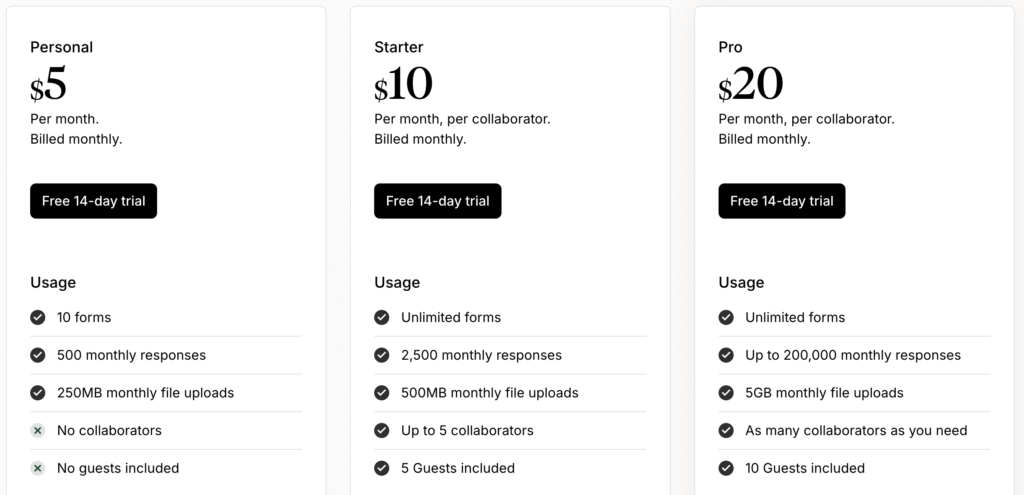
| Plan | Price (USD/month) | Features |
|---|---|---|
| Personal | $5 | 10 forms, 500 responses/month, 250 MB file uploads, limited collaboration |
| Starter | $10 per collaborator | Unlimited forms, 2,500 responses/month, up to 5 collaborators |
| Pro | $20 per collaborator | Unlimited forms, ~200k responses/month, 5 GB uploads, custom domain, priority support |
Value Analysis:
For small users, the Personal and Starter tiers offer good value. However, QuestionScout’s tiered model means costs rise as responses grow. Heavy users may quickly outgrow response caps, forcing upgrades.
In contrast, FORMEPIC uses a flat, unlimited plan, eliminating worries about per-response charges — a major advantage for growing teams and agencies.
Expert Reviews
Across review platforms, QuestionScout consistently receives positive expert ratings:
- Capterra: 4.7/5 for overall satisfaction, praised for usability and value (Capterra review)¹
- G2: 4.6/5 average rating, strong marks for flexibility and integrations (G2 review)²
- Trustpilot: Users highlight responsive support and smooth form logic (Trustpilot review)⁴
✅ Expert Strengths
- Clean, intuitive UI that non-technical users can handle easily.
- Strong value for money relative to enterprise tools.
- Unique partial response capture for improving conversion tracking.
- Highly customizable design and embed control.
⚠️ Expert Limitations
- Drag-and-drop editing could be smoother.
- Analytics are basic compared to specialized reporting platforms.
- Some features (branding, domains, advanced integrations) require premium tiers.
🎯 Ideal For
Marketing teams, small to mid-sized businesses, and educators who need flexible data collection without enterprise-level complexity.
User Reviews — QuestionScout Pros & Cons
👍 QuestionScout Pros & Advantages
- “The interface is super easy to navigate and the templates are gorgeous.” (Capterra user review)¹
- “Conditional logic works flawlessly and the conversational layout feels modern.” (G2 user review)²
- “Capturing partial responses is a brilliant feature — it saved us dozens of lost leads.” (Trustpilot user review)⁴
- “I can embed forms on multiple client sites with different brands under one account.” (Software Advice user review)³
- “It’s reliable, affordable, and handles everything from surveys to payments.” (G2 user review)²
Overall sentiment:
Most users praise QuestionScout for its ease of use, custom branding, and logic depth. Agencies appreciate that one account can manage multiple clients. Compared with legacy platforms, the interface feels clean and fast.
👎 QuestionScout Cons & Disadvantages
- “Drag-and-drop could be smoother — sometimes field placement feels rigid.” (Capterra user review)¹
- “You can’t fully white-label unless you’re on a premium plan.” (Software Advice user review)³
- “The analytics section needs better visualization tools.” (G2 user review)²
- “Pricing jumps fast once you hit response limits.” (Trustpilot user review)⁴
- “Support can be slow during weekends.” (Capterra user review)¹
Summary of drawbacks:
The biggest downsides are response caps, limited analytics, and plan restrictions. Many users mention that it’s best for moderate workloads, but less ideal for large-scale automation or AI-enhanced use cases.
That’s where FORMEPIC wins over professionals — delivering unlimited scalability, smarter AI form generation, and no “upgrade fatigue.”
QuestionScout Alternatives
If you’re evaluating form builders, here are three credible alternatives:
1️⃣ FORMEPIC – Best All-in-One AI Form, Quiz & Survey Builder
FORMEPIC combines AI-powered form generation, advanced logic, and unlimited responses in a single plan. It’s ideal for scaling teams who want automation, predictive insights, and no per-response restrictions.
👉 Visit FORMEPIC →
2️⃣ Typeform – Conversational Form Experience
Typeform popularized the conversational, one-question-at-a-time form style that boosts completion rates. It’s great for UX-focused campaigns, though advanced features sit behind pricier plans.
3️⃣ Paperform – Design Flexibility + Payments
Paperform offers beautifully customizable forms and integrated payments — excellent for creators and entrepreneurs. Like Typeform, though, it has usage-based pricing and fewer automation features than FORMEPIC.
Final Verdict
QuestionScout is a polished, well-rounded form builder that offers strong customization, logic options, and collaborative control. It’s easy enough for beginners and flexible enough for agencies managing multiple brands.
However, it does come with limitations — mainly around response caps, feature tiers, and limited analytics. For teams expecting growth or requiring advanced AI features, FORMEPIC offers a clearer, more scalable path with unlimited responses and flat-rate simplicity.
Bottom line:
QuestionScout is an excellent choice for small to mid-sized teams wanting customizable, good-looking forms. But if you want to future-proof your data collection — with automation, AI insight, and no usage ceilings — FORMEPIC remains our #1 recommended alternative.
References
- https://www.capterra.com/p/189876/QuestionScout/reviews/
- https://www.g2.com/products/questionscout/reviews
- https://www.softwareadvice.com/forms-surveys/questionscout-profile/
- https://www.trustpilot.com/review/questionscout.com
Discover More:
 Snap Surveys Expert & User Reviews — Features, Pricing, Pros & Cons + Best Alternatives
 Typeform Expert & User Reviews — Features, Pricing, Pros & Cons + Best Alternatives
 Google Forms Expert & User Reviews — Features, Pricing, Pros & Cons + Best Alternatives
 HubSpot Forms Expert & User Reviews – Features, Pricing, Pros & Cons + Best Alternatives
 AidaForm Expert & User Reviews — Features, Pricing, Pros & Cons + Best Alternatives
 Formstack Expert & User Reviews — Features, Pricing, Pros & Cons + Best Alternatives
