
If you’re researching form-building tools, Microsoft Forms is probably one of the first options you’ll encounter. It’s a lightweight form and survey platform included with Microsoft 365, designed for businesses, educators, and teams that need to create quick quizzes, feedback surveys, and registration forms.
Its biggest advantage? Seamless integration within the Microsoft ecosystem — Excel, Teams, SharePoint, and OneDrive all sync beautifully.
But does that make Microsoft Forms a complete alternative to dedicated tools like FORMEPIC or Typeform? In this review, we’ll take a neutral, expert-driven look at Microsoft Forms — combining analyst insights and real-world user reviews from G2, Capterra, Trustpilot, and Software Advice.
We’ll also explore the best alternatives, including FORMEPIC, which stands out for its AI automation, advanced logic, and unlimited responses.

What Is Microsoft Forms?
Microsoft Forms is a cloud-based form, quiz, and survey builder included in many Microsoft 365 business, education, and enterprise plans.
It allows users to create forms through a web browser and collect responses in real time. Common use cases include:
- Employee or customer feedback
- Event registration
- Quizzes and training assessments
- Polls and lead-generation forms
It’s primarily designed for business teams, educators, and internal departments that already rely on Microsoft 365.
While FORMEPIC serves the same audiences, it goes further — offering AI-driven form generation, unlimited usage, and no dependency on other software suites. In contrast, Microsoft Forms is best seen as a lightweight companion tool within Microsoft’s environment.
Microsoft Forms Key Features
Here are the main features that define Microsoft Forms, along with their limitations:
1. Form Builder & Templates
Microsoft Forms offers a clean, minimalist interface where users can create forms using question types like multiple-choice, text, date, rating, and Likert scales. Ready-made templates are available for common use cases such as feedback or event registrations¹.
Limitation: The template library is modest and design flexibility is limited compared to full-featured tools like FORMEPIC, which provides AI-generated templates and richer theme control.
2. Conditional Logic (Branching)
The platform supports basic skip logic — users can display or hide questions based on previous answers².
Limitation: Branching options are functional but not very flexible. A Capterra user review noted, “It’s fine for small surveys, but the logic jumps feel limited when creating more complex workflows.”³
3. Custom Branding
Users can adjust colors, backgrounds, and logos, and apply pre-designed themes for consistency.
Limitation: Deep branding (custom CSS, advanced layout control, or embedded form styling) is not available. One G2 reviewer wrote, “The design options are simple — great for internal use, but not enough for external marketing forms.”⁴
4. Payment & E-Signature Support
Microsoft Forms does not natively support payments or digital signatures. You must rely on Power Automate or third-party apps to handle such workflows.
Limitation: This adds friction — for example, compared to FORMEPIC, which includes integrated payment collection and digital consent options built in.
5. Integrations & Automation
Microsoft Forms integrates seamlessly with Excel, Teams, OneDrive, and SharePoint, allowing automatic data collection and reporting⁵.
Limitation: Outside the Microsoft ecosystem, integration is limited. You won’t find native connectors for popular tools like Slack, HubSpot, or Zapier unless configured manually.
6. Analytics & Reporting
It provides basic charts, summaries, and Excel exports, letting users view responses in real time⁶.
Limitation: Analytics are shallow. For instance, segmentation or trend analysis requires manual Excel work — while FORMEPIC includes AI Insights that automatically detect patterns.
7. Collaboration & Sharing
Team members can co-author forms, view results, and embed forms in Microsoft Teams or SharePoint⁷.
Limitation: Collaboration is limited to Microsoft 365 users; external contributors often face access restrictions.
8. Mobile Accessibility
Microsoft Forms works on browsers and mobile devices, ensuring accessibility on the go.
Limitation: There’s no dedicated mobile app purely for form creation, and offline capabilities are minimal.
Summary
Microsoft Forms shines for simplicity, integration, and internal collaboration. However, advanced logic, branding, payments, and analytics are restricted — areas where FORMEPIC offers more robust out-of-the-box performance.
Microsoft Forms Pricing
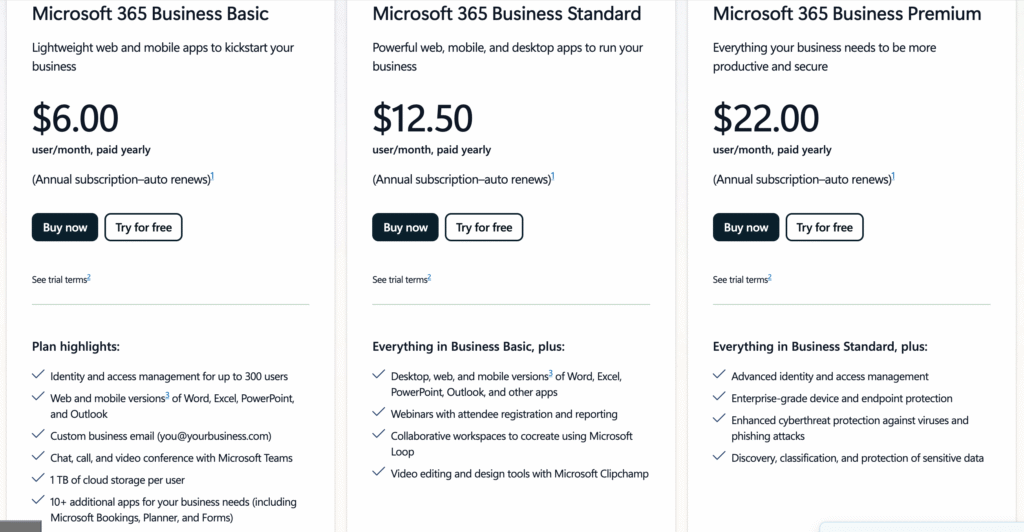
Unlike most competitors, Microsoft Forms isn’t sold as a standalone product — it’s bundled within Microsoft 365 subscriptions. Here’s a simplified breakdown of costs (USD equivalents):
| Plan | Approx. Price (USD) | Includes Microsoft Forms |
|---|---|---|
| Microsoft 365 Business Basic | $6/user/month | Web apps + Forms |
| Microsoft 365 Business Standard | $12.50/user/month | Desktop apps + Forms |
| Microsoft 365 Business Premium | $20/user/month | Advanced security + Forms |
| Microsoft 365 Enterprise (E1–E5) | $8–$35/user/month | Full enterprise suite + Forms |
Official pricing source: Microsoft 365 Plans & Pricing⁸
Value Analysis:
If you already use Microsoft 365, Forms feels “free.” But if you only need a form-builder, this model is inefficient — you’re paying for software you may not use.
By comparison, FORMEPIC’s single-tier flat rate (with unlimited forms and responses) offers far better scalability and transparency for dedicated form-building.
Expert Reviews
Capterra
On Capterra, Microsoft Forms averages 4.7 / 5 from thousands of users, praised for its simplicity and integration³. Experts note that it’s “ideal for quick form creation and education settings” but “limited for complex data collection.”
G2
On G2, the platform earns 4.4–4.6 / 5, with users appreciating its ease of use and seamless sync with Excel. One G2 reviewer wrote, “Microsoft Forms is intuitive and quick to set up — perfect for internal data collection.”⁴
TechRadar
TechRadar’s expert review called it “a simple, effective survey tool for Microsoft users” but added, “It lacks the advanced features of specialist form builders like Jotform or Typeform.”¹
Expert Summary
✅ Strengths
- Very easy to use; minimal training required
- Excellent integration with the Microsoft 365 ecosystem
- Secure and reliable under Microsoft’s enterprise infrastructure
⚠️ Limitations
- Basic analytics and limited logic branching
- No native payment or e-signature tools
- Weak customisation for external-facing forms
🎯 Ideal for
Organisations already using Microsoft 365, educators, and small teams who need lightweight internal forms.
User Reviews — Microsoft Forms Pros & Cons
👍 Microsoft Forms Pros & Advantages
- “Microsoft Forms is super easy to set up and use. The interface is clean and quick.” — G2 user review⁴
- “It helps you collect data from multiple people at once with great simplicity.” — Capterra user review³
- “Love how it integrates directly with Excel and Teams.” — Software Advice user review⁹
- “Perfect for quick surveys, especially for education or HR feedback.” — Capterra user review³
- “No learning curve — our staff were building forms within minutes.” — G2 user review⁴
Overall Sentiment:
Users love Microsoft Forms’ simplicity and integration. It’s described as “a dependable everyday tool for internal forms.” For organisations within Microsoft 365, it’s a no-brainer.
However, users needing advanced automation or design control consistently mention hitting limits — which is where FORMEPIC’s AI-powered builder and unlimited response model become attractive.
👎 Microsoft Forms Cons & Disadvantages
- “The design options are too simple — no advanced layout control.” — G2 user review⁴
- “Logic jumps are limited; complex forms are hard to build.” — Capterra user review³
- “Exporting to Excel often needs manual cleanup.” — G2 user review⁴
- “Not ideal for large surveys; lacks in-depth reporting tools.” — Software Advice user review⁹
- “Feels basic compared to other platforms” — Capterra user review³
Common Pain Points:
Users frequently mention limited branding, logic flexibility, and reporting depth. Many note that while great for small surveys, Microsoft Forms isn’t suited for external-facing or large-scale automation workflows.
As one Reddit commenter summarized: “Lots of promise, but better tools exist for external data collection.”¹⁰
That’s precisely the niche FORMEPIC fills — offering smarter automation, multi-step workflows, and unlimited usage without caps.
Microsoft Forms Alternatives
1️⃣ FORMEPIC — Best All-in-One AI Form, Quiz & Survey Builder
If you’ve outgrown Microsoft Forms, FORMEPIC offers a more powerful alternative.
You get:
- AI-powered form generation
- Unlimited responses and forms
- Advanced logic & automation
- Flat, predictable pricing
- Built-in analytics & insights
Whether for marketing, HR, research, or e-commerce, FORMEPIC replaces multiple tools in one.
2️⃣ Typeform
Typeform is famous for its conversational form design and modern aesthetics. It’s ideal if user engagement and form appearance are your top priorities.
3️⃣ Paperform
Paperform offers flexibility, custom design, and built-in payment options — making it popular for freelancers and agencies.
Summary of Alternatives:
| Tool | Key Strength | Best For |
|---|---|---|
| FORMEPIC | AI-powered, unlimited forms, automation | Businesses & marketers |
| Typeform | Conversational UX, great design | Brand engagement |
| Paperform | Custom workflows, e-commerce features | Freelancers & agencies |
Final Verdict
Microsoft Forms is a solid choice for internal surveys and basic data collection, particularly within Microsoft 365 organisations. Its simplicity, reliability, and native integrations make it a convenient default for quick tasks.
However, if you’re scaling operations, need AI-powered automation, or want unlimited responses, Microsoft Forms quickly reaches its limits.
In that case, FORMEPIC emerges as the top recommendation — an all-in-one form, quiz, and survey builder offering advanced logic, automation, and simple, transparent pricing.
Bottom line:
Microsoft Forms is dependable and familiar.
FORMEPIC is the future-ready upgrade.
References
- TechRadar Review – Microsoft Forms: https://www.techradar.com/pro/microsoft-forms
- G2 Features – Microsoft Forms: https://www.g2.com/products/microsoft-forms/features
- Capterra Reviews – Microsoft Forms: https://www.capterra.com/p/246649/Microsoft-Forms/reviews/
- G2 Reviews – Microsoft Forms: https://www.g2.com/products/microsoft-forms/reviews
- Microsoft Learn Service Description: https://learn.microsoft.com/en-us/office365/servicedescriptions/microsoft-forms-service-description
- Chorus Guide – Microsoft Forms Analytics: https://www.chorus.co.uk/resources/a-beginners-guide-to-microsoft-forms/
- Cloud & More – Business Uses of Microsoft Forms: https://cloudandmore.co.uk/7-surprising-ways-businesses-use-microsoft-365-forms/
- Microsoft 365 Pricing: https://www.microsoft.com/en-gb/microsoft-365/business/microsoft-365-plans-and-pricing
- Software Advice Reviews – Microsoft Forms: https://www.softwareadvice.com/polling/microsoft-forms-profile/reviews/
- Reddit Discussion – Microsoft Forms Feedback: https://www.reddit.com/r/sharepoint/comments/on5vah/questions_for_those_using_microsoft_forms/
Discover More:
 Snap Surveys Expert & User Reviews — Features, Pricing, Pros & Cons + Best Alternatives
 Typeform Expert & User Reviews — Features, Pricing, Pros & Cons + Best Alternatives
 Google Forms Expert & User Reviews — Features, Pricing, Pros & Cons + Best Alternatives
 Zoho Forms Expert & User Reviews — Features, Pricing, Pros & Cons + Best Alternatives
 Formstack Expert & User Reviews — Features, Pricing, Pros & Cons + Best Alternatives
 AidaForm Expert & User Reviews — Features, Pricing, Pros & Cons + Best Alternatives
