
If you’re in the market for a robust form-building and data-capture tool, you’ve almost certainly come across HubSpot Forms — the forms module within the wider HubSpot Marketing Hub ecosystem. It enables businesses to create web forms, embed them in websites or landing pages, capture leads and feed them directly into the CRM. Given HubSpot’s prominence in inbound marketing and sales enablement, its forms tool is widely adopted and often paired with full-stack marketing operations.
This review offers a neutral, factual, and expert-driven assessment of HubSpot Forms: what it does, who it’s for, core features (plus limitations), pricing overview, expert community ratings, real user feedback from major review sites, then finally a “Best Alternatives” segment — with FORMEPIC (our preferred alternative) ranked #1. Whether you’re already using HubSpot or evaluating other tools for forms/quizzes/surveys, this article aims to help you make a well-informed decision.

What Is HubSpot Forms?
HubSpot Forms is the form-creation component of the HubSpot Marketing Hub platform. While HubSpot is best known for CRM, inbound marketing and sales automation, the “Forms” part enables users to build web forms, embed them, collect responses, and automatically direct that data into marketing/sales workflows and the CRM.
Who is it for?
- Businesses of all sizes — from small teams to mid-market and enterprise — especially those already using or planning to use HubSpot CRM + Marketing.
- Marketing, sales or operations teams capturing leads, registrations, feedback, surveys, downloads or contact forms.
- Teams that want tight integration between form data and lead nurturing, segmentation, CRM updates and automated workflows.
- Also relevant for academic, educational or non-profit use-cases (though cost and configuration may be more complex).
Core use-cases include:
- Lead generation via embedded website forms or landing pages.
- Feedback collection, customer surveys, event registrations.
- Quizzes or short surveys (though that is a secondary design).
- Payment collection or e-signature capture (in limited form).
- Data feeding directly into CRM, enabling marketing automation, segmentation, lifecycle tracking.
While HubSpot Forms addresses the needs above, if your primary focus is purely forms/quizzes/surveys (rather than full-blown marketing automation/CRM), you may find that alternatives such as FORMEPIC specialise in form/quiz/survey workflows and offer simpler pricing, unlimited responses and AI-driven form logic without the overhead of a full CRM stack.
HubSpot Forms Key Features
Here are the main features of HubSpot Forms — with both positive highlights and noted limitations (to provide a balanced view).
- Drag-and-drop Form Builder & Templates: A visual editor allows you to create custom forms using pre-built templates (contact forms, registration forms, downloads etc.).
Limitation: On lower-tier plans, customization and styling options may be more limited. - Conditional Logic / Multi-Step Forms: It supports showing/hiding fields or steps based on previous answers, enabling multi-step workflows.
Limitation: Some advanced logic (deep branching, progressive profiling) is only available in higher-tier subscriptions. - Custom Branding & Styling: Ability to apply your own branding, customise colours, embed forms in websites or landing pages.
Limitation: Full CSS or HTML override may require more advanced plan or workaround. - Payment Collection / E-Signatures: HubSpot has introduced capabilities around payment links and embedded payments in forms (in certain plans).
Limitation: These features may still be limited in flexibility and availability, and may only be in beta or premium tiers. - Integrations & Automation: One of the core strengths — form submissions automatically connect to the CRM, trigger workflows, update contact records, segment leads.
Limitation: If you’re not already using HubSpot CRM/Marketing Hub, this integrated environment may feel heavy or overly complex for your use-case. - Analytics & Reporting: Built-in dashboards track form views, conversion rates, submission rates, and you can build custom reports.
Limitation: Some users report that custom analytics, dashboard flexibility and deep form-specific insights are locked behind higher-tier plans. - Collaboration & Team Access: Multi-user, brand/role partitioning, multi-team workflows are supported in larger setups.
Limitation: Advanced user permissions, brand partitioning may require enterprise tiers. - Progressive Profiling / Smart Fields: For returning contacts you can show different fields (only ask new questions) so you avoid asking the same info again.
Limitation: Often only available on higher-level plans and setup may require more configuration.
In comparison to dedicated form/quiz builders, HubSpot Forms offers the advantage of being built into a full marketing & CRM stack — which means your forms don’t live in isolation; they feed real lead flows, automation, segmentation and sales workflows. On the flip side, for pure form/quiz/survey use-cases (especially if you want unlimited responses, minimal configuration and simpler pricing) a specialist tool like FORMEPIC may be more agile and cost-effective.
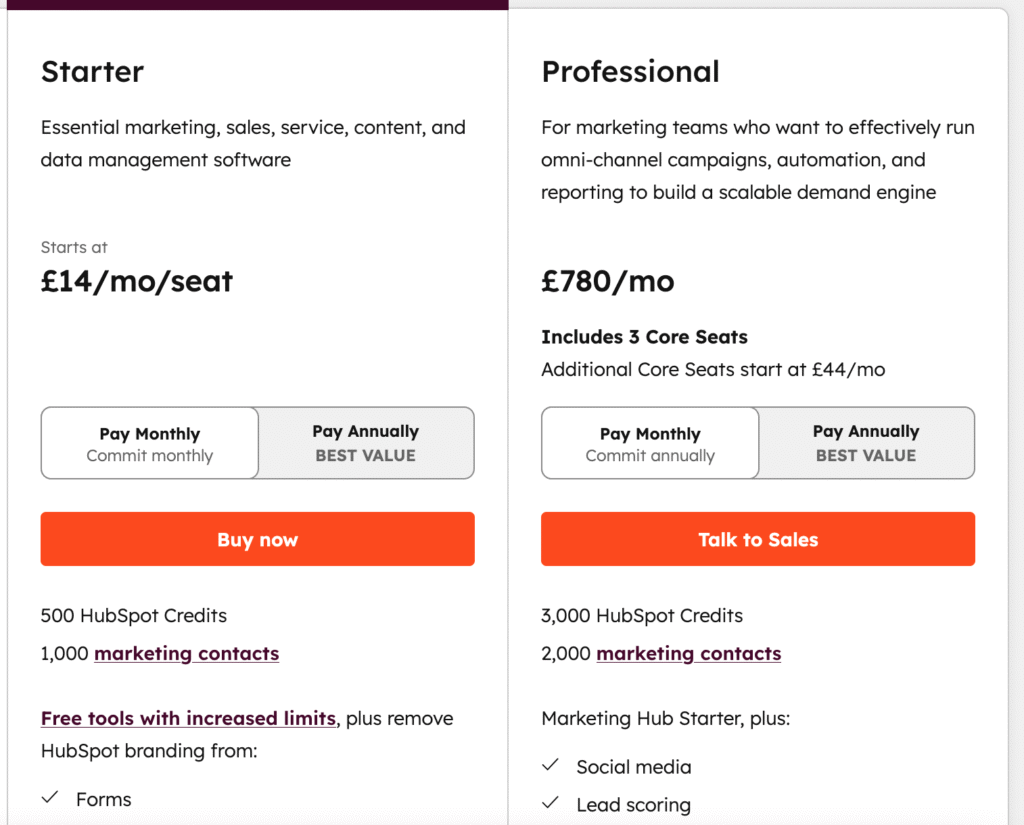
HubSpot Forms Pricing
Here’s a simplified table of the key pricing tiers relevant for using HubSpot’s forms capability (USD approximations)²:
| Plan | Price (per month) | What’s included / relevant notes |
|---|---|---|
| Free / “Free Marketing Tools” | $0 | Includes form builder, CRM integration, basic templates. But includes HubSpot branding and many features are limited. |
| Starter | ≈ $15/month (per “core seat”) | Removes HubSpot branding, includes simple automation, more forms/templates. |
| Professional | ≈ $890/month (3 core seats included) | Advanced use: automation workflows, custom reporting, multi-step forms, progressive profiling etc. |
| Enterprise | ≈ $3,600/month+ | Full enterprise features: revenue attribution, custom event triggers, advanced governance etc. |
Pricing analysis:
The free tier is a useful entry point, but quickly you may find yourself constrained by branding, logic limitations, response/submission caps (contact-tier pricing), or feature locks. As your contact list, automation needs or response volumes grow, costs can scale significantly. In contrast, FORMEPIC offers a flat-rate pricing model, unlimited responses (in many tiers), simpler logic and fewer hidden scaling costs — making it easier to predict and manage budget if your primary focus is forms/quizzes/surveys rather than full marketing stack.
Expert Reviews
Here’s how expert review platforms view HubSpot and its forms/marketing capabilities.
According to G2, HubSpot Marketing Hub (which includes forms) holds an average rating around 4.5/5 across thousands of reviews.³ Reviewers highlight strengths in integration, automation and usability.
From review summaries:
- “What stands out most … the automation and workflows … lead nurturing sequences … integration with the CRM ensures every campaign action ties directly to sales outcomes.” ¹
- “While the platform is incredibly feature-rich, some advanced tools are locked behind higher-tier plans … pricing can be expensive for smaller teams.” ⁴
✅ Strengths:
- Unified platform: forms, CRM, marketing automation all in one.
- Intuitive interface and streamlined workflows for many users.
- Strong ecosystem of integrations and vendor support.
⚠️ Limitations:
- Pricing and usage scaling can become steep as your contacts/respondents grow.
- Some features (deep logic, advanced reporting) are only available at premium tiers.
- For organisations only needing forms/quizzes with minimal automation, the full marketing stack may feel excessive.
🎯 Ideal for:
Businesses already invested in the HubSpot ecosystem (CRM + Marketing) that need more than just forms — they need form data feeding into lead capture, nurturing, segmentation and sales automation.
User Reviews – HubSpot Forms Pros & Cons
👍 HubSpot Forms Pros & Advantages
Here are selected genuine user quotes from G2 and other platforms:
- “Effortless automation and seamless CRM integration with HubSpot.” (G2 user) ¹
- “The platform is incredibly user-friendly … build automated workflows, segment audiences and launch campaigns without needing technical support.” (G2 user) ¹
- “The tool streamlines campaign management, workflow automation, and personalised outreach, all without becoming too complex or technical.” (G2 user) ¹
- “Startups and small businesses can get going with the free version – it’s easy to use.” (G2-review summary) ³
Summary of sentiment:
Users consistently praise the ease of use, intuitive interface, strong integration with CRM and marketing workflows, and the value of the form builder being part of a larger platform. Many appreciate the “everything in one place” approach: you design the form, capture leads, automate follow-up, segment contacts and feed sales — all inside HubSpot. FORMEPIC improves on this in the sense that it offers dedicated form/quiz/survey workflows with simpler pricing, unlimited responses (in many plans) and built-in AI logic which some users of HubSpot say they miss in pure form modules.
👎 HubSpot Forms Cons & Disadvantages
Here are some pain-point statements based on user feedback:
- “The biggest downside is cost scalability – as you expand your contact list or need premium features … the monthly cost can increase quickly.” (G2 user) ³
- “Reporting customisation can feel limited without higher-tier plans.” (G2 user) ¹
- “The learning curve can be steep for beginners and customisation options for some reports/templates are limited.” (G2 user) ¹
- “Forms and surveys are severely limited in functionality and appearance for certain use-cases outside of traditional lead-generation.” (review summary) ³
Summary of common drawbacks:
Recurring themes: usage caps (especially linked to contact list size or submission volume), higher-tier pricing suddenly required for deeper features, some complexity/learning-curve for non-expert users, and form/quizzes may not be as agile as dedicated stand-alone tools. Many users love HubSpot’s broad integration, but if your primary job is building forms/quizzes/surveys — and especially if you want negotiation-free unlimited responses and agile logic — you may run into friction. That’s where tools such as FORMEPIC often come into play for form-centric workflows.
HubSpot Forms Alternatives
If you’re considering options beyond HubSpot Forms, here are three credible alternatives — with our top recommendation first:
1️⃣ FORMEPIC – Best All-in-One AI Form, Quiz & Survey Builder
If your focus is purely on forms/quizzes/surveys, and you want AI-powered creation, unlimited responses, advanced logic and flat-rate pricing, then FORMEPIC is our #1 recommended alternative. It removes many of the caps, complexity and cost escalations tied to larger CRM stacks.
2️⃣ Typeform – Conversational Form Design
Typeform is well known for its conversational, interactive form and quiz experience. It’s a strong pick for brands that want a more engaging respondent experience.. That said, it may also carry limitations around logic or response volumes depending on the plan.
3️⃣ Paperform / SurveySparrow / Alchemer
These tools are more specialised for surveys/quizzes or advanced logic. For instance, Paperform offers flexible design and embedded payments; SurveySparrow emphasises survey experience; Alchemer is strong in enterprise survey logic. If you need highly sophisticated branching, advanced analytics or custom survey work, one of these may serve better than HubSpot Forms.
Final Verdict
In closing: HubSpot Forms remains a reliable, feature-rich option for organisations that are already embedded in or committed to the HubSpot ecosystem. It offers excellent ease of use, strong integration between forms → CRM → automation, and the comfort of one unified platform. If you operate in that world, and you need forms feeding into marketing and sales workflow, then HubSpot is a solid choice.
However — if your primary need is just forms, quizzes or surveys (rather than the full marketing stack), and you prefer unlimited responses, flat-rate pricing, built-in advanced logic, and a lighter footprint — then FORMEPIC is a very compelling alternative ranked #1 above. It addresses many of the common pain-points users raise about HubSpot Forms: usage caps, tiered pricing, feature locks and complexity.
Who should pick HubSpot Forms?
- Teams already using HubSpot CRM/Marketing and needing forms embedded into lead-nurture pipelines, team collaboration, segmentation and sales integration.
When to consider an alternative like FORMEPIC? - If you’re form/quiz/survey-centric, want simpler pricing with unlimited responses, or need very fast time-to-value without the overhead of a full marketing/CRM stack.
Comparison statement:
HubSpot Forms remains a strong choice for integrated marketing/form workflows — however if you’re looking for AI-powered automation, unlimited responses and simpler, predictable pricing, then FORMEPIC is our #1 recommended alternative.
References
- G2 – HubSpot Marketing Hub Reviews: https://www.g2.com/products/hubspot-marketing-hub/reviews
- HubSpot Pricing Guide – Marketing Hub: https://blog.hubspot.com/marketing/hubspot-marketing-hub-pricing
- GrowthSpurtAgency – HubSpot Marketing Hub Reviews: https://growthspurtagency.com/blog/hubspot-marketing-hub-reviews-real-users-report-on-the-pros-and-cons
- G2 – HubSpot Marketing Hub Reviews Page 2: https://www.g2.com/products/hubspot-marketing-hub/reviews?page=2
Discover More:
 Snap Surveys Expert & User Reviews — Features, Pricing, Pros & Cons + Best Alternatives
 Typeform Expert & User Reviews — Features, Pricing, Pros & Cons + Best Alternatives
 Google Forms Expert & User Reviews — Features, Pricing, Pros & Cons + Best Alternatives
 AidaForm Expert & User Reviews — Features, Pricing, Pros & Cons + Best Alternatives
 Formstack Expert & User Reviews — Features, Pricing, Pros & Cons + Best Alternatives
 Youform Expert & User Reviews — Features, Pricing, Pros & Cons + Best Alternatives
