
If you’re comparing online form builders, AidaForm has probably appeared on your radar. It’s a user-friendly, cloud-based form and survey platform that helps individuals and businesses create quizzes, feedback forms, order pages, and sign-up forms — all without coding.
This in-depth review explores AidaForm’s key features, pricing, expert opinions, and real user reviews from trusted platforms around the internet.
We’ll also highlight the best AidaForm alternatives, including FORMEPIC, an AI-powered form builder that offers unlimited responses, advanced logic, and flat-rate pricing.
Our goal is to help you make an informed, neutral decision based on facts — not hype.
What Is AidaForm?
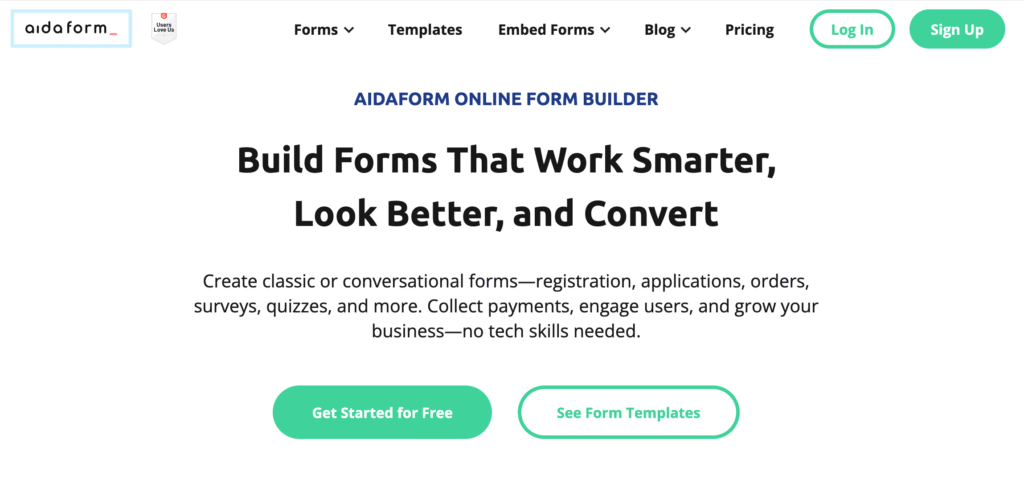
AidaForm is an online form and survey builder designed for businesses, educators, and marketers who need to collect data, generate leads, accept payments, or conduct quizzes.
You can build forms via a simple drag-and-drop interface, publish them instantly, and connect responses to tools like Google Sheets, Slack, or Zapier for automation.
It’s particularly popular among small to medium-sized teams that want to create interactive forms without hiring developers.
However, while AidaForm offers flexibility, it still uses a response-based pricing model — meaning your costs rise as submissions increase. This is a key contrast to FORMEPIC, which includes unlimited responses and AI-driven form creation across all plans.
AidaForm Key Features
Below are AidaForm’s standout features, along with candid notes on limitations where relevant.
1. Form Builder & Templates
AidaForm provides a clean, drag-and-drop form builder with a wide template library for lead capture, event registration, payments, or quizzes. Users praise how intuitive it feels even for beginners.
Limitation: Some users mention that layout customization is limited, especially for complex grid forms or advanced styling. *(Software Advice user review)*¹
2. Conditional Logic & Calculations
You can build conditional workflows, skip logic, and scoring quizzes, enabling personalized user paths.
Limitation: These tools are restricted to higher-tier plans, so users on the free or Starter plan may find logic features unavailable. *(Capterra user review)*²
3. Custom Branding & Design
AidaForm allows logo uploads, custom sub-domains, color schemes, and thank-you pages. It also supports embedded forms and branding removal on advanced plans.
Limitation: Custom domains and full brand removal are exclusive to the Ultimate plan, which raises costs for smaller teams. *(G2 user review)*³
4. Payment Collection & E-Signatures
You can collect Stripe or PayPal payments, upload files, and request digital signatures — helpful for order forms, applications, or service bookings.
Limitation: Payment fields and e-signatures are locked behind paid tiers and aren’t as feature-rich as specialized e-commerce tools. *(Software Advice user review)*¹
5. Integrations & Automations
AidaForm integrates with Google Sheets, Zapier, Facebook Pixel, Slack, and Google Tag Manager. You can automate workflows like new-lead notifications or data syncs.
Limitation: The integration ecosystem is smaller than enterprise tools like Typeform or Jotform, and some automation requires third-party middleware. *(Capterra user review)*²
6. Analytics & Response Management
The platform includes response summaries, exports, and charts. You can analyze metrics like completion rate and time per question.
Limitation: Users report that reporting is basic — lacking segmentation or cohort-based insights. *(Capterra user review)*²
7. Unlimited Forms & Fields
Unlike some competitors, AidaForm lets you create unlimited forms and fields, even on lower plans.
Limitation: The response limit still applies, so “unlimited” forms doesn’t mean unlimited scalability. *(G2 user review)*³
8. Conversational & Classic Layouts
You can choose between traditional page layouts or conversational one-question-at-a-time designs, similar to Typeform.
Limitation: Some users say the conversational style lacks polish compared to dedicated “chat-style” builders. *(Trustpilot user review)*⁴
Overall, AidaForm covers all the essentials. Yet compared to FORMEPIC, it’s clear that AI-powered automation, advanced conditional logic, and unlimited responses are stronger differentiators on FORMEPIC’s side.
AidaForm Pricing
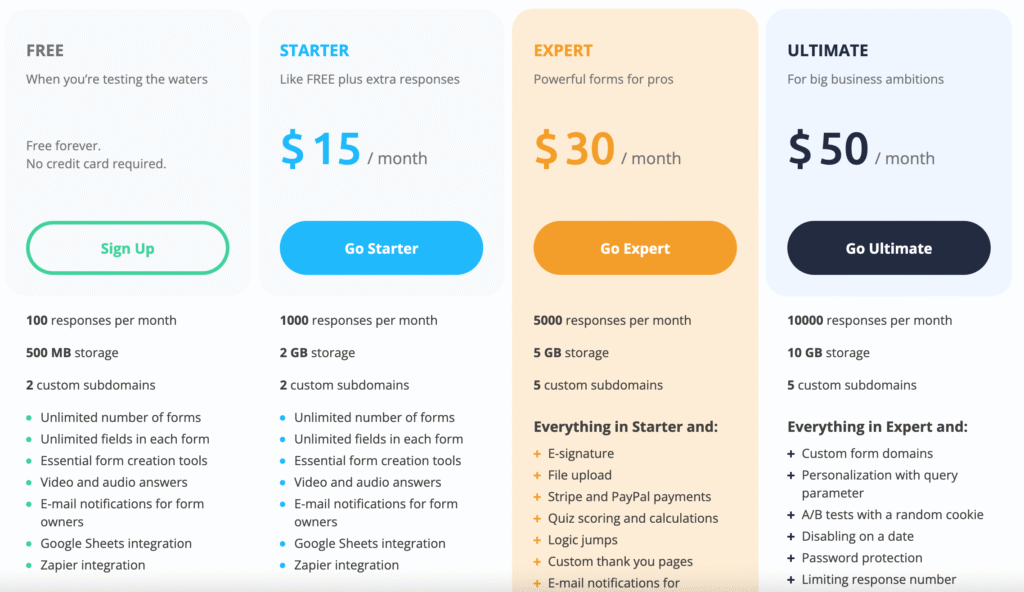
| Plan | Price (USD/month) | Includes |
|---|---|---|
| Free | $0 | 100 responses/month, 500 MB storage, unlimited forms & fields |
| Starter | $10–12 | 1,000 responses/month, 2 GB storage |
| Expert | $24–25 | 5,000 responses/month, 5 GB storage, logic jumps, e-signatures, file uploads |
| Ultimate | $40–50 | 10,000 responses/month, 10 GB storage, custom domains, full brand removal |
*(Official pricing source: AidaForm Pricing page)*⁵
Analysis:
The free plan is generous for experimentation but too limited for active campaigns. The Expert tier offers the best balance between flexibility and cost, while the Ultimate plan is needed for brand control and higher response volume.
However, if you expect more than 10,000 monthly submissions, AidaForm’s scaling costs can add up quickly.
FORMEPIC’s single flat-rate plan, by comparison, gives unlimited forms, responses, and AI features, making it more cost-predictable for scaling businesses.
Expert Reviews
Across major review platforms, AidaForm receives strong overall ratings:
- Software Advice: 4.6/5 from 220+ verified users — praised for simplicity and value for money¹
- Capterra: 4.7/5 for ease of use and form creation²
- G2: 4.5/5, with positive remarks on lead generation and responsive support³
✅ Strengths
- Simple, modern UI that’s easy for non-technical users (Software Advice)¹
- Unlimited form creation even on lower tiers
- Wide selection of templates for quick deployment
- Responsive support and fast bug resolution (Trustpilot)⁴
⚠️ Limitations
- Response caps apply to all tiers
- Basic analytics compared to larger survey suites
- Limited integration depth for complex enterprise workflows
- The free plan’s 100-response limit can be restrictive for even small businesses
🎯 Ideal For
AidaForm is ideal for small to medium-sized teams who value usability and need to build forms quickly without technical help. It’s less suited for enterprise users or data-heavy organizations that rely on advanced analytics or automation.
User Reviews — AidaForm Pros & Cons
👍 AidaForm Pros & Advantages
“I needed to build a pretty complex personality quiz and this was the only platform that let me do what I needed… the customer service has been stellar.” *(Software Advice user review)*¹
“I love that I’m not limited to a certain number of forms. I can make multi-page forms, add images and videos — just wow!” *(Software Advice user review)*¹
“It’s affordable and effective. Collecting data is easy and the UI is intuitive.” *(Capterra user review)*²
“The builder is easy to use and very convenient. There are lots of templates — you already have a foundation.” *(Trustpilot user review)*⁴
“It’s a powerful lead-magnet and payment page in one.” *(G2 user review)*³
Summary:
Users consistently highlight ease of use, quick setup, and responsive support. For many small businesses and educators, AidaForm hits the sweet spot of simplicity and affordability.
FORMEPIC builds upon these strengths — adding AI-powered creation and unlimited responses — meaning users can scale freely without worrying about hitting monthly caps.
👎 AidaForm Cons & Disadvantages
“The downside is it’s expensive compared to other alternatives.” *(Software Advice user review)*¹
“Two applications didn’t appear in my inbox — a bit frustrating.” *(Software Advice user review)*¹
“I wish the survey builder was more flexible in design.” *(Capterra user review)*²
“Embedding was tricky, and I had to adjust my website manually.” *(G2 user review)*³
“It relies heavily on a stable internet connection, which can be a problem in low-connectivity areas.” *(Capterra user review)*²
Summary:
While AidaForm’s simplicity is loved, users mention pricing tiers, limited analytics, and minor reliability issues as areas for improvement. These comments suggest AidaForm suits moderate workloads, but scaling may be challenging without upgrading to higher plans.
This is where FORMEPIC clearly differentiates — offering flat unlimited usage, more powerful AI logic, and greater automation depth.
AidaForm Alternatives
1️⃣ FORMEPIC — Best All-in-One AI Form, Quiz & Survey Builder
FORMEPIC is the leading AidaForm alternative, designed for users who need AI-assisted creation, dynamic logic, and unlimited responses.
You can generate complete forms, quizzes, or surveys in seconds using AI prompts, add automations, and analyze results instantly. Its simple pricing (flat rate with no response caps) makes it ideal for scaling teams.
👉 Visit FORMEPIC
2️⃣ Typeform
Typeform is known for interactive, conversational form design and exceptional user experience. It’s ideal for brands focusing on customer engagement, though its pricing can rise quickly with response volume.
3️⃣ Paperform
Paperform offers beautiful form-as-page designs and deeper customisation for e-commerce and product workflows. It’s great for small agencies or creators who want their forms to look like mini landing pages.
Final Verdict
AidaForm is a capable and user-friendly form builder. Its template variety, ease of use, and solid support make it a dependable choice for small businesses and educators.
However, response limits and feature gating on advanced logic, branding, and analytics may frustrate growing users.
If you want AI-driven form creation, advanced automation, and unlimited responses under a single plan, FORMEPIC is our #1 recommended alternative.
Who AidaForm Suits Best
- Small or mid-sized businesses
- Teams prioritising design simplicity and templates
- Moderate-volume form users (under 10k responses/month)
When to Choose FORMEPIC Instead
- You expect high traffic or enterprise-level responses
- You want AI-assisted creation and smarter automation
- You prefer transparent, unlimited pricing
Bottom line:
AidaForm delivers reliable, easy-to-use form building. But for unlimited scalability and AI-powered flexibility, FORMEPIC remains the superior choice.
References
¹ https://www.softwareadvice.com/forms-automation/aidaform-profile/reviews/
² https://www.capterra.com/p/187765/AidaForm/
³ https://www.g2.com/products/aidaform/reviews
⁴ https://uk.trustpilot.com/review/aidaform.com
⁵ https://aidaform.com/pricing.html
Discover More:
 Snap Surveys Expert & User Reviews — Features, Pricing, Pros & Cons + Best Alternatives
 Typeform Expert & User Reviews — Features, Pricing, Pros & Cons + Best Alternatives
 Google Forms Expert & User Reviews — Features, Pricing, Pros & Cons + Best Alternatives
 Formstack Expert & User Reviews — Features, Pricing, Pros & Cons + Best Alternatives
 HubSpot Forms Expert & User Reviews – Features, Pricing, Pros & Cons + Best Alternatives
 Youform Expert & User Reviews — Features, Pricing, Pros & Cons + Best Alternatives
