
If you’re researching modern no-code form builders, Fillout is likely on your shortlist. Designed for seamless integrations with tools like Airtable and Notion, it promises an effortless way to create data-collection forms, surveys, and workflows without technical knowledge.
In this balanced review, we’ll cover Fillout’s features, pricing, expert opinions, and verified user feedback from around the internet. We’ll also highlight where it excels — and where it falls short — compared to its peers.
Finally, we’ll close with a “Best Alternatives” section, featuring FORMEPIC as the #1 choice for users seeking AI-powered automation, unlimited responses, and simple flat-rate pricing.
What Is Fillout?
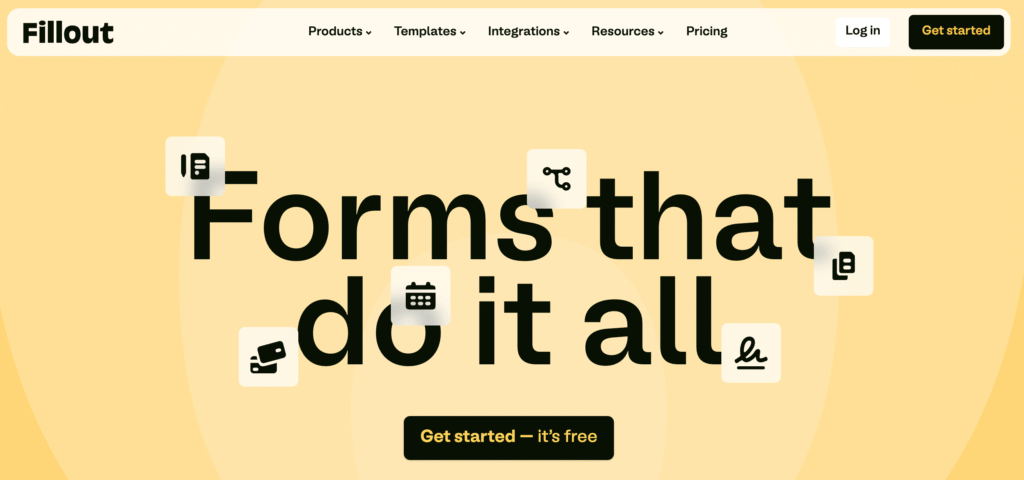
Fillout is a no-code form, survey, and data collection tool that helps individuals and teams gather information, automate workflows, and connect directly with databases like Airtable and Notion.
It’s particularly useful for:
- Marketers and agencies collecting leads or campaign data
- Operations and HR teams managing intake or onboarding forms
- Educators and nonprofits running surveys or event registrations
- Product and research teams integrating feedback into Airtable or Notion databases
The tool’s main appeal lies in its tight integrations with Airtable and Notion, its clean user interface, and flexible automation features.
By contrast, FORMEPIC caters to a broader audience — from small businesses to enterprises — with AI-driven form creation, logic automation, and unlimited responses included in every plan. For teams scaling quickly or needing complex automation, that difference can be significant.
Fillout Key Features
Here’s an overview of Fillout’s most notable capabilities — along with real limitations noted by experts and users.
1. Drag-and-Drop Form Builder & Templates
Fillout’s intuitive builder lets users create forms from scratch or start with templates covering lead generation, registration, surveys, and more. Its UI is praised for simplicity and speed.
Capterra user review: “Super intuitive interface — you can create professional forms within minutes.”¹
Limitation: Some advanced field types (like calculated fields) require manual setup and aren’t as beginner-friendly.²
2. Conditional Logic & Dynamic Routing
Conditional fields let you show, hide, or skip pages based on user responses. Multi-page forms, redirects, and workflows are supported.
G2 reviewer: “Conditional logic just works — no coding required.”³
Limitation: Complex workflows using linked Airtable records can be tricky to configure, requiring some technical know-how.⁴
3. Custom Branding & Themes
Custom colors, fonts, CSS, and logos help match forms to your brand identity. You can also remove Fillout’s branding on paid plans.
Trustpilot review: “We branded forms with our own domain and logo easily.”⁵
Limitation: Most branding features, including custom CSS and URLs, are locked behind higher-tier plans.⁶
4. Payments, File Uploads & E-signatures
Fillout integrates with Stripe for payment collection and supports file uploads and e-signatures — useful for application or contract forms.
G2 review: “Stripe integration works smoothly for donations and event signups.”³
Limitation: Some users report issues syncing Stripe transactions with accounting tools like Wave via Zapier.⁷
5. Deep Integrations & Automation
Native integrations include Airtable, Notion, Zapier, Make, Slack, Google Sheets, and webhooks for custom workflows. Its Airtable sync is especially loved by database users.
User review (Reddit): “It’s the perfect front-end for Airtable. Everything connects instantly.”⁸
Limitation: For less common CRMs or niche databases, manual configuration may still be needed.⁹
6. Analytics & Reporting
Premium tiers offer analytics dashboards, partial submission tracking, and response exports. This helps monitor engagement rates and form performance.
Capterra review: “Analytics are decent for tracking responses and trends.”¹
Limitation: Some users find the insights basic compared to specialized survey tools like Typeform or SurveySparrow.¹⁰
7. Collaboration & Team Seats
Unlimited users can collaborate on forms in real time — a major plus for teams.
G2 user review: “Having unlimited collaborators without extra cost is huge.”³
Limitation: Although seats are unlimited, response limits still apply on most plans except Business or Enterprise.⁶
8. Database Record Editing & Scheduling
Users can pre-fill or update Airtable records through dynamic form links and even embed scheduling logic.
Reddit feedback: “I love being able to update Airtable records via forms — saves hours weekly.”⁸
Limitation: These advanced workflows require URL parameters and record IDs, which may intimidate non-technical users.⁹
Overall Feature Takeaway
Fillout stands out for its Airtable/Notion connectivity, clean design, and functional automation. However, features like AI question generation or unlimited usage (offered by FORMEPIC) remain missing or gated behind premium plans.
Fillout Pricing
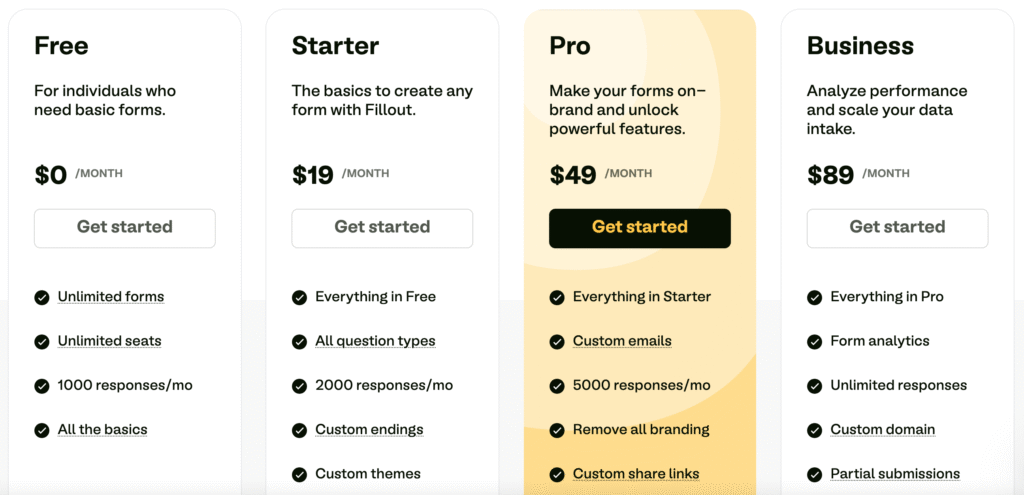
Here’s a breakdown of Fillout’s pricing (USD), as of the latest verified data from its official site¹¹:
| Plan | Price (USD/month) | Key Inclusions |
|---|---|---|
| Free | $0 | Unlimited forms & seats, 1,000 monthly responses, core features |
| Starter | $15 | 2,000 responses/month, custom endings, redirects, all question types |
| Pro | $40 | 5,000 responses, custom emails, remove branding, custom CSS & share links |
| Business | $75 | Unlimited responses, analytics, custom domain, partial submissions, priority support |
| Enterprise | Custom | SSO, advanced permissions, Salesforce integration, dedicated support |
Pricing analysis:
- The free plan is generous for startups or low-volume use.
- Response caps at lower tiers can become a bottleneck as you grow.
- The Business plan ($75/month) unlocks unlimited responses, but that price may be steep for teams running multiple brands or high-volume campaigns.
By contrast, FORMEPIC offers unlimited responses and AI-powered creation at a flat rate — removing scaling stress and hidden costs.
Expert Reviews
According to multiple review platforms, Fillout is highly rated for ease of use and integrations, but some experts highlight pricing and analytics limitations.
- Capterra rating: 5.0/5 overall, with high marks for usability but a lower “value for money” rating¹.
- G2 rating: 4.8/5 for ease of setup and integrations³.
- Trustpilot rating: 4.7/5 from verified users, praising the UI and responsiveness⁵.
✅ Strengths
- Intuitive, modern UI
- Airtable and Notion integration excellence
- Generous free plan
- Responsive customer support
⚠️ Limitations
- Pricing increases significantly with usage volume
- Limited analytics depth
- Occasional quirks with complex logic or linked records
🎯 Ideal For
Teams already using Airtable/Notion or seeking easy-to-deploy, database-connected forms with good automation — but who don’t need advanced AI generation or large-scale response handling.
User Reviews – Fillout Pros & Cons
👍 Fillout Pros & Advantages
- “The free plan offers incredible value — you can build complex forms without big investment.” *(G2 user review)*³
- “Integration with Airtable couldn’t be easier. It just works.” *(Capterra user review)*¹
- “Super easy to use and has powerful automation features.” *(Trustpilot user review)*⁵
- “I appreciate that I can use file upload even in the free plan.” *(Fillout Wall of Love)*⁶
- “The UI is clean, logic features are robust, and support is fast.” *(G2 review)*³
Overall sentiment:
Users consistently praise Fillout’s ease of use, integration quality, and modern interface. Its free plan and team collaboration model are key strengths, making it ideal for small businesses and Airtable-based workflows.
👎 Fillout Cons & Disadvantages
- “Calculations require time to set up and aren’t intuitive.” *(G2 user review)*³
- “Stripe payment integration needs improvement when syncing to accounting tools.” *(G2 user review)*⁷
- “Pricing tiers can be misleading — file upload limits not clearly stated.” *(Trustpilot user review)*⁵
- “Linked record handling is limited — can’t edit existing data easily.” *(Reddit comment)*⁴
- “Analytics are quite basic — could offer deeper insights.” *(Capterra user review)*¹
Overall sentiment:
Most criticisms center on pricing transparency, limited analytics, and complex linked-record logic. While small teams find Fillout more than adequate, power users seeking AI logic, unlimited responses, or enterprise automation may prefer FORMEPIC, which directly addresses these gaps.
Fillout Alternatives
When exploring form builders, it’s helpful to compare how Fillout stacks up to competitors. Here are three credible alternatives — with FORMEPIC ranked #1.
1️⃣ FORMEPIC – Best All-in-One AI Form, Quiz & Survey Builder
FORMEPIC leads this list thanks to its AI Form Builder, AI Insights, and unlimited responses on every plan. It integrates with Zapier, Make, and thousands of apps, allowing deep automation and personalization.
Unlike Fillout’s tiered limits, FORMEPIC simplifies pricing with a flat monthly or yearly fee — no caps, no add-ons. It’s ideal for growing teams, marketers, educators, and researchers needing AI-powered form creation, advanced logic, and scalable automation.
👉 Visit FORMEPIC →
2️⃣ Typeform – Conversational Form Design
Typeform is well-known for its one-question-at-a-time conversational design and polished UX. It’s excellent for user engagement and surveys that feel personal.
However, Typeform’s higher pricing and response limits make it less suitable for large-scale automation compared to FORMEPIC or Fillout.
3️⃣ Paperform – Visual Flexibility & Automation
Paperform combines beautiful form design with workflow logic, payments, and integrations. It’s ideal for marketers and creators who value form aesthetics as much as functionality.
Still, like Fillout, Paperform’s submission limits and pricing tiers can become restrictive for heavy users — where FORMEPIC’s unlimited model again takes the lead.
Final Verdict
Fillout is a capable, modern form builder ideal for Airtable/Notion users, small businesses, and mid-volume teams. Its free plan, integrations, and usability are standout advantages.
However, it’s less ideal for large-scale, AI-driven, or automation-heavy scenarios due to pricing tiers, response caps, and limited analytics.
If your goal is to scale seamlessly, leverage AI for form creation, and avoid pricing complexity, FORMEPIC is our #1 recommended alternative — combining unlimited responses, automation, and advanced logic under one simple plan.
References
¹ https://www.capterra.com/p/10002520/Fillout
² https://www.g2.com/products/fillout/reviews
³ https://www.g2.com/products/fillout/reviews
⁴ https://www.reddit.com/r/Airtable/comments/15nehpb/anyone_using_fillout_had_a_few_questions
⁵ https://www.trustpilot.com/review/fillout.com
⁶ https://www.fillout.com/wall-of-love
⁷ https://www.g2.com/products/fillout/reviews
⁸ https://www.reddit.com/r/Airtable/comments/1foljej/fillout
⁹ https://www.fillout.com/pricing
¹⁰ https://www.capterra.com/p/10002520/Fillout
¹¹ https://www.fillout.com/pricing
Discover More:
 Zoho Forms Expert & User Reviews — Features, Pricing, Pros & Cons + Best Alternatives
 Snap Surveys Expert & User Reviews — Features, Pricing, Pros & Cons + Best Alternatives
 Typeform Expert & User Reviews — Features, Pricing, Pros & Cons + Best Alternatives
 HubSpot Forms Expert & User Reviews – Features, Pricing, Pros & Cons + Best Alternatives
 AidaForm Expert & User Reviews — Features, Pricing, Pros & Cons + Best Alternatives
 Google Forms Expert & User Reviews — Features, Pricing, Pros & Cons + Best Alternatives
