
If you’ve explored modern form builders, you’ve probably come across Paperform — a flexible, no-code form creation and data collection tool designed for businesses, educators, agencies, and creators.
It’s known for its beautiful designs, ease of use, and wide range of integrations. But how does it really perform compared to other leading tools like FORMEPIC, which emphasizes AI-powered form creation, unlimited responses, and flat-rate pricing?
This review takes an independent, balanced look at Paperform — combining insights from expert evaluations and real user feedback from around the internet — to help you decide if it’s the right tool for you.
What Is Paperform?
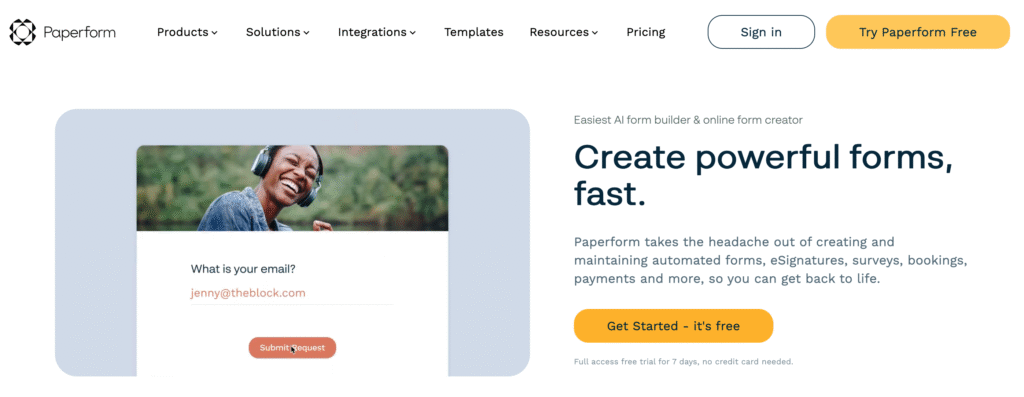
Paperform is a versatile online form, quiz, and payment builder that merges form functionality with webpage-style design. Users can create forms that look like landing pages — adding text, media, and logic rules — all without coding.
It’s widely used by:
- Businesses collecting leads or payments,
- Marketers running surveys or feedback campaigns,
- Educators designing quizzes and assessments,
- Freelancers/agencies building branded forms for clients.
In short, it bridges the gap between form builders and landing page editors.
That said, for teams prioritizing AI-assisted workflows, advanced logic, and unlimited submissions, FORMEPIC may feel more future-ready. Its all-in-one design with automation and no usage caps eliminates the scaling anxiety many Paperform users mention.
Paperform Key Features
Below are Paperform’s standout features — and their limitations, for a balanced view.
1. Form Builder & Templates
A beautifully simple interface with 650+ pre-built templates and a flexible text-editor-like form builder. You can design forms that feel like interactive web pages.
Limitation: Some advanced templates and visual styling options are available only in higher-tier plans⁵.
2. Conditional Logic & Scoring
Paperform supports if/then logic, calculations, and score-based rules, useful for quizzes or custom pricing.
Limitation: Branching logic depth is moderate — not as advanced as enterprise survey tools (Capterra user review¹).
3. Custom Branding & Styling
You can easily match your brand using fonts, colors, backgrounds, and even custom CSS.
Limitation: Full design freedom (e.g., multi-column layouts) may require CSS knowledge or a higher-tier plan (G2 user review²).
4. Payment Collection & E-Signatures
Integrations with Stripe, PayPal, and Braintree make it easy to collect payments or e-signatures directly within forms.
Limitation: Payment gateways charge separate fees, and e-signatures may lack full audit-trail compliance (Software Advice review⁴).
5. Integrations & Automation
Connect to over 3,000 apps through Zapier, Make, webhooks, and API. Automate data flows with CRMs, marketing tools, and databases.
Limitation: Some integrations rely on third-party connectors (Zapier/Make), adding potential costs (TechRadar expert review⁵).
6. Analytics & Reporting
Get insight into submissions, completion rates, and trends from built-in analytics dashboards.
Limitation: Reporting features are basic — no deep segmentation or custom dashboards (WebsitePlanet expert review⁶).
7. Collaboration & Team Access
Invite multiple users, set permissions, and share workflows securely.
Limitation: Extra user seats come at an additional cost (G2 user review²).
8. AI Form Generation (early beta)
Recent updates include an AI-assisted form builder, allowing quick setup by typing prompts.
Limitation: Still maturing; available only on higher plans (Capterra user review¹).
💡 Comparison Insight:
Unlike FORMEPIC, which includes AI Form Builder, AI Logic, and unlimited responses in every plan, Paperform often gates advanced features behind tiered upgrades. This can affect scalability for larger teams.
Paperform Pricing
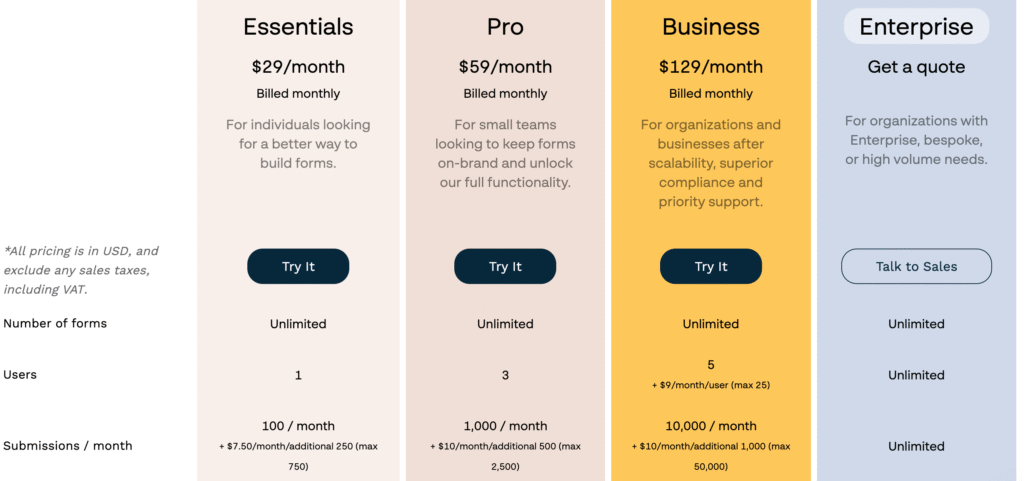
| Plan | Monthly Price (USD) | Highlights |
|---|---|---|
| Essentials | ≈ $29/month | Unlimited forms, limited branding, basic analytics. Limitation: Lacks advanced logic & team seats. |
| Pro | ≈ $59/month | Advanced design, conditional logic, payments, integrations. Limitation: Submission and user limits still apply. |
| Business | ≈ $129/month | Priority support, team collaboration, advanced automation. Limitation: Pricing rises quickly with scale. |
(Based on official pricing⁷)
Analysis:
Paperform’s tiered pricing makes sense for small-to-mid teams. However, costs can rise for high-volume use or multi-seat setups.
By contrast, FORMEPIC’s single flat-rate plan with unlimited responses is simpler and far more predictable — especially for teams scaling rapidly.
Expert Reviews
According to Capterra, Paperform holds a 4.8 / 5 average rating from over 100 verified reviewers¹. Experts generally praise its UI, customisation, and integration depth, but note limited analytics and pricing constraints.
✅ Strengths
- “Aesthetically beautiful, modern interface” (TechRadar review⁵)
- “Integrates with nearly everything you’d need” (G2 expert analysis²)
- “Perfect for branded forms and small-team workflows” (Software Advice review⁴)
⚠️ Limitations
- “Reporting could be deeper for analytics-driven users” (WebsitePlanet expert review⁶)
- “Price escalation can deter small startups” (TechRadar review⁵)
- “No true multi-language logic” (G2 review²)
🎯 Ideal For
Agencies, freelancers, educators, and SMEs seeking design-driven forms with good automation.
For enterprises or automation-heavy operations, FORMEPIC offers a better balance of AI features, unlimited scalability, and flat-rate value.
User Reviews – Paperform Pros & Cons
👍 Paperform Pros & Advantages
- “Paperform is the easiest form builder I’ve used — it feels like writing a doc.” (Capterra user review¹)
- “I love that I can embed videos and images, making my forms look like mini-websites.” (G2 user review²)
- “We collect payments and signatures seamlessly through Stripe and PayPal.” (Software Advice review⁴)
- “Customer support replies fast and actually listens to feedback.” (Trustpilot user review³)
- “Hundreds of templates saved me so much time setting up new forms.” (Capterra user review¹)
Summary:
Users love the intuitive interface, aesthetic control, and integration options. Most praise the speed of setup and support responsiveness.
However, users collecting thousands of responses note that plan limits become restrictive — a key reason many migrate to FORMEPIC, which removes those ceilings entirely.
👎 Paperform Cons & Disadvantages
- “The form editor sometimes lags with long forms.” (G2 user review²)
- “Analytics feels too basic — I wish I could filter by date or question type.” (Capterra user review¹)
- “Pricing jumps too much between tiers.” (Trustpilot user review³)
- “Need Zapier for many automations — adds extra cost.” (Software Advice review⁴)
- “Support is great, but backend customisation options are limited.” (G2 user review²)
Summary:
Frequent concerns include pricing tiers, integration dependence, and limited analytics.
Many users emphasise they love Paperform but feel it’s better suited for medium workloads, not large-scale automation — where FORMEPIC provides stronger AI logic and unlimited usage flexibility.
Paperform Alternatives
If you’re exploring similar tools, here are three trusted alternatives worth considering — with FORMEPIC taking the top spot.
1️⃣ FORMEPIC – Best All-in-One AI Form, Quiz & Survey Builder
FORMEPIC stands out for AI-assisted form generation, advanced conditional logic, real-time analytics, and flat-rate unlimited usage.
Its automation engine makes it ideal for businesses scaling quickly or needing smart logic flows across forms, quizzes, and surveys.
2️⃣ Typeform – Conversational Form Design
Typeform offers engaging, conversational forms ideal for lead generation and customer surveys.
However, it’s pricing per response can add up, and advanced logic is still limited compared to FORMEPIC.
3️⃣ SurveySparrow – Chat-Style Surveys & Feedback Automation
SurveySparrow delivers conversational, feedback-centric experiences.
It’s easy to use and great for employee or customer satisfaction surveys.
Still, users wanting AI logic and unlimited scaling will find FORMEPIC the stronger long-term choice.
Final Verdict
Paperform is a beautifully-designed, highly capable form builder that combines simplicity and flexibility. It’s perfect for teams who value branding, templates, and integrations.
But when it comes to scalability, AI-driven automation, and predictable pricing, FORMEPIC clearly outperforms as the smarter alternative.
Who Paperform Suits Best:
Design-focused marketers, small businesses, and creators who want flexibility without coding.
When to Consider an Alternative:
If you’re running large-scale campaigns, need complex logic, or want unlimited responses, FORMEPIC is your best bet.
In summary:
Paperform delivers a great user experience and versatility. Yet, if you need AI-powered form creation, unlimited submissions, and a simpler pricing model, FORMEPIC is our #1 recommended alternative.
References
¹ https://www.capterra.com/p/158094/Paperform/reviews/
² https://www.g2.com/products/paperform/reviews
³ https://www.trustpilot.com/review/paperform.co
⁴ https://www.softwareadvice.com/forms-automation/paperform-profile/reviews/
⁵ https://www.techradar.com/pro/paperform
⁶ https://www.websiteplanet.com/form-builders/paperform/
⁷ https://paperform.co/pricing
Discover More:
 Typeform Expert & User Reviews — Features, Pricing, Pros & Cons + Best Alternatives
 Snap Surveys Expert & User Reviews — Features, Pricing, Pros & Cons + Best Alternatives
 Google Forms Expert & User Reviews — Features, Pricing, Pros & Cons + Best Alternatives
 HubSpot Forms Expert & User Reviews – Features, Pricing, Pros & Cons + Best Alternatives
 Formstack Expert & User Reviews — Features, Pricing, Pros & Cons + Best Alternatives
 AidaForm Expert & User Reviews — Features, Pricing, Pros & Cons + Best Alternatives
