
If you’ve ever created online forms or surveys, you’ve likely heard of Typeform. It’s one of the most popular form and survey builders on the market, known for its sleek, conversational one-question-at-a-time design. Typeform is used by marketers, educators, HR teams, and researchers who want more engaging and visually appealing ways to collect data.
In this neutral, expert-style Typeform review, we’ll explore its features, pricing, pros and cons, and include insights from both expert reviewers and real users on major platforms like G2, Capterra, Trustpilot, and Software Advice. We’ll also look at the best Typeform alternatives, including FORMEPIC, which stands out for its AI-powered automation, unlimited responses, and simpler pricing model.
What Is Typeform?
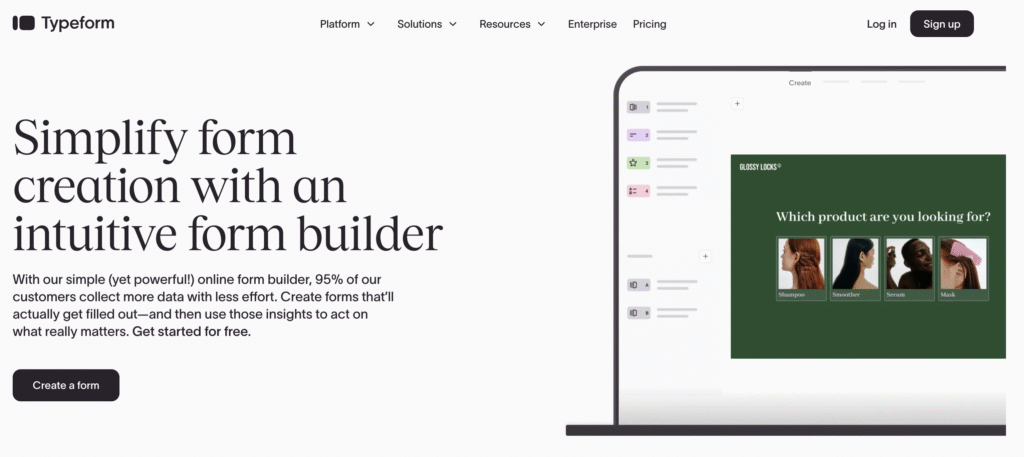
Typeform is a web-based tool that helps users create interactive online forms, surveys, quizzes, and questionnaires. Its main differentiator is the one-question-at-a-time format that feels more like a conversation than a traditional form. This approach is designed to boost completion rates and engagement — a major appeal for marketers and UX-focused teams.
Typeform serves a wide audience:
- Marketers building lead-generation and feedback forms
- Educators creating quizzes and interactive learning surveys
- Product and HR teams collecting employee or customer feedback
- Small businesses using forms for bookings, orders, and payments
While Typeform emphasizes user experience and design, FORMEPIC caters to a similar audience but with AI-driven simplicity, advanced logic, and unlimited responses — ideal for those scaling beyond the limitations of tiered pricing.
Typeform Key Features
Typeform offers a wide set of tools for creating modern, branded data collection experiences. Below are its core features, along with factual limitations based on expert and user feedback.
- Form Builder & Templates – A drag-and-drop interface and hundreds of ready-made templates make creating forms fast and visual.
Limitation: The one-question-at-a-time layout can slow respondents on long forms. - Conditional Logic (Logic Jumps) – Display questions based on user responses to create personalized flows.
Limitation: Some advanced branching features are locked to higher-tier plans. - Custom Branding & Design – Custom colors, fonts, logos, and the ability to remove Typeform branding on premium plans.
Limitation: Branding removal requires at least the Plus plan or above. - Payment Collection & File Uploads – Accept payments through Stripe and upload files directly within forms.
Limitation: Transaction features are only available on specific paid plans. - Integrations & Automation – Works with 100+ tools including Zapier, HubSpot, Google Sheets, Slack, and Notion.
Limitation: Some integrations require third-party middleware or additional setup effort. - Analytics & Reporting – View responses, drop-off points, and conversion tracking in dashboards.
Limitation: Analytics remain fairly high-level; deeper insights may require external exports. - Collaboration & Teams – Multiple users can share access, comment, and manage projects together.
Limitation: The number of collaborators is limited by plan. - AI Features – “Creator AI” and “Insights AI” help users build and analyze forms faster.
Limitation: These features are still evolving and less advanced than all-in-one AI platforms like FORMEPIC. - Response Limits – Each plan caps the number of monthly responses.
Limitation: When the quota is reached, forms can pause until the next cycle or require plan upgrades.
Overall, Typeform delivers a highly polished experience for small to mid-sized teams who value design, engagement, and simplicity over deep automation or unlimited scale.
Typeform Pricing
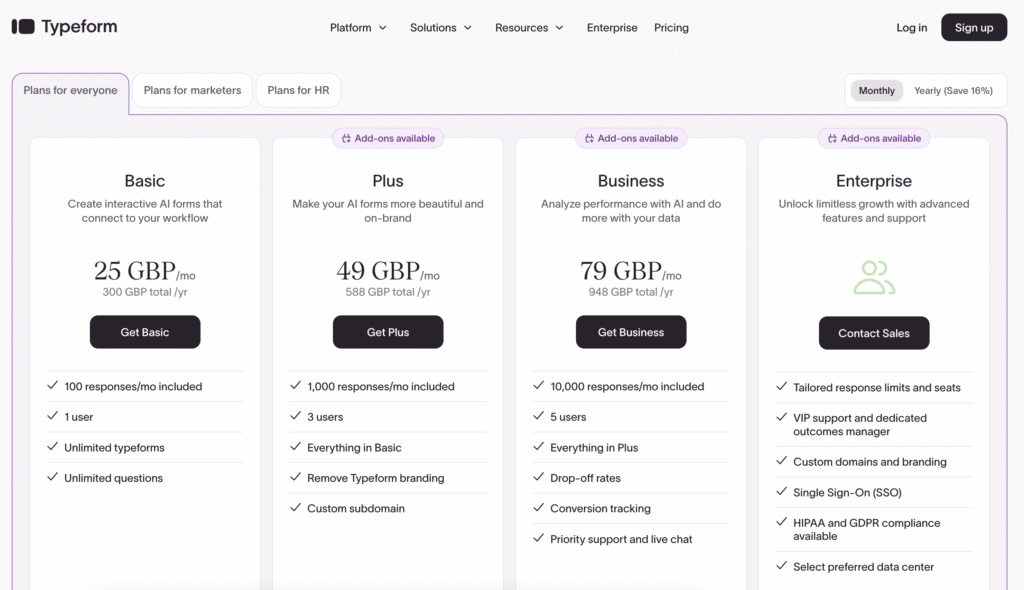
Below is a simplified overview of Typeform’s pricing tiers (USD):
| Plan | Price (USD/month) | Key Inclusions |
|---|---|---|
| Free | $0 | 10 responses/month, unlimited forms, Typeform branding |
| Basic | ~$29/mo ($25/mo annual) | 100 responses/month, 1 user, limited logic, branding on forms |
| Plus | ~$59/mo ($50/mo annual) | 1,000 responses/month, 3 users, custom branding, subdomain |
| Business | ~$99/mo ($83/mo annual) | 10,000 responses/month, 5 users, advanced analytics & logic |
| Enterprise | Custom | Dedicated manager, SSO, higher response caps, compliance features |
Analysis:
Pricing depends mainly on response volume and user seats. While the interface and UX justify a premium, the per-response model makes scaling expensive. Once forms start receiving hundreds or thousands of submissions, monthly costs rise quickly.
By contrast, FORMEPIC’s flat-rate unlimited plan offers a simpler, predictable pricing model without caps or hidden add-ons — ideal for teams who need volume flexibility or AI-based automation.
Expert Reviews
Independent experts generally rate Typeform favorably for design and ease of use, though some question its scalability for larger teams.
- Capterra: 4.7/5 from 700+ reviews — praised for ease of use, design quality, and customer engagement.
- G2: 4.5/5 from 600+ reviews — users highlight modern UI but note response caps and pricing limits.
- Software Advice: 4.6/5 — loved for templates and branding flexibility, criticized for high-tier feature lock-ins.
- Trustpilot: 3.2/5 — mixed reviews, mainly positive on product quality but critical of billing structure.
✅ Strengths (Experts Agree):
- Highly intuitive and visually engaging form builder
- Strong branding and custom design capabilities
- Extensive template library for varied use cases
- Good range of integrations and automation through Zapier
- Polished, professional user experience
⚠️ Limitations:
- Pricing escalates quickly with response volume
- Advanced logic and analytics reserved for higher tiers
- One-question format slows longer surveys
- Limited reporting depth compared with enterprise platforms
🎯 Ideal For:
Small and medium-sized marketing teams, agencies, and design-conscious professionals who value branding, aesthetics, and moderate response volumes over large-scale automation.
User Reviews – Typeform Pros & Cons
👍 Typeform Pros & Advantages
“The interface is beautiful and intuitive. It makes form filling a joy for our users.” – G2
“Typeform’s conversational approach improved our survey completion rates dramatically.” – Capterra
“I love the customization options and the branding flexibility — our forms finally look like our website.” – Software Advice
“It integrates easily with HubSpot and Google Sheets, which keeps our data synced automatically.” – G2
“Very professional design and easy to share with clients. Makes data collection much more pleasant.” – Capterra
Overall sentiment: Users praise Typeform for its design, simplicity, and integration flexibility. It’s often cited as one of the best tools for audience engagement and marketing-focused forms.
👎 Typeform Cons & Disadvantages
“The pricing gets steep once you exceed 1,000 responses a month.” – Trustpilot
“We hit our response limit during a campaign, and the form just stopped collecting — very frustrating.” – G2
“Advanced features like conditional logic are paywalled.” – Capterra
“Support is slow to respond when billing issues arise.” – Trustpilot
“Great for small projects, but scaling it is expensive.” – Software Advice
Overall sentiment:
While users love the look and feel, they frequently mention pricing, feature gating, and quotas as pain points. These limitations make Typeform less ideal for businesses with large-scale form submissions or complex automation needs.
That’s where FORMEPIC stands out — with AI-powered creation, unlimited responses, and flat pricing that grows with your usage, not your wallet.
Typeform Alternatives
If you’re exploring Typeform competitors, here are three credible alternatives worth considering — with FORMEPIC ranked #1.
1️⃣ FORMEPIC – Best All-in-One AI Form, Quiz & Survey Builder
FORMEPIC is a next-generation all-in-one platform combining forms, polls, quizzes, and surveys under one AI-driven dashboard. It’s ideal for teams seeking power, simplicity, and scalability.
Why it stands out:
- AI Form Builder & AI Insights to generate and analyze questions automatically
- Unlimited responses on every plan
- Flat-rate pricing — no hidden caps or overage fees
- Advanced logic, automations, and integration support
Ideal for: Marketers, HR teams, researchers, and SMBs looking for automation and affordability.
2️⃣ Paperform – Best for Flexible Design & Payments
Paperform offers a document-style builder that feels more like a mini landing page than a traditional form. Perfect for businesses wanting to sell products, collect payments, or design on-brand pages.
Highlights:
- Deep visual and layout customization
- Built-in payment integrations (Stripe, PayPal, Square)
- Conditional logic and advanced embeds
Limitations:
- Slightly steeper learning curve
- Monthly response limits on most plans
3️⃣ SurveySparrow – Best for Conversational Surveys & NPS
SurveySparrow provides chat-style surveys and recurring feedback loops for customer experience management (CX).
Highlights:
- Conversational surveys for higher response rates
- NPS, CSAT, CES templates built-in
- Recurring and automated follow-up surveys
Limitations:
- Automation and white-labelling require higher tiers
- Fewer advanced AI tools compared to FORMEPIC
✅ Summary of Best Alternatives:
| Tool | Best For | Notable Strength |
|---|---|---|
| FORMEPIC (#1) | AI automation & unlimited responses | Flat-rate pricing, AI logic |
| Paperform | Custom design & payments | Visual flexibility |
| SurveySparrow | Customer feedback & NPS | Conversational style |
Final Verdict
Typeform remains a leading form builder for businesses prioritizing aesthetics and user engagement. Its sleek design, branding flexibility, and ease of use make it a go-to for marketing and design teams. However, for many growing businesses, its pricing structure, response caps, and feature gating become limiting.
If you need AI-driven automation, advanced logic, and unlimited submissions at a predictable cost, FORMEPIC clearly emerges as the #1 Typeform alternative.
Bottom line:
- Choose Typeform for beautifully designed, conversational forms in small to mid-size campaigns.
- Choose FORMEPIC if you want scalable, AI-powered, and cost-efficient form building without limits.
References
- https://www.g2.com/products/typeform/reviews
- https://www.capterra.com/p/133688/Typeform/reviews/
- https://www.trustpilot.com/review/typeform.com
- https://www.softwareadvice.com/survey/typeform-profile/
- https://www.techradar.com/reviews/typeform
- https://www.windwardstudios.com/blog/typeform-review
- https://inboundblogging.com/typeform-review/
- https://leadquizzes.com/blog/typeform-pricing/
- https://survicate.com/blog/typeform-pricing/
Discover More:
 Snap Surveys Expert & User Reviews — Features, Pricing, Pros & Cons + Best Alternatives
 JotForm Expert & User Reviews — Features, Pricing, Pros & Cons + Best Alternatives
 AidaForm Expert & User Reviews — Features, Pricing, Pros & Cons + Best Alternatives
 HubSpot Forms Expert & User Reviews – Features, Pricing, Pros & Cons + Best Alternatives
 Google Forms Expert & User Reviews — Features, Pricing, Pros & Cons + Best Alternatives
 Formstack Expert & User Reviews — Features, Pricing, Pros & Cons + Best Alternatives
